• Skip to main content
  • Skip to footer

Digital Ducats Inc.

SEO Consulting & Services

  • Home
  • About
    • SEO Consulting
  • Services
    • SEO
    • Local SEO
  • Contact
    • Pricing
    • Write For Us
  • Blog
You are here: Home / Archives for Local SEO

Local SEO

Aug 10 2020

Claim & Optimize Your Business Listing On Bing Maps

Appearing in a local pack or local map listing on any search engine can be one of your greatest sources for high converting leads. Claim and optimize your business listing on Bing Maps in order to maximize your search presence, improve your local SEO and drive more high-converting traffic to your site.

People who are searching for local businesses are typically looking to make a purchase in the near future. Believe it or not, people actually use Bing and Yahoo to search for stuff!

Despite Google’s domination in the search engine market, Bing still carries a percentage of searches that are valuable to every business. In March of 2019, approximately 6 billion searches a month were made on Bing, which currently holds approximately 33% of the desktop searches in the US.

What’s more, is that Bing is a major directory that Google uses to confirm the authority and credibility of your business’s NAP details. The name, address and phone number should be consistent across the board. Every directory and review site should have correct and up to date NAP details to avoid confusion from users looking for your business.

If you haven’t claimed your Bing business profile, doing so will help you manage the information to better match your Google My Business profile and every other citation built on your company.

Here is a step-by-step guide on how to claim your listing and create a stronger local presence by completing and optimizing your profile.

First screen to claim and optimize your business listing on bing maps

How to claim your listing on Bing Places for business

Go to Bing Places to get started.

Since you’ve never used Bing before you’re going to select New User.

The next screen you’re faced with a decision. To either import your business from Google My Business or start new.

Screen to import your GMB profile to your business listing on bing maps

By opting to import your GMB profile

You will already have many of the fields filled out for you. This eliminates the possibility of making any typos when you’re completing your profile.

This also saves you time.

This also gives Bing the power to read and edit your data on GMB. Despite the ominous gift of power you’re donating, it’s reasonable to import your data and avoid the extra headache.

If you use this option you don’t need to go through the entire verification process.

By opting to claim or add your business manually

To claim and optimize your business listing on Bing, you’ll need to go through some additional steps to get your business listed with the correct details.

Apart from filling in your company details, the main time-consuming factor is the time it takes to verify your information to make your profile live on Bing.

How to add your Bing listing manually

If you opt to add manually, the first question you’ll need to answer is about the type of business you’re adding. Enter the appropriate answer from the drop-down menu.

Select bing listing business type

Make sure the country is correct in the next box and you will be prompted to search for your business. 

Select country and region

This is to see whether a profile has already been created. Enter your business name and the zip/postal code or city and state/province in which your business is located.

If you see your company name in the list of options that are presented, click on it to edit the profile.

Screen that shows whether your business is already listed on bing

If your company is not in the list of options, scroll all the way to the bottom and select the box that says My business is not listed in the search results.

Claim and edit business listing on Bing

A box will immediately appear for you to modify your search or to create a new business.

Create a new business on Bing or modify search option

If you’ve spelled your company name correctly and it hasn’t appeared, select create a new business.

You will be asked to log in using one of the following platforms:

Sign in to Bing places for business

It doesn’t matter what you select, but if you want to sync profiles or manage multiple profiles, choose the platform that you use the most (if you have a GMB profile it would make sense to use the same account).

Optimize your Bing Places profile

You will be brought to your first screen, which should be fairly straightforward to fill out as it is all basic company information.

First basic information screen to optimize your Bing business listing

If you don’t have a location where you serve clients (you operate in service areas eg. Locksmith) there is an option to select. However, you will still need to enter an address where you receive mail to verify your business.

The next screen will dive a little deeper into how Bing identifies your company. You will be asked to select your segment of business.

Choose segment of business for your Bing business profile

Choose the most appropriate segment that best represents your business. These are the main groupings in which you will further define in your next selection for your main category.

After choosing your segment, choose your primary category in order to optimize your business listing on Bing.

Choose primary category for you business profile

Getting these categorizations correct is extremely important in order for the search engines to properly place your website in keyword-related searches.

If you don’t see the main category of your business, you may not be in the right segment.

For example, if you chose Business-To-Business as a segment-you wouldn’t find website design in the next dropdown to select the primary category. 

You would need to go back and choose Professionals & Services as your segment in order for Website design to appear in the Primary Category dropdown.

If there is any uncertainty about what your category is, do a Bing search for businesses like yours. You can check how they’ve categorized their profile from the local listings themselves.

Web design listing to see how the other website have chosen their business category

Once you’ve moved on to the next screen you’ll have the option of listing your address publicly or privately. If you don’t have customers visit your business address click the option to hide this address in the search results.  

Additional business details

Fill in your contact details. The more information you provide the better.

Enter contact details

Add images to your profile. This may seem optional but images can have a big impact on how prospective clients view your business. Adding images will help to give your company more credibility and instil stronger feelings of trust.

Add products of your business

Add your business hours. If you type in the times for Monday before you open any other days, they will all open at the same time you typed into Monday’s slot. This saves you a bit of time searching the drop down for each day.

Enter working hours

Make sure your hours are the same on your website, GMB profile and any other citation you’ve built with the operational hours of your business.

Click Submit to complete the last section for optimizing you profile.

Verify your business on Bing Maps

Choose the method of verification that works best for you. You can elect to have a postcard sent to your address or can download the Bing Places App and verify over the phone.

Screen with options to verify your business on Bing

The postcard can take as long as two weeks to get to your address. 

Downloading the app is significantly faster since your listing can be approved in only two days.

Note: If you’re using a computer-generated number to verify your business through the app-it won’t work. You need an authentic landline or cell phone number to get the phone call from Bing.

If you’ve entered a legitimate cell phone number or landline, a machine will call and give you a confirmation code to enter in order to verify your listing. You can also opt for an SMS text message.

Once verified there you will be one more review of your business before it become official. You will be notified by email (or App) when you’re business listing is officially live and on display.

Encourage reviews and keep your NAP details up to date. Bing Places is a major directory that feeds a number of other data aggregators. Incorrect information on your Bing profile will ultimately filter through to other sites. 

Keeping your data synced with Google My Business on a weekly basis ensures the two biggest local directories are kept consistent. 

Remember that despite the paltry 2.5% of the world search engine market that Bing holds, much of the market share comes from the United States. That makes Bing one of the few companies that resemble being a competitor of Google’s. 

Be sure to claim and optimize your business listing on Bing Maps and reap the rewards of high-converting local traffic to your site, or have one of our SEO consultants do it for you.

Christian Carere
Christian Carere

Christian Carere is the owner and founder of Digital Ducats Inc. in Toronto and heads the SEO team at Austin Bryant Consulting in Plano, TX.  Christian has been published on publications such as Search Engine Watch, Venngage, Small Biz Daily, Grasshopper, Data Box, Socialnomics, and Mention.

old.digitalducats.com/

Written by Christian Carere · Categorized: Local SEO

Aug 06 2020

Local SEO For Dentists: A Guide To Client Acquisition

The significance of local SEO for dentists has continued to grow in the dental industry ever since Google became the new Yellow Pages. Google processes more than 3.5 billion searches each day and approximately 46% of all searches are made with the intent of obtaining local information.

When people want to find a local dentist, 87% of people will search on Google. Local searches are one of the highest converting sources of traffic. According to Google itself, 72% of people will reach out to a local business within 5 miles of their location after finding them in a search.

Whether you’re starting your first practice or you want to accelerate the number of clients that find you on Google, defining a local SEO strategy for your dental practice will increase the volume of traffic through improved search visibility.

Drive traffic with Google My Business

One of the first areas that should be addressed is your Google My Business profile. Consider this an extension of your website that is eligible for a top position in Google’s Local Finder.

Image of Google local finder, which is essential to local SEO for dentists

Only the top three businesses will be listed on the first page, however, getting your practice on the map and in front of an audience will start to get your website noticed. In order to move your listing to the first page into what’s called the “Local Pack”, you’ll need to follow a series of steps to make your profile more competitive.

Appearing in Googles local pack is a local seo strategy for dentists

How to optimize your GMB profile

Go to Google My Business to set up an account. You may be asked to enter your company name to make sure a listing doesn’t already exist.

First step to Google my business setup is find out of your business already exists

The next step is to choose the primary category to enlist your practice. This is an extremely important step for driving traffic that best fits your business so read all of your options.

GMB dentistry category selection is a local SEO ranking factor

You can always change your primary category so don’t feel like it’s a final decision. One way to confirm you’ve chosen the right category is to search for one of your keywords and see what category your competition is using.

The next steps should be self-explanatory. If you don’t have a website you can choose to “create a free website” for the time being and add the URL of your website at a later time.

GMB option to get a free website

List every service your practice offers. Include every procedure and everything you charge your clients to make your page eligible to show up in keyword searches.

Add custom services to your local business profile

Publish a professional and keyword-rich business description

Create a keyword-rich description that your prospective clients will read when they view your business. This is your message to people who are looking for your services so make sure you’re thorough, warm and welcoming and have described the range of services available.

Add interior, exterior and relevant images 

Upload as many images of your practice as possible. You can do this anytime but keep in mind you’re much more likely to convert visitors when they get a sense of who you are and the environment you’re working in.

GMB photos get a lot of views-especially the interior of dental offices. People want to see where they’re going. Use high-quality images that show the best aspects of your office. 

Example of interior image on a Toronto dentists GMB profile

There is a separate field to upload your logo.

Add logo section on GMB

Go to the info tab and add to every field that you’re able to provide information. A complete listing has much more information to connect you to potential searches from users.

You will need to verify your listing before any of your information becomes available to the public. Your listing will only be visible to you until you enter the verification code received on the Google postcard (sent within 12 days).

Pending verification notice on GMB profile

Building structured citations

In order to confirm the validity of your business information, you use citations on a variety of different websites. Structured Citations are considered review websites and directory listings because they offer a specific place to enter your business information.

Listing accurate NAP details are vital in establishing the credibility of your businesses’ local presence. Your name, address and phone number need to be consistent in every instance it appears online.

List your business on alternative search engines

Create profiles on the major search engines that offer local business listings. Duplicate your GMB profile information exactly as it is displayed on Bing Places for Business and Yahoo! Small Business (in the US). 

You can import the information from your GMB directly into your Bing account. This can save you loads of time and will eliminate the possibility of typos. Learn how to claim and optimize your Bing places for business profile.

Bing places for business option to import GMB profile for Toronto dentist listing

List your business on keyword related directories

You can search for directories that are directly related to your niche by using your keyword in a search. Check the first five pages of search results to see which directories appear.

Directories that appear in a keyword search are potential sources of traffic since users may be clicking on them to find more options for dentists. Here the first and second results for the term dentist in Toronto happens to be directories.

Example of to directories as top two results in a Google search

Apart from adding an additional position in which your website can be found, a directory that appears in a keyword search is also an indication of the relevance the directory has in the niche. 

Not only will appearing in the directory provide additional traffic, but acquiring a backlink the directory will improve the local authority your website has in localized search results.

List your business on local directories

Search for local directories by searching [your city] business directories. Google will display a list of city-specific directories that are unique to your location. 

List your business on major directories

Yellow pages are one of the top directories that feed into many smaller directories in Canada and in the US. Listing your business here is automatic because of the volume of traffic it receives as well as the fact it gets your info into multiple directories.

Every country has a different set of directories that will play a larger role in your optimization. Identify the top tier of directories to build profiles of your practice.

Choose three websites from each type of directory to give your company a diverse profile. Many of these directories will link back to your site to give it a good start in building a local backlink profile.

Be extremely cautious listing your website on directories you haven’t heard of that look spammy (filled with ads). If you list your website on directories with low authority and low traffic, you will end up hurting your site more than helping it.

You can check the quality of a website by using SEMRush (no account needed). Simply enter the URL in question and look at the traffic the site receives. Low traffic will indicate that the site will not help you receive any benefits from being listed on it.

SEMRush showing the low organic traffic flow of a Toronto business directory

Review management

Part of managing a local SEO strategy for dentists is creating a review strategy. Reviews are believed to contribute to your local business ranking. In fact, in the State Of Local SEO Industry Report 2020, 90% of marketers believed reviews impact your website’s presence in the local pack.

State of Local SEO Industry Report showing reviews are very important to ranking

In a poll that surveyed 1000 marketing professionals, Google reviews scored a second place in most important ranking factors for localized search results.

Put a review strategy in place so that you can keep reviews continuously coming in on a steady basis. It should be obvious that you need to acquire Google reviews, however, a good cross-section from other relevant review sites can also have a big impact on your local presence.

How to encourage more reviews

In order to encourage receiving the highest reviews, make sure you only ask people that are extremely satisfied with your work. A personal request goes a long way, however, people don’t always remember when they get home, so you may need a backup plan.

Include the request for a review on the receipt or in a thank you email after you’ve completed any particular service. Embed a link in your email with written instructions to simplify the process and serve as a reminder to your clients.

Respond to positive and negative reviews

If you’ve asked for a review and received one, thank your client. There is a way to do this on every platform and a simple expression of gratitude will go a long way. When other clients see your responses, it can be more encouraging for them to leave a review as well.

Negative reviews are bound to happen. Be sure to respond in a timely manner in order to show your best customer service. Publicly offering to correct a mistake or misunderstanding shows people you’re willing to go the extra mile to make your clients happy.

It also puts another spin on the situation apart from the disgruntled clients. Train your receptionists to include asking clients if they’re happy with the service. Having a system where reviews continually roll in is a great way to strengthen your local presence.

How to choose the best keywords for your practice

In order to drive the highest converting traffic, you’ll need to identify the keywords that suit your practice best. List the main services that you want your practice to be known for to create the major pillars of your site.

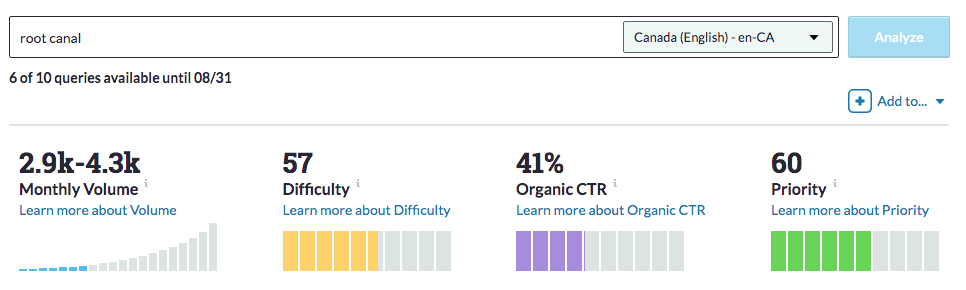
Using a keyword tool you can confirm the number of searches and the level of competition that each keyword possesses in order to finalize your decision. Here you can see the keyword root canal is a level 57 difficulty.

Moz keyword analysis for root canal

If your city us super competitive you may need to add a geo modifier in your title and URL to make your page hyper-local. By adding Toronto as the geo-modifier, this reduces the competition considerably.

Moz keyword analysis for root canal toronto showing drop in competition for local SEO by adding geo-modifier

Keyword tools can also give you insight into different ways to target the service that you’re offering. There is a list of options that are generated as suggestions to your keyword that you can use as alternatives or incorporate into your content to enhance the optimization of the page.

Keyword suggestions from Moz on root canal

Choose the keywords that offer the highest volume of traffic with the lowest competition. Whenever you consider pursuing a target phrase always use it a Google search yourself to see what results are displayed. You want to confirm that you’ve assumed the correct search intent that the keyword suggests.

For example, you should expect to see other dentist websites appear in a keyword search you’re considering to target. Anything other than your competition may suggest that the users are not looking to hire a dentist, but gather information or satisfy a different form of search intent.

Implement a content strategy that builds awareness and educates

A major part of driving traffic to your website is publishing content that is popularly being searched. SEO for dentists is not just about being found for one keyword, but also involves creating awareness and nurturing leads to build trust and confidence in your practice.

For example, someone who is nervous about getting a cavity filled may be searching Google for answers to questions they have about the experience. Creating a blog that answers these questions increases the number of visitors on your site. 

This approach to answering commonly asked questions not only goes a long way with potential clients but is also rewarded by search engines. Using a topical content structure to build on the depth of your services is a powerful way to drive more traffic from Google.

For every service you have, there are different stages people go through before committing to a dentist. These stages can be categorized as awareness, consideration and decision.

Buyer journey showing three stages

Some people may not know why they’re feeling pain when they bite into a pineapple. Your blog can address the potential causes of tooth sensitivity, cavities and provide the options for a solution. 

For many new patients, the information provided on your blog is the help they needed to overcome something minor. When something becomes more serious, they are now thinking of your website as a source for dental services from the awareness previously built. 

Educating your clients is a crucial part of the SEO cycle that drives more traffic by creating awareness, educating and building trust in your dental practice.

Publish location pages to expand your business

Location pages create a local presence in neighbouring towns and cities. For instance, if you’re in Toronto but would like your practice to appear in Mississauga, a Mississauga location page would be a solution to appear in search results specifically for that city.

Location pages allow your business to expand beyond the limits of your own city. Localized search results are largely influenced by on-page optimization and a local backlink profile.

Although you may not show up in the local pack without a physical address, an optimized location page can get your website to appear in the organic results in any city you target.

Publish local content

Use your blog to publish city-specific content as it relates to your business. Creating content about your city creates strong ties to your locality and will contribute to local rankings.

An example could be keeping updates on the various stages of recovery your city is experiencing that has resulted from COVID-19. Relating this to your business operations and how it affects the residents of your city contributes to positive local optimization signals.

On-page optimization

Every page on your website should target a specific keyword. In order to give your page the best chance at appearing for your keyword, you should ensure it is placed in all the right places. Use a plugin such as Yoast to make things easier by alerting you if any of the major on-page optimization attributes are missing. 

Here are a few of the main aspects of on-page optimization:

Use a keyword-optimized title with H1 tags

Your H1 tag should contain your keyword because it describes to search engines the most important content on the page. Most content management systems will tag the title of your page with h1 tags automatically.

Your title is one of the most important parts of your page because it’s what appears in search results. Be sure to include your keyword in the front end of your title to ensure it’s not cut off or truncated on smaller sized screens.

Write a compelling meta description

Your meta description is another crucial part of advertising your page in the search results. The description you use should create an interest in clicking through to your page.

Write your meta descriptions using keyword-rich descriptions. The use of keywords communicates to the user that they have found what they’re looking for and promotes a higher click-through rate.

Again, keep your target keyword near the front end of your description.

Use your keyword a few times within your content

In order to show that your page is highly related to your target keyword, it should appear in your copy at least a few times. There’s no need to repeat your keyword more times than that since it won’t make your page any more optimized. In fact, unnatural use of your keyword or excessive repetition may result in adverse results to your search visibility.

Use your keyword in the first 100 words or first paragraph whenever possible.

Optimize your images

Save your images using your keyword in the filename. If you have multiple images, don’t overdo it, simply use keyword synonyms.

The alternative description (or alt tags) tell search engines and the visually impaired what your image is about. Use your keyword and keyword variations with the alt tags of images you post. In this example of an image in WordPress, you can see the keyword improve on-page SEO highlighted in the area assigned for the alt tag.

Example of using alt tags on WordPress image

Use the correct dimensions for the images you post. If you have images that are 2000+ pixels, the chances are you won’t need an image that large. Reduce the file size to exactly what is required on your site will increase your page speed from reduced server requests and a smaller file.

If you’re using WordPress, install a plugin called Smush to compress your images. You can also implement “lazy loading” which delays images beneath the fold from loading until you scroll down towards them resulting in faster page speed.

Interlink your content

Using internal links can enhance the optimization of every page on your site. When you have a page that references the content on another page, you can use an anchor text link to connect the pages.

The text you use to link the pages should be descriptive in order to increase a search engine’s understanding of the content on your page. Use both optimized and un-optimized anchor text to interlink content on your website.

Building authority, credibility and ultimately ranking ability

If you’re no stranger to SEO for dentists, you might already understand the significance of building backlinks to your website. In order to build authority and credibility, your website needs “referrals” or “votes of confidence” from other websites. These come in the form of backlinks.

The main concept that ties ranking in with a strong backlink profile is that other websites find your content so valuable that it’s worth sharing with a link. 

In order to get the most from your backlinks, you need to focus on getting links that improve your credibility in your expertise, and in your locality. Acquiring backlinks from local sites in or related to your industry are considered the most powerful types of links.

Leverage the power of unstructured citations

An unstructured citation is an instance of your name, address or phone number being posted to another website-even though there is no set place for it to be listed.

For example, a directory listing is a structured citation because there are specific places to enter your information. A blog post that mentions the name of your practice is unstructured because the name of your company is used contextually within the content of a page.

List your professional resources for unstructured citations

Write a list of twenty people that you know have websites and are related to the dental industry. Ask the following questions:

  • Who do you order supplies from?
  • What companies do you work with?
  • What other dentists may support you with a link from their website?

Exhaust your network for likely candidates because the people who already know you are most likely to link to your site.

Search Google or link opportunities

Another method of identifying links is to search Google using specific command operatives such as inurl. 

You can look for sites that offer resource links and guest posting opportunities by telling Google to search for websites with a keyword in their URL.

For example, the command teeth whitening + inurl:links displays the following websites with pages that link out to other websites:

resource links for local SEO

Join a professional association

You can also become a member of professional associations. These sites will often link back to your site with a highly relevant backlink. Here’s an example of a profile from the Dental Industry Association Of Canada:

professional association profile

One practice that requires a bit of caution but is highly effective, is spying on your competitor’s backlink profiles. Enter the URL of a top-ranking website into an analytic tool like Moz to get a glimpse at the websites that are linking to the top websites ranking for your keywords.

competitor analysis by moz

Keep in mind that although you may find a lot of backlinks that point to a top URL, not all of them will be good for your site. In fact, some of those links may not be good for your competition either.

Make your decision based on relevance to your niche, city and whether the site gets a decent volume of traffic. You don’t want to go through the effort of getting a link on a graveyard site because Google won’t give you too much credit for those anyway.

Tracking and monitoring your progress

In order to adapt and grow, create measurable goals for your website. This cannot be achieved without tracking the performance of your website on a monthly basis. Two of the most powerful tools you’ll need also happen to be free of cost.

Make use of webmaster tools using Google search console

Just as you would open the hood of your car to see the engine, you open Google search console to see what’s going on with your website. Search console tracks the performance of your site as well as alerts you to any problems that it may be experiencing.

Familiarize yourself with the performance tab functions to see what pages are ranking. You can see your top-performing pages, how many times they appeared in searches and how many clicks they received.

sarch console performance tab

You can also monitor any errors that are being generated from your site that might affect page ranking.

search console errors

Google analytics

Although Google search console can show you a lot of information, you need Google Analytics for more specific details in reporting. Here you can customize reports, set goals and monitor goal conversions.

An example of a goal conversion could be to get visitors to make a call or book an appointment. You can set this up in Analytics by going to Admin, Goals, New Goal.

Goal setting in Google analytics

You can also see how your users are navigating your site.

Google analytics page flow

There are also comparative reports you can run to see whether your website is generating more traffic at any given block of time. You can compare previous years, previous months or any specific periods of time.

Option for comparative reports in GA

Tracking results is your only way of knowing whether your SEO efforts are paying off. Despite the advanced capabilities of Search Console and Analytics, if you’re interested in tracking your website’s rankings, you’ll need a separate rank tracking software such as Moz, Ahrefs, SEMRush, Rank Tracker, etc.

Capitalize on Local SEO for dentists and increase your revenue

Defining a local SEO strategy for your dental practice is one of the wisest decisions you can make for our business. SEO is one of the few marketing strategies that is growing in popularity and will only get more competitive as time passes. 

Take control of your companies growth by implementing the practices outlined in our guide. Build a local presence for your dental practice to guarantee the long-lasting success and growth of your business.

Christian Carere
Christian Carere

Christian Carere is the owner and founder of Digital Ducats Inc. in Toronto and heads the SEO team at Austin Bryant Consulting in Plano, TX.  Christian has been published on publications such as Search Engine Watch, Venngage, Small Biz Daily, Grasshopper, Data Box, Socialnomics, and Mention.

old.digitalducats.com/

Written by Christian Carere · Categorized: Local SEO, Toronto SEO, Web development

Jul 18 2020

What Is A Location Page And How Do I Publish One?

A location page is a location-specific page that ranks in a city, state, province or country that is built specifically for the location you target. Location pages are used to improve your local presence in another location.

If your business is capable of providing service to multiple areas (service area business or multi-location), this is an excellent method of creating a local presence in the city you’re targeting.

Let’s say, for example, you’re a mobile mechanic. You have a garage located in Scarborough ON, however, you’re able to service the Greater Toronto Area. 

Rather than optimize for searches just within Scarborough, you can build a location page to target searches for Toronto, or any other city surrounding Toronto as well.

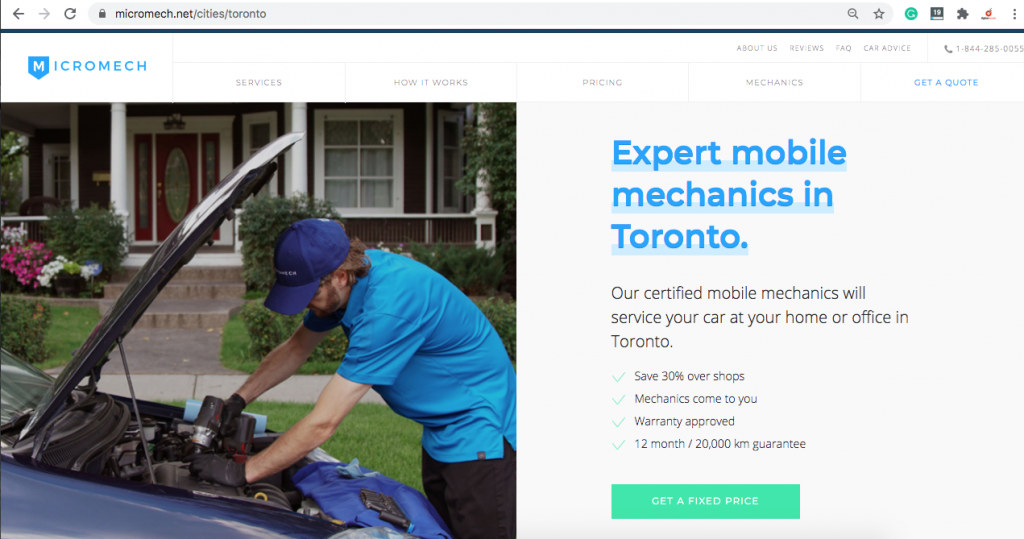
Here is an example of a mobile mechanic location page for Toronto.

A location page for a mobile mechanic servicing Toronto

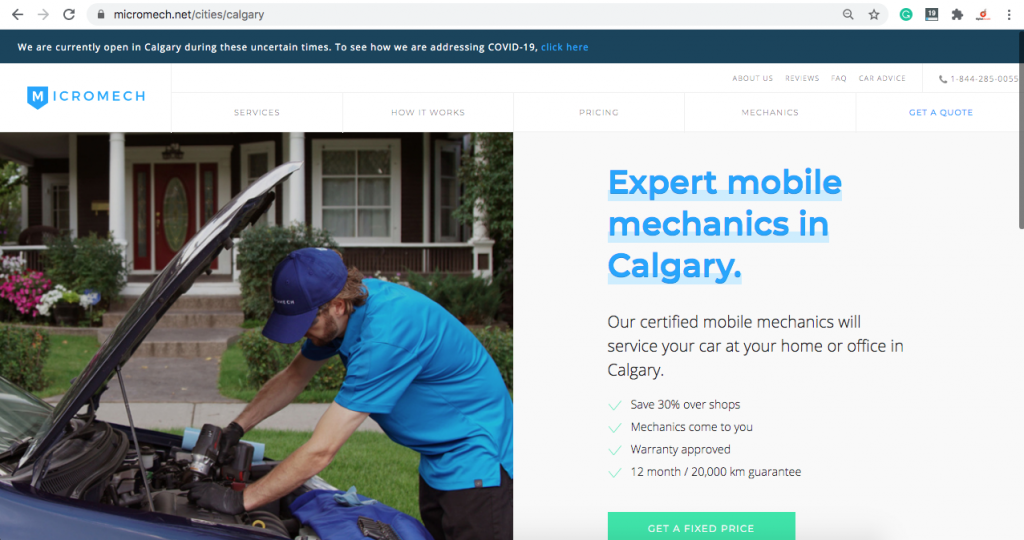
Here is another page on the same site for Calgary.

location page for calgary

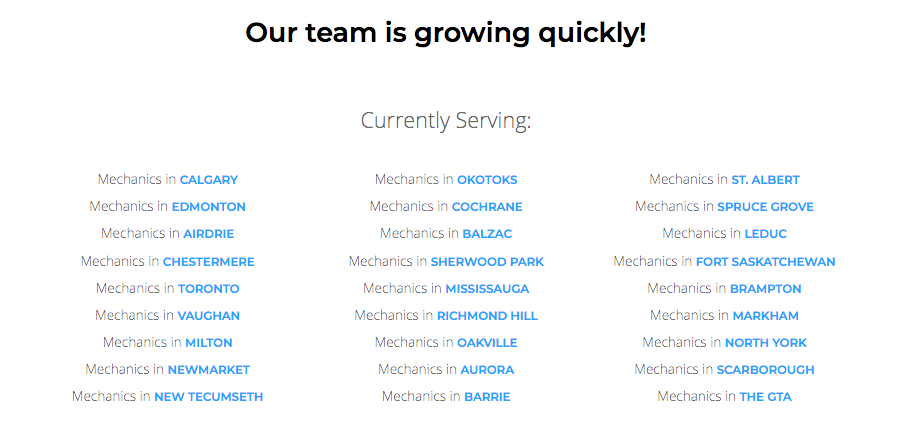
This company is taking advantage of ranking in multiple cities to expand the areas in which they can do business. Here is a look at the service areas this busienss covers:

Multiple location pages targeting cities across canada

Whenever a user in another city searches for your service, your location page will have a much better chance of ranking on the first page.

Location pages are an aspect of local search engine optimization to expand your company’s reach and increase the revenue your business makes.

Why be tied down to one location if your company is capable of doing more business in more cities? It’s a similar concept to setting up franchise locations except your using web properties to stake your claim in other cities.

9 tips for publishing location pages

Location pages share similar characteristics that allow them to rank highly. To see your location page rise in the search results, address the following areas:

Target the most effective keyword

It’s impossible to optimize a page without doing any research on the keyword you’re targeting. Keyword research provides insight into the value of your target phrase and the level of competition you will be facing.

If you’re going to go through the trouble of ranking a location page, make sure it’s worth it. Your target phrase should drive enough relevant traffic to generate revenue. Choose the best keywords to target by going through the proper steps for keyword selection. 

Identify and satisfy the intent of the search

Establish the true intent of the search phrase to understand the type of traffic that is driven to your site. Keyword research helps to establish what visitors are looking for when they type in a particular search phrase. When your page satisfies the intent of the search there’s a better chance of ranking highly in the search results.

Are the pages that currently rank for your keyword informational, transactional, navigational or commercial?

The chances are most location pages will need to include a bit of everything. To completely take your prospects from and introduction to conversion, requires careful content planning.

Each competing page that ranks is major clues to how search intent is begin defined by search engines. This typically is a direct correlation to what users are looking for as well.

Optimize your page in all the right places

Optimize your page to target a specific search term that includes the city you’re targeting. Include the target keyword in the page title, URL and a few times within the content. Any images should have the keyword and keyword variations in their alt tags.

This is the bare minimum for basic on-page optimization, however, it goes a long way in local SEO. You can enhance your on-page SEO a number of ways but using the basics is a must for every location page.

Make your page hyper-local

Make your page hyper-local to the target city. If you can mention landmarks, or make city-specific references, it will tie your page to the locality. Link out to local sites and resources. Prove to search engines that you’re familiar with the area and cater to local residents.

Post name, address and phone number on your page

If your company has a physical location within the city, post the NAP details on the location page.

For service area businesses, a unique phone number with the city area code will help to optimize your page.

Use structured data markup

Use structured data markup wherever possible to help search engines better understand your page. This will also make your page more attractive to users and entice more clicks if you can generate rich results.

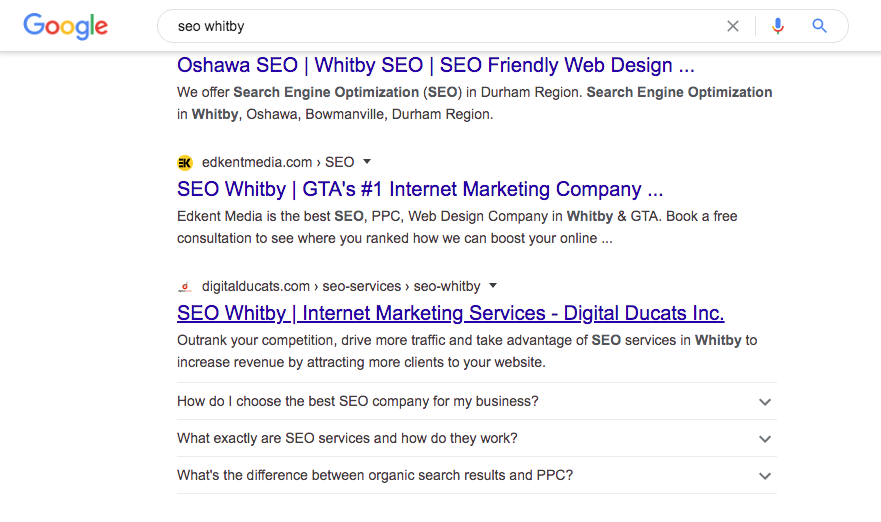
FAQ structured data markup is an example of a rich result. This snippet gets users to understand more about your business directly from the SERP. The extra space your search listing takes up attracts more attention and pushes your competition down the page.

faq rich results on a whitby location page

This type of rich results allows you to link to interior pages of your site. Help people to better understand what you can do for them with your product or service.

Reviews are another major type of rich result that is insanely popular.

Structured data markup makes your search listing more attractive with rich snippets. Although Schema.org has over 800 different categories to use, Google only offers about 30 types of rich results.

Implement structured data markup to increase the click-through rate and drive more traffic to your site.

Use an internal linking strategy

The linking strategy you use to build the authority of your page begins internally. Use descriptive anchor text and link from related pages to your location page. This builds the profile and authority of your location page.

In the same respect, link from your location page to relevant pages on your site. The links should help your visitors understand what your business offers.

This linking structure forms a basic topic cluster and highlights your location page as a pillar within your site. This linking structure will contribute to a more authoritative location page.

Build external links carefully

Use extreme caution when building the ranking ability of your location page with external links.

SEO best practices are to build links as natural as possible. Any unnatural link building patterns will be ignored and possibly have adverse results on your location page.

For example, it’s common for local businesses to have backlink profiles mainly comprised of directories and review sites. Local links will have the greatest impact on your location page.

You can indirectly link to your location page by linking to blog posts that in turn link to your location page. The link equity is transferred as a second-tier link. This builds more overall authority to your site and helps power the authority of your location page.

Publish local content

The content you publish on your blog has a large impact on how your site is viewed in a specific city. Search engines will take city-specific posts into consideration when they assess your site. Create blog posts that have very location-specific references to create more relevance in the city you’re targeting.

Link your city-specific blog posts to your location pages to include them in your topic cluster. This ensures that search engines connect your local SEO content to your location page.

Use location pages to build an empire

The beauty of creating an effective location page is that your business is able to expand the market in which it competes. You’re company is essentially setting up a new branch in another city by creating a page that ranks for your keywords.

When growth is your goal, create location pages to increase the traffic your site generates with visitors from different cities and locations.

Christian Carere
Christian Carere

Christian Carere is the owner and founder of Digital Ducats Inc. in Toronto and heads the SEO team at Austin Bryant Consulting in Plano, TX.  Christian has been published on publications such as Search Engine Watch, Venngage, Small Biz Daily, Grasshopper, Data Box, Socialnomics, and Mention.

old.digitalducats.com/

Written by Christian Carere · Categorized: Local SEO, Web development

Jul 12 2020

Local SEO Content: Improve Your Local Presence

Want to rank for searches within a specific city? The solution is simple; Be city-specific with the content you publish. Local SEO content is an excellent way to get search engines to recognize the city in which you want to improve your local search presence.

What is local SEO content?

Local SEO content is content that is optimized for a city-specific keyword. The content within your page will identify unique elements that relate the content to a specific city.

By identifying popular landmarks, places, addresses or anything unique to the locality, your page and your website become more closely associated with searches that originate from your target location.

There are a few different types of content that work well to optimize for your city, county, state or province. Here are seven of the more popular types that you’re most likely to see used on a website.

Expert round up from professionals in your city

An expert roundup is a form of evergreen content where you combine the quotes from a group of professionals. Confining the area in which you collect your quotes will make your content local to your city.

You can generate a lot of good local backlinks from different local experts that will in turn boost the competitive ability of your website within your city. People will link to your content when they are featured in it.

This type of content can be combined with an infographic to really improve the likelihood of your project being shared within your industry. An example of this is 12 Web Design Trends In 2020 By Toronto Experts.

In this example, 18 experts shared their opinions on the top web design trends for 2020. The infographic was shared and used on a few of the participant’s sites, which accounted for a boost in local traffic.

You can read the details in a local SEO strategy case study.

Local client surveys

Create a survey for your clients that will help you understand how to serve them better as well as create extremely targeted content. Original data is one of the most valuable assets you can obtain in terms of content creation. Focus your survey on your local clientele to create highly optimized content.

One of the benefits of generating your own data is that you can promote your content to other companies in your niche. When you have something no one else it becomes a linkable asset. Other websites will be much more likely to use your data as a resource when the information is coming straight from your own research.

Host a local event

If you’re planning on hosting an event, no matter how small or large, you should be writing about it on your blog. Include the name, address and times of the event and use structured data mark up on your page.

Hosting your own local event creates an opportunity to publish highly optimized content to your city. As search engines index your site, the amount of local content you’ve published contributes to a stronger local presence.

Sponsor a local event

If your business covers service areas or you simply don’t have the resources to host an event, there are plenty of opportunities to sponsor a local event.

Simply getting a link to your website on the sites that are promoting the local event is worth the local optimization points. These events should take place in the city you’re optimizing for and you can write about the event on your blog to promote awareness.

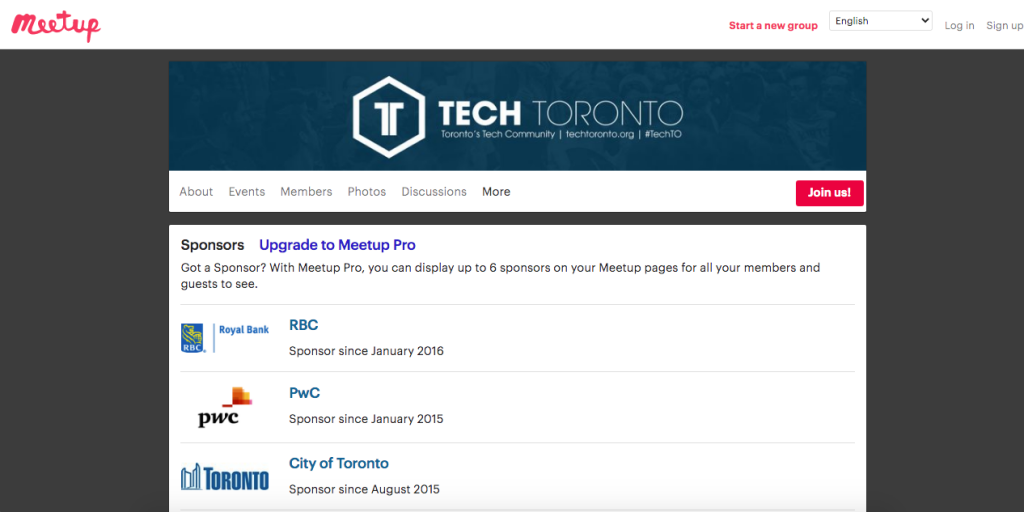
Here’s an example of a Meetup group in Toronto that has six sponsors listed on their Meetup page.

This Toronto Meetup group has sponsors that can use this material for local SEO content

You can look for opportunities to sponsor events on sites like Meetup, Eventbrite and your local chamber of commerce.

Location pages

If your website operates in multiple locations, a location page for that city will give you the best opportunity to rank highly for city-specific search terms.

Location pages can be optimized to provide more relevance to the target location. With a page dedicated to a specific city, you can optimize for the city in the metadata as well as include city-specific references within your content.

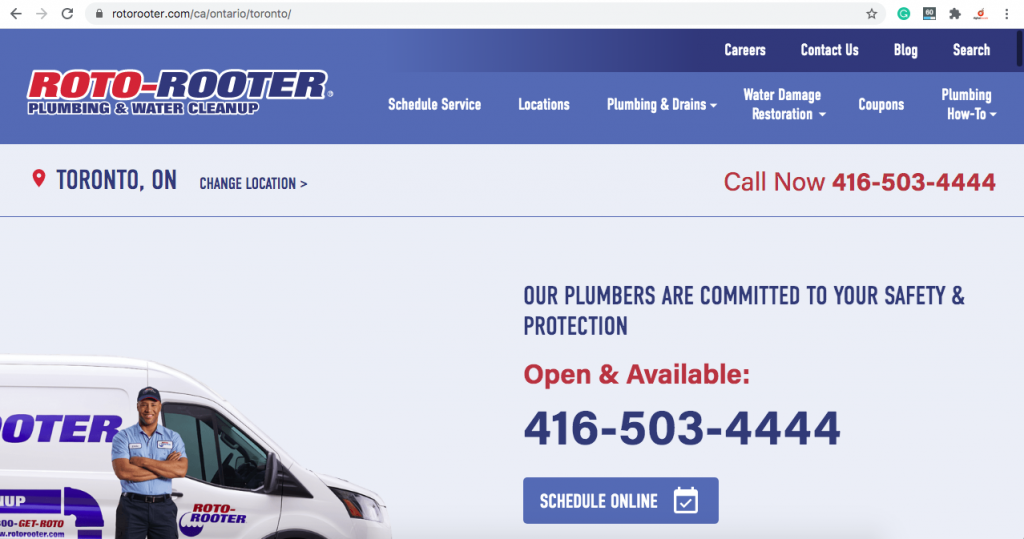
Here’s an example of the Toronto location page for Roto-Rooter. You can see the URL includes the province and city. The title (h1 tag) is also Toronto, On.

Roto-Rooter Toronto location page as an example of local SEO content

If you have an address located within that city, your NAP details should be included in your on-page optimization. Including structured data mark up will ensure search engines know your page is dedicated to a specific city.

Write about local events and activities

Publish content on local events and activities that relate to your business. Give your audience updates on current events that affect your locality and how it relates to your business. 

Content that makes city-specific references and links builds your local notoriety for both users and search engines.  

FAQ page and/or section

Publish a frequently asked questions page to win positions on the SERP (search engine results page) and drive more traffic to your site.

You can use a FAQ page to target featured snippets and PAA boxes. The sweet spot to appear in these SERP features are answers to commonly asked questions that fall within the 40-60-word count.

Use h-tags to mark up your questions.

You can even add FAQ sections to location pages or any page where it makes sense. Use structured data to mark up your content. This will make your page eligible for rich results when it ranks on the first page of Google.

Create a local SEO content strategy

Every business will have different opportunities available for working out an effective local content strategy. Identify the best traffic opportunities as well as the best link building opportunities to harmonize your efforts.

Develop a strong local presence to capitalize on some of the highest converting traffic available. Make sure your content includes a local element to build your brand recognition in your locality.

Christian Carere
Christian Carere

Christian Carere is the owner and founder of Digital Ducats Inc. in Toronto and heads the SEO team at Austin Bryant Consulting in Plano, TX.  Christian has been published on publications such as Search Engine Watch, Venngage, Small Biz Daily, Grasshopper, Data Box, Socialnomics, and Mention.

old.digitalducats.com/

Written by Christian Carere · Categorized: Content strategy, Local SEO, Web development

Jul 11 2020

How To Get More Google Reviews

Defining a simple review strategy can help you get more Google reviews. To get the most positive reviews of your business it comes down to two major factors; the service you provide your clients and the review strategy you implement for encouraging reviews.

Google reviews promote strong ranking signals for localized search results.

The truth is people typically leave reviews if their experience was either extremely pleasant or utterly horrible. A mediocre experience is quickly forgotten and the urge to share is somewhat non-existent.

Not every customer interaction will hot one extreme or the other so it becomes necessary to implement a review strategy to encourage reviews.

To get more reviews on Google you will need to:

  • Provide outstanding service
  • Ask your clients for reviews
  • Make it easy for them through reminders and review links.
  • Respond to all of your reviews

Provide the best customer service possible

Outstanding service is the best way to get the most positive reviews of your company. The level of effort your business puts forth in this department will be your customers’ testament to the quality you provide.

This aspect sets your company up for each and every other way to encourage customers to leave a review.

Ask the client in person

Asking in person is an effective way to gently guide your customer to leave a review. The timing can be more strategic where at the end of a transaction you or your employees can suggest that they leave a review if they were satisfied with the way things went.

Asking in-person applies to both in-store experiences as well as over the phone customer service calls.

Send a review link via email

Make it a point to thank your clients by sending an email letting them know you appreciate their business. At the end of the email, ask them to kindly leave a review.

Provide a link to make things easy and take them directly to your review page.

How to create a link for customers to review your business on Google

Time needed: 3 minutes

How to create a Google review link using a desktop computer

  1. Go to your Google My Business profile

    Click Home on the left side of your navigation menu.home screen for GMB profile

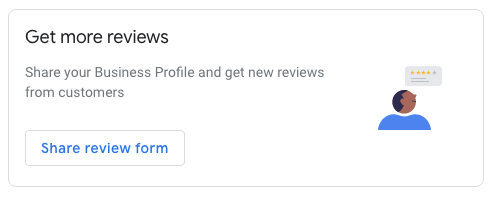
  2. Find the box that says Get more reviews

    Click on the button that says Share review formShare review form

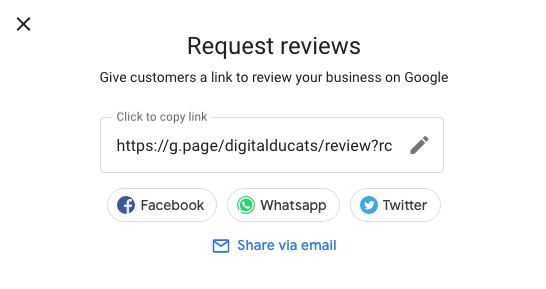
  3. Copy the link generated with your short URL

    If you haven’t created a short URL you may be prompted to do so before getting your link to review your business on Google.LInk to review Digital Ducats on Google

Respond to each type of review

Think of reviews as additional ways to promote your business. Reviews are simply another way that people can learn about your business. Build. your brand and your reputation by responding to as many reviews as possible.

Reviews are a powerful marketing tool that highly influence purchase decisions. Make the most of them by putting your best foot forward for future clients and customer loyalty.

Treat negative reviews as marketing opportunities

It’s imperative to respond quickly to negative reviews. It’s bound to happen from time to time that someone will not get what he or she wanted from your product or service.

Never ignore a negative review as it is best remedied by a timely response.

Responding to a negative review will give you an opportunity to show people how you deal with an unsatisfied customer.

You can take the venom out of a bad review, by stating your side of the story and offering a solution (or apology if it’s required).

People are much more forgiving of a negative review when they see your side of the incident and how you handle a disgruntled customer.

Show your appreciation for positive reviews

When a client leaves your positive review they are helping your business. Show them appreciation by responding to their review. Not only does this make them feel appreciated but it shows other people that you value their business.

There are some people who might feel they should be thanked when they leave a positive review for your business. Cater to your existing clients to promote customer loyalty and keep them coming back time and time again.

Things to avoid when collecting reviews

There are a few guidelines that Google has specifically stated for how you go about asking for reviews. If there is a violation of those guidelines, your reviews may be ignored or your profile suspended.

Never set up a review station to get more Google reviews

Setting up a station for reviews is strictly prohibited. If you are accumulating reviews from the same IP address there is a good chance that Google will begin to ignore reviews that originate from the same IP address.

Never mass email clients to leave a review

Reviews are one of the few things in SEO that you can take your time building. Google expects reviews to trickle in naturally. Any spikes in the number of reviews that you receive will raise suspicion and may result in those reviews being ignored.

Never pay a service to review your company

There are companies that offer services to increase the number of reviews you have on your business. Your reviews should be directly from your clients for an accurate representation of your company.

Never offer incentives to review your company

If a client leaves a review of your business it should be for the right reasons. An incentive creates false reviews since clients are writing the review for the wrong reasons.

Learn more about local SEO services and how your business can benefit.

Christian Carere
Christian Carere

Christian Carere is the owner and founder of Digital Ducats Inc. in Toronto and heads the SEO team at Austin Bryant Consulting in Plano, TX.  Christian has been published on publications such as Search Engine Watch, Venngage, Small Biz Daily, Grasshopper, Data Box, Socialnomics, and Mention.

old.digitalducats.com/

Written by Christian Carere · Categorized: Local SEO

  • « Go to Previous Page
  • Go to page 1
  • Go to page 2

Footer

Need professional SEO advice?

Give us a call to learn more about how we can help your business

Call for a consultation Request a proposal

Request a free website analysis and proposal for your company by filling out the ” Request a Proposal” form.

  • Privacy Policy
  • Terms Of Service
  • Cities we’ve served

© 2026 · Digital Ducats Inc.