• Skip to main content
  • Skip to footer

Digital Ducats Inc.

SEO Consulting & Services

  • Home
  • About
    • SEO Consulting
  • Services
    • SEO
    • Local SEO
  • Contact
    • Pricing
    • Write For Us
  • Blog
You are here: Home / Blog

Sep 23 2019

Page Speed: A Complete Guide For 2020

Feb 2, 2022 @ 11:25 am

Page speed has been an SEO issue ever since Google made it an official ranking factor in 2015. The importance of page speed is paired with the significance of providing a better user experience, an important aspect of user engagement. Now it remains an important factor that could save you clients and revenue.

What exactly is page speed?

Page speed is the measure of time it takes for your page to load (not to be confused with site speed, which is the overall speed of your website). Page speed is measured by the time it takes until the first contentful paint (FCP), which. is the first appearance of content.
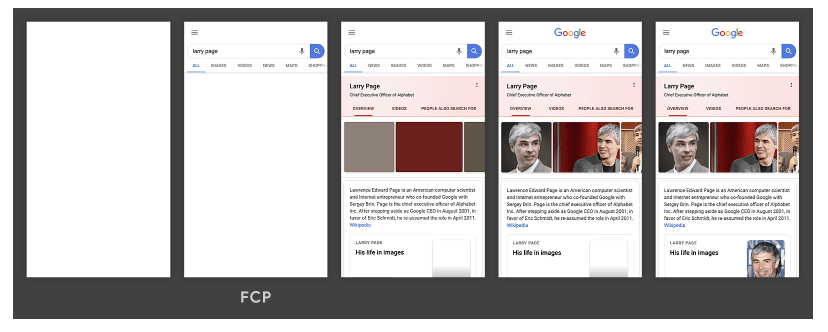
Page speed measures the first contentful paint which is the first appearance of content
The FCP appears in the second frame

Every web page has a sequence of items that need to load before we see the full web page. The browser loads a page in the order it’s prioritized. You can increase the speed this all takes place by improving any or all of a number of the issues that can cause a bottleneck and result in slower load time.

What are the benefits of fast page speed?

The time it takes your pages to load can have a significant impact on the performance of your website. If your site is already fast, the improvements might be marginal, but the long-term benefits will be substantial.

Reduced bounce rate

By far, this is one of the most well-known improvements you can make to your page because it has such far-reaching implications. The bounce rate of your site is the percentage of people that land on your page and back off of it without clicking through to other pages or reading any of the content.

Generally, a high bounce rate indicates the user is not interested in what they’ve found when they land on your page. Studies have shown that there is a direct, inverse correlation between page speed and bounce rate. The faster your pages load, the lower your bounce rate becomes.

The opposite is also true where the longer it takes your pages to load the more users will bounce off of your page.

According to Google, every second in load time represents a percentage of visitors who will back out of the site in search of another that loads faster. This becomes very apparent after three seconds.
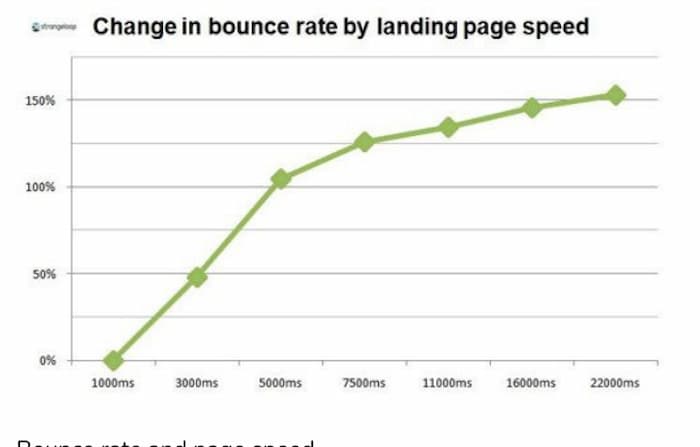
Page Speed VS Bounce Rate

The logic behind the relationship between page speed and bounce rate is simple; People hate to wait and when their patience is tested, they will leave your website in search of another whose pages load faster.

Increasing your page speed will literally keep more people on your website.

This discovery led retail giants to save billions of dollars every year. The more they improved page speed, the more they reduced abandoned shopping carts and increased their revenue.

The general consensus among people is that they tend to distrust websites that take a longer time to load. Long load times equate to poor user experience. If Amazon experienced a loss in potential business and they are one of the most trusted sites in the world, what do you think people will think of your site if it’s not loading in a time that’s up to the status quo?

So what is the status quo for page speed? Below is a chart of the average load times across different industries.
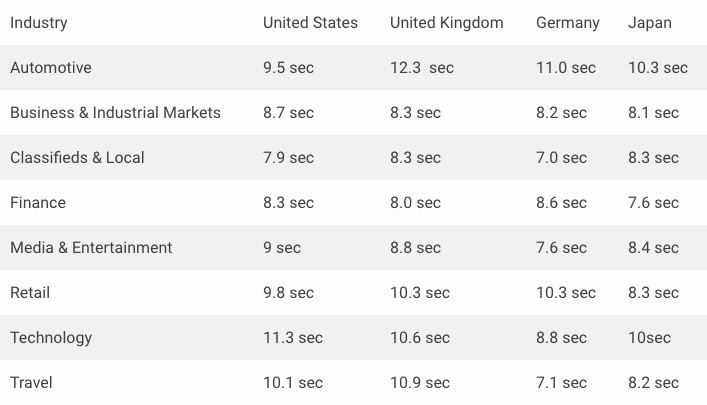
Average page speed by industry
Image resource: https://www.machmetrics.com/speed-blog/average-page-load-times-websites-2018/

What you can draw from this is that although there is a heavy emphasis on improving your pages load time, there are still a lot of websites that haven’t conformed to the recommended standard set by Google of 3 seconds.

This presents an opportunity to get your site faster for a competitive advantage that contributes to ranking and a better user experience than what your competition offers.

Now that we can all agree that the faster your page load time, the more visitors stay on your site, there are a bunch of good things that happen from the domino effect.

Fast page speed improves your click-through rate

More visitors staying on your pages means a higher click-through rate. If your pages are loading faster, you’re getting more of your content in front of them to find and click through to on your website.

Longer dwell time

With more users able to click through to more pages, the average time spent on your website is going to get longer. Longer dwell time demonstrates a positive signal that will benefit your website’s search visibility from improved ranking.

Increased search visibility

Improved page speed leads to improved user engagement, which is also a positive ranking factor that becomes highly relevant on the first page of results. Rankbrain is one of Google’s artificial intelligence programs that is specifically designed to assign rank positions.

Rankbrain measures user engagement statistics along with other ranking factors to determine the popularity of a website and whether users are enjoying the content they find. Your site will experience increased search visibility from a higher ranking.
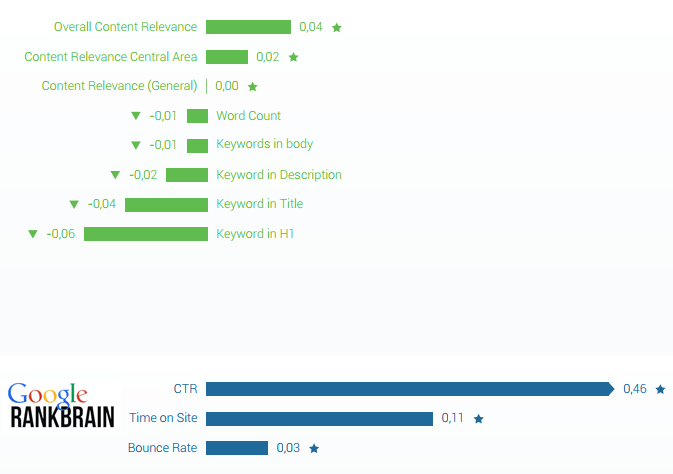
Rankbrain metrics that impact ranking and are influenced by page speed

Increased volume of traffic

Higher rankings will almost always mean an increase in the volume of traffic your website receives. Apart from the rise in traffic from improved ranking, the increased volume of traffic that stays on your site provides your website with more opportunities to convert visitors into clients.

Higher conversions

Longer dwell time and higher click-through rates are the perfect recipes for increased conversions. The more content you can get in front of your audience, the more opportunity you have to build trust and guide them to products, contact forms or making a phone call. The conversions on your site will naturally increase.
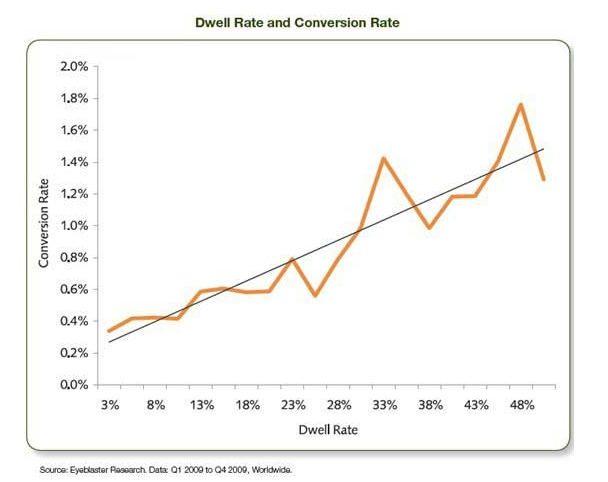
Chart showing the relationship between dwell time and conversions rates

Time is money. Walmart and COOK have reported huge percentages of increase in profit by reducing their pages load time. Walmart increased conversions by 2% with every second of increased speed. Cook increased load time by 0.85 seconds and enjoyed a 7% increase in conversions. (~Radware Blog)

In the chart below, mPulse Mobile was tested for its conversion rates vs. load times. The case study was performed by Skilled and here are their findings :
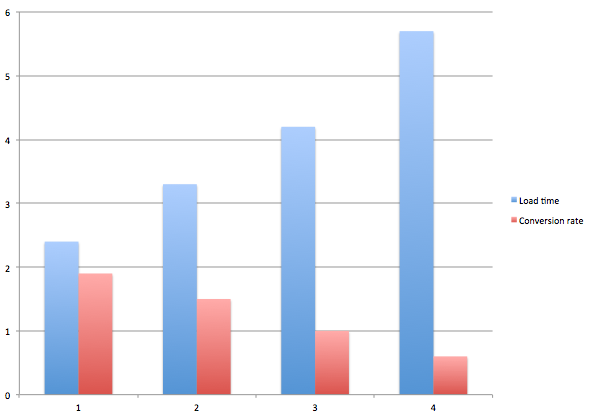
Page Speed vs Conversion Rate comparative case study by Skilled
Page Speed VS Conversion Rate
Comparative Case Study
  • At 2.4 seconds they had a 1.9% conversion rate
  • At 3.3 seconds conversions were 1.5%
  • 4.2 seconds was less than 1%
  • 5.7 seconds and higher was 0.6%

Increased revenue

The ultimate benefit of increased page speed is the increase in revenue your company receives. The law of averages suggests that the more visitors that land on your website (from relevant search terms), the more conversions and sales your website will experience.

If your website traffic goes from 500 visitors a month to 1000 visitors a month, you can expect to see a direct relationship in the revenue your company receives. Improving the page speed within your website will ultimately increase the revenue your website generates on a regular basis.

How to improve your page speed

  • Test your speed
  • Images
  • Minify HTML, CSS and JavaScript
  • Leverage browser caching
  • Lazy loading
  • Use CSS Sprites
  • Use a CDN
  • Delete unused plugins
  • Choose the right hosting plan

Test your page speed

The first step to increasing your page speed is to get a report on the actual speed of your page. Included with your actual page speed will be a list of items that you. can do to speed up the load time of your page.

How do I test the speed of my website?

Go to any of the following websites to generate a report on the speed of your website.

  1. Pingdom
  2. Google PageSpeed Insights
  3. Google Mobile Website Speed Testing Tool
  4. Google Analytics Site Speed
  5. WebPageTest
  6. GTMetrix
  7. KeyCDN Website Speed Test
  8. DareBoost
  9. Web Page Analyzer
  10. YSlow
  11. Chrome DevTools
  12. Load Impact
  13. Site Relic
  14. dotcom-monitor
  15. New Relic

You can any of these free tools but why not go straight to the source by using Google PageSpeed Insights.

Enter the URL of your page and you’ll receive a page speed score out of 100 on both desktop and mobile.

Scroll down to view a list of items that are affecting your load time.

Every website will experience its own unique issues but for the most part, the following are the most common fixes and should be incorporated into a routine to maintain the time it takes for your pages to load.

Whats a good page speed score?

If your page scores a 90 and above, your page is considered to have a “good score” A score between 50-89 is considered to “need improvement.” If your page scores less than 50 it’s a bad score that needs immediate attention.

Reduce the size of your images

Images are one of the leading causes of slow page speed, however, there’s a lot you can do that directly affect your pages load time. The first is to reduce the file size of your images by reducing the dimensions and pixels you upload onto your site.

Choose the exact dimensions that are needed in order to eliminate the need for additional resources requests from the server.

When you upload an image taken directly from a camera, the file size is often 1000’s pixels in width and length. If the required size is smaller than the actual image size, you can streamline the time it takes to load by only uploading an edited version.

Use the correct image formats

Another way to reduce the size of your images is to use the most appropriate formats than enable compression. GZIP is ideal to use on your website for the smallest version of your images.

Choose PNG and JPEG as the preferred formats. PNG is mostly for web colours, which is ideal for charts, graphs, banners, etc. JPEG is best for actual photos with a more complex range of colours.

Remove unnecessary metadata

Many cameras will embed information into the images it renders. Removing the unnecessary metadata can reduce the file size and streamline the load time.

Use lazy loading

Lazy loading prioritizes the sequence of loading images on your page. The priority is given to the images that are located above the fold and in plain view when a user lands on a page. The images below the fold are delayed loading until the user scrolls down.

Prioritizing this sequence on your page allows more resources to be dedicated to the content that is immediately being viewed. When the user scrolls down, the images are then triggered to load, which is faster than having the entire page load at the same time.

Minify and inline HTML, CSS & JavaScript

You may see on your page speed report to minify and inline scripts and languages such as HTML, CSS and JavaScript. This refers to streamlining the code that is found in the header of your website.

Most WordPress sites are built from templates and the code used in the header will often have notes and many spaces between the lines to separate segments. These spaces are mostly for human developers since the bots that read the headers don’t need the spaces to differentiate segments or the notes for their understanding.
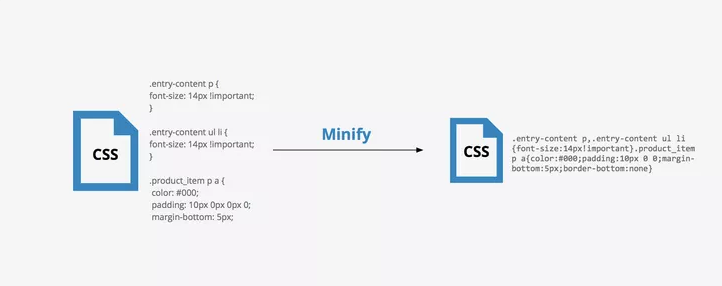
What CSS code looks like before and after you minify

You can reduce and compress the code on your page by eliminating both. It may seem difficult, but you don’t need to do this on your own. Some plugins will do the work for you-we’ll name a few tools you can use later in this article.

Leverage browser caching

You can lighten the load your server takes on by enabling a command that tells browsers to save the most important files on your site. Browsers will save images and other time-sucking resources so that after the first visit from a user, those files are ready for display in a fraction of the time it would take to retrieve them from your server.

Browser caching increases your page speed by reducing the number of server requests you make when loading your website.

Use CSS sprites

The use of CSS sprites can save load time by using a template image that includes many smaller images that can be used on different parts of the page.
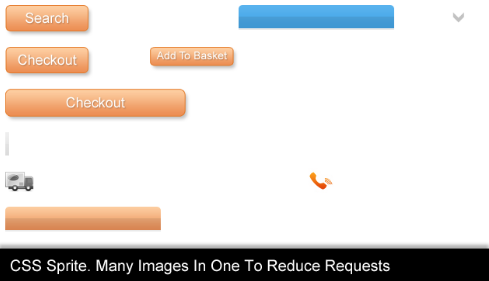
CSS sprites template

Rather than have the server make multiple requests for each individual image, you can choose to show the parts of the image to use on the different parts of your website.
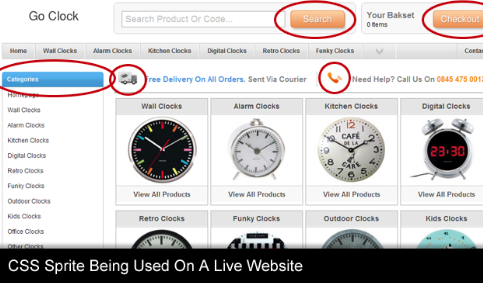
Example of how a CSS sprites template is used for different areas. ofa web page.

Use a CDN

A content delivery network is ideal for reducing server response time. Your website data is loaded into servers that are strategically placed around the world. Whenever your website is accessed, the information is taken from one of the remote servers as opposed to being requested from your hosting company servers.
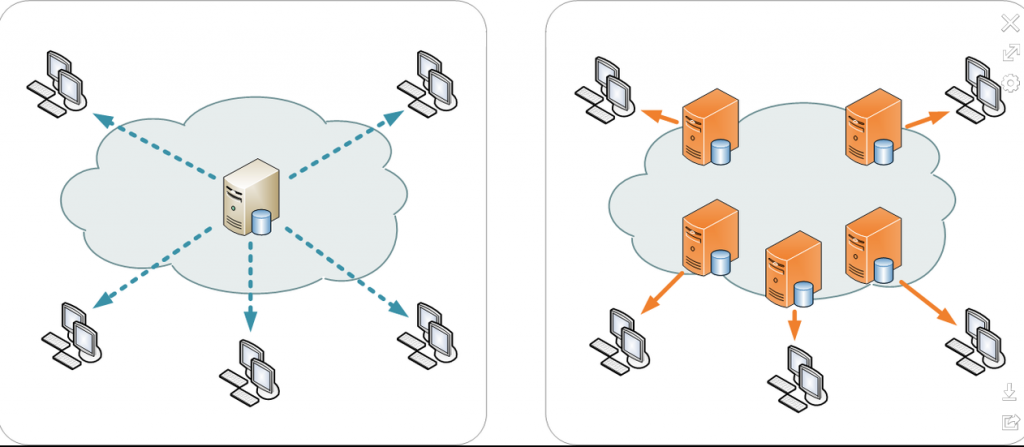
Content delivery network providing servers and data centres in locations closer to the user
Illustration of a Content Delivery Network
Image resource: https://en.wikipedia.org/wiki/Content_delivery_network

The information being relayed from your server to your website has less distance to travel which cuts your server response time down tremendously if you’re website is being accessed all over the world. Activating your CDN with default settings has been stated to improve site speed 10 times faster than without.

Delete unused plugins

Every plugin on your website will take up a specific amount of resources due to the code that’s written in the header. By deleting plugins you don’t need you can free up more resources by eliminating clutter in the header. Even if the plugin is deactivated, delete it if you’re not using it on your website.

Choose the right hosting plan

Depending on the resource requirements of your website, the wrong hosting plan could negatively affect your page speed. There are three options when you choose a hosting plan and each plan allows you different amounts of server resources.

Shared hosting plan

This plan is to put your website on a server that’s shared by a group of other people. Whenever people land on your website, there is a request for resources in order to load the page. If your server doesn’t have those resources available, your site will experience a delay in load time.

This can happen if too many accounts share one server. Multiple server requests made at once can overload the capacity of the server to handle every account’s needs. Even if the server has a reasonable number of accounts, if the traffic on your site grows, you may need to upgrade to the next level of hosting.
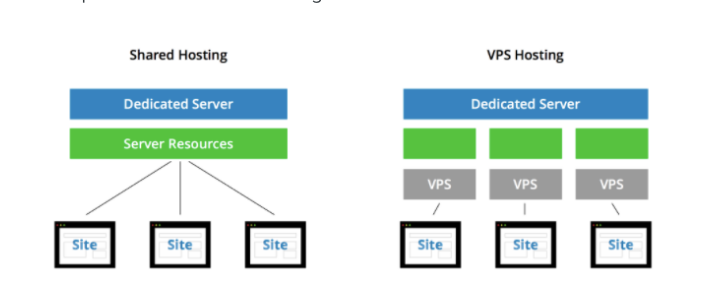
Shared hosting vs. VPS Hosting
Image source: https://www.crazyegg.com/blog/speed-up-your-website/

VPS hosting account

A VPS hosting account guarantees you a specific amount of resources at any given moment. This ensures your website has the resources needs based on the expected volumes of traffic you receive.

A VPS hosting account is still a shared account, however, the number of accounts is limited in order to persevere the guaranteed allotted resources for your website.

Dedicated server

If your website experiences massive spikes in traffic you may need a dedicated server to handle the loads required to keep your site up and running. A dedicated server means there is no one else sharing your resources, which makes your server response time lightning quick.

Tools for page speed maintenance

Many of the issues that prevent fast load times can be solved without needing a degree in computer science. If there’s ever an item on your page speed report that you’re unsure about, you can always Google the problem to find a plugin that solves that issue.

Here are a few tools that can handle the majority of page speed problems and contribute to faster load times.

W3 Total Cache

This plugin can handle a few different issues in one fell swoop.

Once installed, you can configure your settings to inline and minify HTML, CSS and JavaScript by simply enabling this function in the settings.
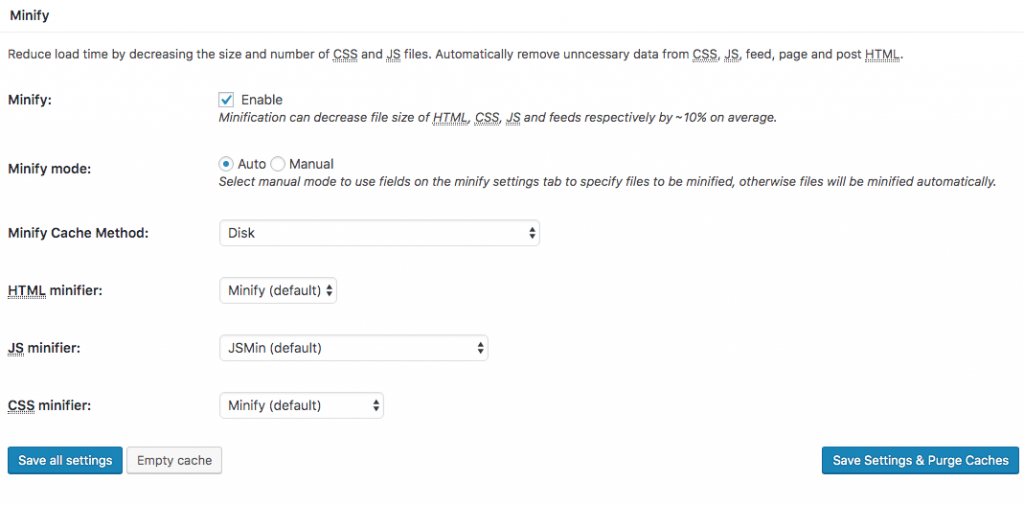
Minify HTML, JavaScript and CSS with W3 Total Cache
Minify HTML, CSS and JavaScript with W3 Total Cache

The option to leverage browser caching is also located with the settings of the plugin. Be sure to enable this option and set it to the maximum amount. of time-which is one year.

Test your website before and after installing and setting up the plugin. You’ll want to make sure you see a notable drop in your page speed. If your website doesn’t get faster, there may be a conflict between plugins that you’ll need to identify before moving forward.

Cloudflare

As a free option for using a CDN, Cloudflare is ideal. The company has an extensive network of remote servers making your website convenient to load from any region of the world. There are similar options you would find in W3 Total Cache to increase page speed.

Smush

This plugin compresses all of your images to the smallest size possible. The beauty of this plugin is that once it’s installed it will compress every image you upload automatically.

You will need to manually compress images that were uploaded prior to installing this plugin (in the free version).

Smush gives you the option to enable lazy loading to prioritize the load sequence of the images on the page.

Alternate versions of Google PageSpeed Insights

There are multiple tools for testing page speed that you can use instead of Google. Each tool has slightly different features that you may find more useful for your needs.

Sites include, but are not limited to:

  • GT Metrix
  • Pingdom
  • YSlow
  • Webpagetest.org

Incorporate page speed maintenance into your daily operations

Achieving fast page speed is not a one-time shot that is achieved overnight. Sure, you can make significant improvements with specific actions, but there are regular maintenance routines you should practice in order to maintain a website that loads quickly.

Install the plugins that best suit your business in order to automate many of the functions required for fast-loading websites. Keep in mind that just because you installed Smush doesn’t mean you can skip editing the size of your images.

Page speed is a value that fluctuates over time, and so requires a periodic evaluation. Test your pages every month to make sure there aren’t any bottlenecks building up the time it takes to load your page.

Some of the changes you need to make may be quick and apparent, while others may be more gradual and not as clear-cut. Staying on top. of the situation ensures your website pages are continually maintaining and increasing the speed at which they load.

Maintain constant vigilance of the page speed on your most important pages. The effort you put into keeping load time low will result in a landslide of benefits that ultimately increase your revenue on a regular basis.
Written by Christian Carere · Categorized: Technical SEO

Sep 07 2019

What Are Google SERP Features?

The first page of results is often referred to as a SERP (Search Engine Result Page). It’s the most important page of search results because 95% of the total search volume will end up clicking on a result on the first page but less than 5% will venture past to the second page. (~Forbes 2017)

The goal for all websites has traditionally been the number one spot on the first page, however, the emergence of Google SERP features has changed the value that a number one position holds. More traffic is being drawn from the organic listings and absorbed by various SERP features. It’s necessary to survey and assess the first page of results to determine what features you will need to optimize your website to produce the most traffic. 

What is a Google SERP feature?

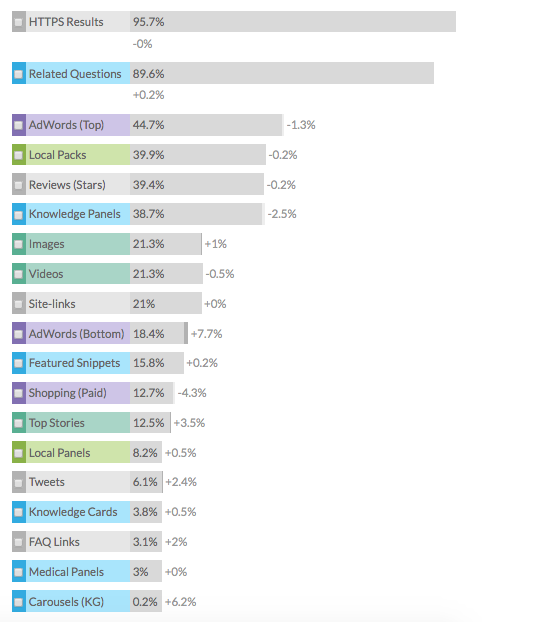
A Google SERP feature is a Google product that is displayed in order to enhance the user experience. The type of features can range in appearance. Each feature can provide additional traffic to your website. Different features present more traffic opportunities than others. Here is a list of the types of features and the frequency they’ve appeared in a search query in the last 30 days.

List of Google SERP Features

People Also Ask Box (PAA)

The first SERP feature on the list is Related Questions, or PAA boxes (People Also Ask). This feature has been appearing in 89% of total searches (as seen in the above chart). 

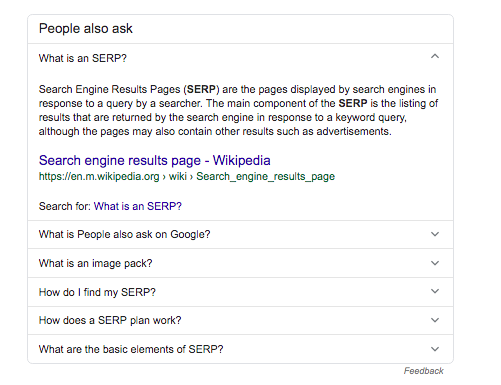
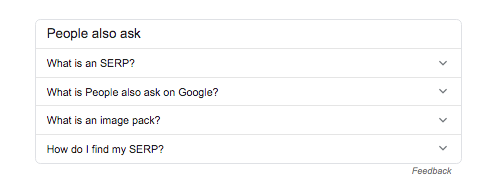
People also ask box

PAA boxes are triggered mostly by questions asked in a search. Each question within the box can lead a user to a different website.

PAA box opened up

The box is interactive meaning that when you click on one question another few lines of questions will appear related to the question you clicked on. This could go on indefinitely and has been one of the reasons for a decline in the number of visitors that make it past the PAA box to the organic listing. 

Google Ads (Formerly AdWords)

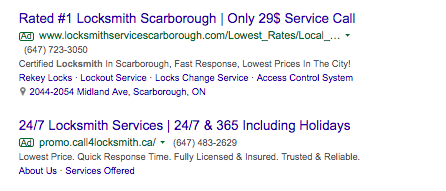
Pay-per-click ads, also known as Google Ads have sponsored placements at the top of the organic results. The highest bidder gets the highest position on the page. Paid ads are only distinguishable by the small green “Ad” posted to the left of the domain.

Google Ads

The advantage of running an Ad campaign is that your website is placed at the top of the SERP if you’re the highest bidder. This gives your website a priority position for being the first listing seen when a user searches a term. Google Ads are performing considerably better on mobile searches than they do on desktop based on this fact alone. 

A disadvantage to a paid ad is that when you stop paying, so does the traffic. Your website disappears from the first page when your campaign ends which makes paid ads relatively expensive. Organic search results provide a better ROI over the long run because of the difference in traffic dispersion to the organic listings. Once your website is optimized to receive traffic organically it will continue to produce unless you lose position to a competitor.

Local Packs

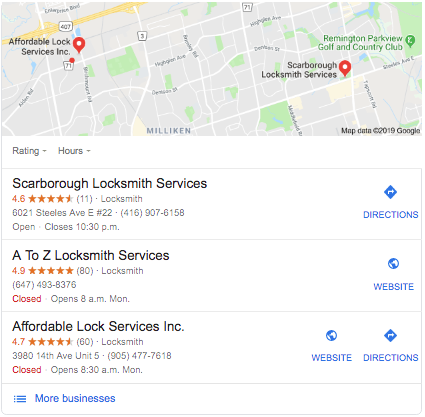
local pack example

The three websites that are ranked at the top of the local finder are displayed as the local pack on the first page of results. The websites selected for the local pack are businesses that can show relevance, prominence and proximity. 

Local packs can generate a substantial amount of local traffic that is typically comprised of high converting visitors. 

Reviews (stars)

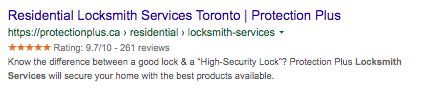
A rich snippet is any feature that shows up to enhance a search result. More companies are including reviews in the meta descriptions to encourage higher click-through rates. 

reviews (star rating)

Knowledge Panels

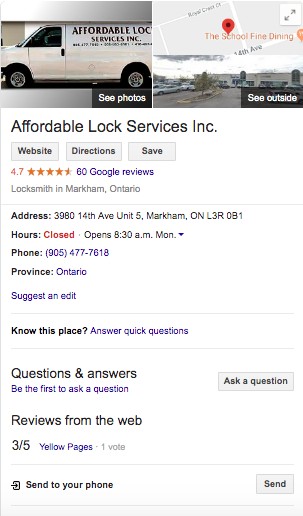
The Knowledge Graph is Google’s own database for collecting and categorizing information on people and places. A knowledge panel will appear whenever a search for your company is directly made. The knowledge panels will display information about your company mainly extracted from your Google My Business profile.

Knowledge panel

Images

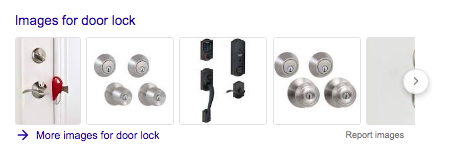
It isn’t uncommon for images to be displayed as the best response to a query. Images are selected as features according to how well they’re optimized for a specific query.

Images on SERP features

Videos

As videos gain more relevance as solutions to search intent they will continue to grow in the frequency of appearance. This SERP position can be won and used to drive traffic at all stages of the buyer phase.

video Google SERP features

Site-links

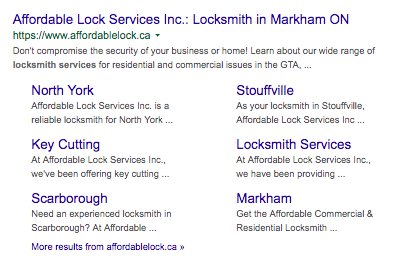
Websites with excellent organizational structure will generate relevant links in a search listing.

site-links example

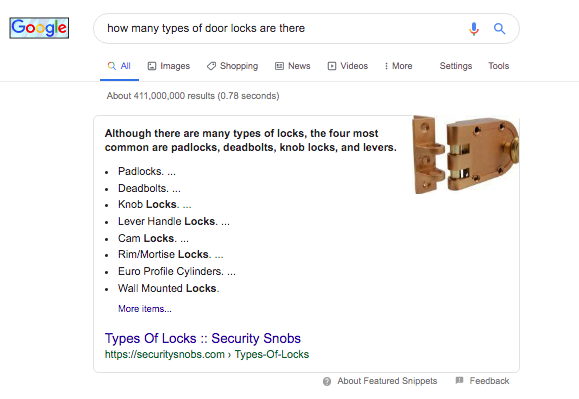
Featured snippets

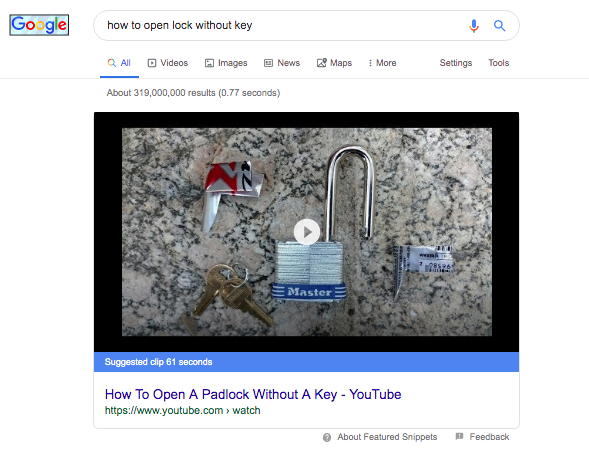
This SERP feature can come in a variety of forms such as the list, paragraph, chart, or graph. Featured snippets are displayed to provide the user with the quickest answer to a search query.

The featured snippet is an example of one of the most popular Google SERP features

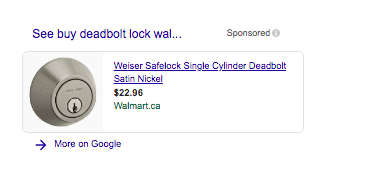
Shopping (Paid)

Often times you will see a carousel of products appear in a search result. These are images of sponsored ads that can be bid on in a Google Shopping Campaign.

Google shopping SERP features

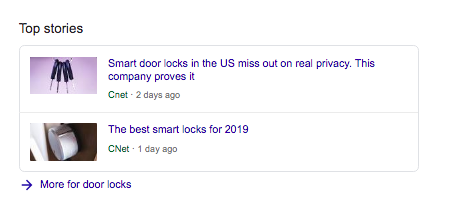
Top Stories

Featured stories are displayed by Google and extracted from news aggregators and websites.

top stories

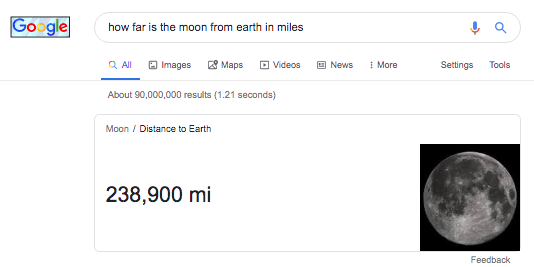
Knowledge Cards

This feature answers generic questions. The information is generated from high authority sources such as Wikipedia and Wikidata.

knowledge card example

Despite the numerous SERP features that have continued to appear more frequently, organic traffic represents a large part of a successful inbound marketing campaign. 

When building content it has become absolutely mandatory to take into account the SERP features that appear in a keyword search because of the percentage of clicks that may be absorbed. 

In order to maximize the number of visitors to your website consider the features that present the opportunity for additional traffic.

Written by Christian Carere · Categorized: On-page optimization, Web development

Aug 06 2019

How to Make Your Website Appear First On Google

Nov 8, 2020 @ 4:04 pm

Want to know how to make your website appear first on Google? It’s simple once you understand the basics of SEO and put in the work. With the right SEO strategy, you can get your site to the top of the search engines for multiple keywords that are important for your business.

To go straight to the top of the search results you need to consider what keywords you’re targeting and the competition that’s pursuing those very same search terms. It’s very difficult to take a brand new site straight to the top of the rankings for a highly competitive term.

Choose the right audience

Choosing a keyword is as simple as describing your business. You can get pretty accurate with your keyword selection by simply explaining what your company offers in a way that people type when searching online. To find visitors that are a perfect match for your business, create the perfect buyer persona.

Creating a buyer persona is an exercise that will help you meet the needs of your client on a more personal level. When you go through this exercise the age, occupation, sex, marital status and many personal defining attributes are established. This brings you to a closer understanding of how this person thinks, what’s most important to them and how you can relate to them on a much deeper level than simply describing your product. Knowing your audience is one of the first steps in creating great content because the language you use is more focused and appropriate in communicating your message.

By establishing who your audience is, the subtopics you choose will be tailored to the issues unique to their current life situations. This makes the content you create more relevant to your readers and contributes to optimization for your main keyword topic.

Assess the competition

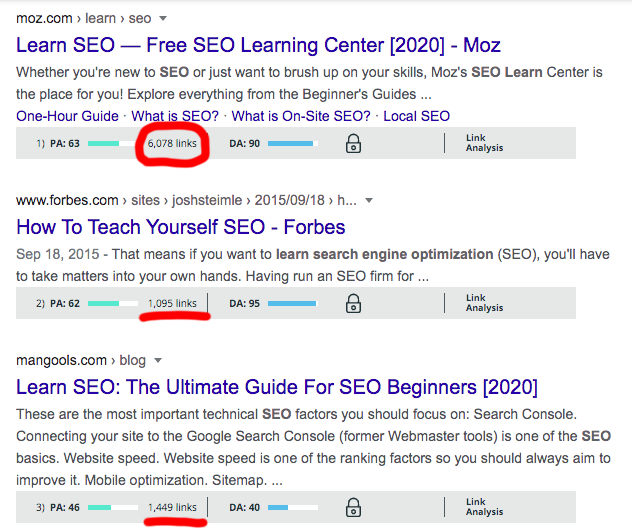
One of the major ranking factors that you need to consider is the backlinks and authority your competition possesses. If you type in an extremely competitive keyword such as, learn SEO, you’ll see the first three results are websites that have been around for years and each has thousands of backlinks pointing to its page.

A search result of the competition to make your site appear first on Google for the term "learn SEO"

These domains are also considered high-authority domains and major influencers in the SEO industry. It would take quite some time to build up enough authority to be able to beat these websites for a competitive keyword like this. This doesn’t mean you abandon this term completely, however, you’ll need to be more strategic with how you choose your keywords.

Eliminate tough competition with focused keywords

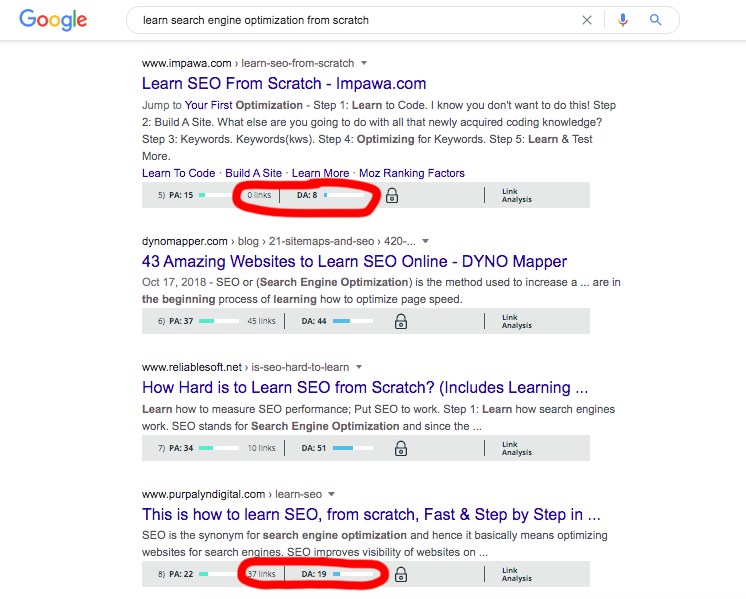
Reduce the strength of your competition by using long-tail keywords to get more specific with the audience and traffic you’re targeting. For example, you can turn the keyword “learn SEO” into a long-tail keyword such as “learn search engine optimization from scratch” to loosen up the competition.

long tail version of the search term "learn SEO" is easier to make your site appear first on Google

As you can see from the search result in the image above, there are a few positions on the SERP that are held by much lower authority websites. In addition, the average number of backlinks has dropped dramatically.

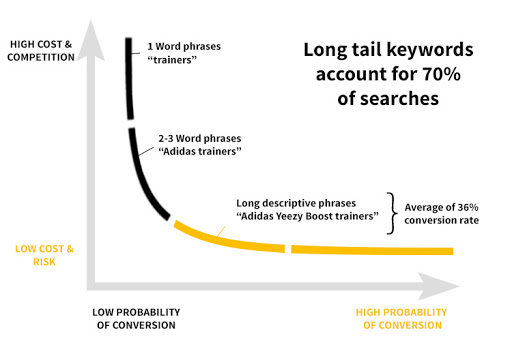
Long-tail keywords make up about 70% of the total searches made on Google. The advance in Google’s ability to understand intent has improved dramatically allowing search phrases to be longer and more conversational. This creates infinite opportunities to optimize for a phrase that will be specific enough to drive traffic that’s a match to your business.

Graph showing long tail keywords convert 36% higher and cost less to rank on the first page of search results

Longer search terms tend to convert at a higher rate because they are a better match to your content. The more specific you are with the phrase you’ve optimized for, the more specific the intent is of the visitors who land on your site.

A clear example of this is if you sold extreme temperature winter boots for men.

Consider who is searching for term winter boots.

If you optimized for “winter boots” you wouldn’t be getting a perfect match for your product because your product would only appeal to a small percentage of the total traffic searching “winter boots.”

Women would make up a huge percentage of the traffic and would immediately leave your site since you only sell men’s boots.

By using more qualifying terms to describe your product you can make your site more visible to those who are actually looking for what you’re selling.

Publish shareable content

When the first page of Google is the goal, shareable content will help propel your site to the top by getting more people on your page and giving your content a higher chance of being linked to by other sites. The number of referring domains linked to your page boosts your ranking and although social shares are not a direct ranking factor they give your page a larger audience and a better chance of being linked to by more websites.

Publishing shareable content means creating pages people enjoy reading as well as find value in what is offered. Great content means it is highly relevant to its audience. If you’ve done a thorough job on your keyword research, you should have been able to come up with a few issues or problems that are common to your target audience. By offering the solution to these problems the value of your content increases as well as its shareability.

Post your content to your social media networks to get as much traffic as possible on your site. Use a call to action and ask people to share your content. Social sharing plugins will make it easier for people to pass your page along through their network.

Outperform competing pages

To outperform competing pages, you need to look at the top ten results for your specific keyword. Take note of the article length, type of media used, the topics covered and the links they’ve acquired to beat them in every way imagineable.

Google tends to prefer longer articles

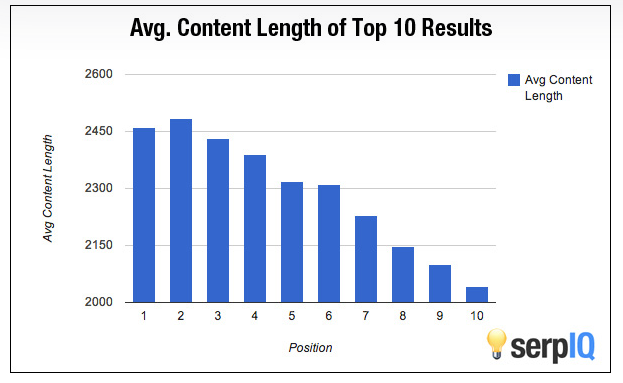
Article length isn’t a direct ranking factor but it does affect the length of time a visitor spends on your page. It also is an idication of the depth a specific page offers for a specific search query. I fyou look at the average length of the top 10 results on Google you’ll notice that the average length of a top-ranknig page is above 2000 words.

Average word count of pages that rank on the first page of Google

To outperform a page make your article longer by including more details and subtopics that would improve the user experience. Avoid “writing for search engines” as it can be easy to get caught up with ranking and miss the mark entirely in publishing a better performing page.

Use multimedia to enhance user experience

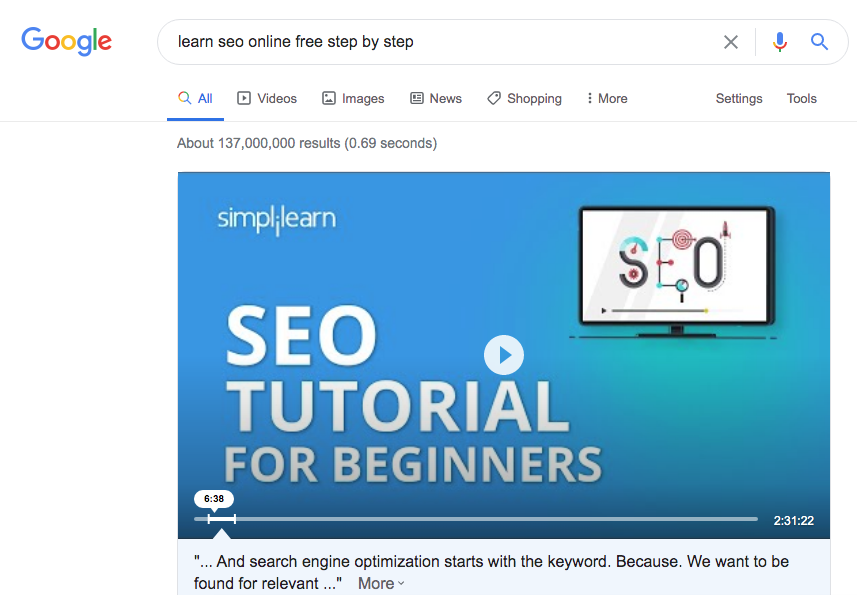
Video improves dwell time and is the preferred choice in learning about a topic by most users. Include a video at the top of your page to immediately engage your visitors. Combine video with other forms of media to create deeper levels of understanding while increasing your reader’s level of engagement.

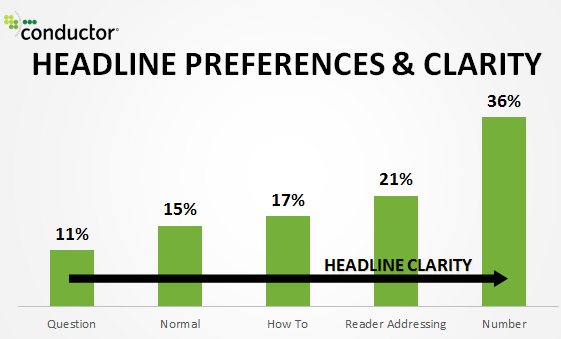
Increase CTR with better headlines and meta descriptions

The click-through rate your page has will affect your first-page ranking. You can improve your click-through rate by creating headlines that grab the attention of your audience. Use established headline strategies to improve the percentage of clicks your page gets in the search results.

Image of types of headlines that increase the CTR of your page which is a metric Rankbrain uses to move your page to up in Google ranking

Your meta description also plays a role in determining your click-through rate. Write a convincing description of what’s in store for a potential reader should they click on your site. This is the sneak preview so make the 160 characters work to entice your audience.

Here’s an example of a very well written meta description that encourages the click with a call-to-action.

Great example of a meta description to increase the CTR to your website

Cut the competition using paid ads

You have to consider this option if you’re in a position to benefit from the traffic from a high-converting keyword. For the more competitive terms that you can’t rank for in the short term, you can get on the first page of Google by using Google Ads.

If you have products that sell and you just need to get it in front of more eyes, a PPC campaign is an option that will make you money by instantly increasing your search visibility for highly competitive terms.

Identify search intent before paying for traffic

When choosing the terms that you’re going to pay for the traffic, you need to consider what the true intent is of the keyword. It would be a waste of time to select a keyword that you pay for and yet no one that lands on your site converts into a client.

Confirm intent by checking the organic results

The first indication of search intent is to see what Google has ranked in the organic positions for the search term in question. The search results can give you the best idea of what people are looking for when they type your keyword in a search.

Compare cost-per-click

The CPC of a keyword is also an indication of whether other websites are making money from that keyword. In most cases, the more publishers are willing to pay for one click, the more valuable the keyword.

There are search terms whose CPC can be misleading, so make sure you use this as an indicator and not the sole reason for pursuing a search term.

Optimize for a SERP feature

The search engine result page is a dynamic landscape that is constantly changing according to search intent. You can take advantage of some of the features that appear on the SERP to enhance your search visibility and appear on the first page of Google.

Featured snippet

In order to appear in this feature, your page needs to be the best answer to a query. The featured snippet is where to make your website appear first on Google because it’s the first thing a user will see in a search result.

Here are few tips to qualify for this feature:

  • Your website needs to already be on the first page.
  • Target long-tail keywords
  • Use h-tags for all of your headings
  • To win the position, take note of what the current snippet holder has done to achieve this top position and duplicate the optimization.

For example, in this featured snippet, it was awarded to a site that featured a video. In order to compete for this spot, you would need to match the result with a video.

The featured snippet is the place to make your website appear first on Google

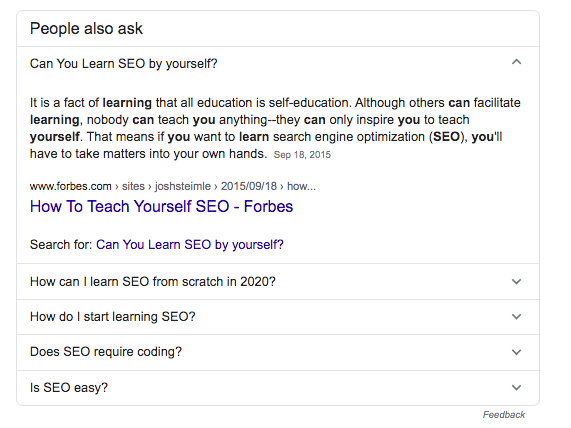
People also ask box

When this feature became more common many SEOs were able to capture this position by creating FAQ pages. Publish a Frequently Asked Questions Page to give your website as many opportunities as possible to win a position in the PAA box.

The winning combination for optimization is to tag your questions and provide short succinct answers that range from 40-60 words immediately after the question.

PAA box is another option to target to get on the first page of Google

Local Pack

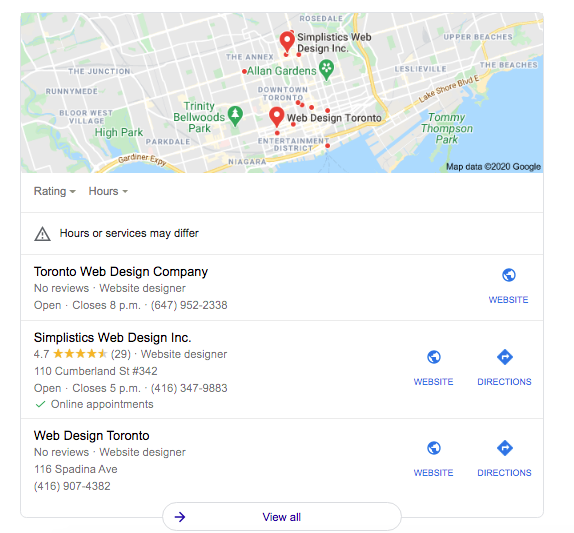
If a local pack is triggered by searching your target keyword, consider optimizing for local searches. Geo modifiers can cut out a large chunk of competition and get your site featured in the local pack.

Local pack only appear on the first page of Google making it a good feature to target

For people who are looking for a business that’s close to them, this is the perfect solution for high-converting traffic. Make sure you add as much information as possible to your Google My Business profile and publish local content on your website.

Get your site to the first page of the search results

It’s not always the most obvious solution, but there are many different ways you can get your website to the first page of Google. Search engine optimization is simply finding the best way to get your site in front of people looking for what you offer.

Define a keyword strategy that makes sense for your website. If you’re a newly developing site, you may need to consider the options that cut the industry influencers and major competitors out of the equation.

Assess the SERP and the options you have available to make your website appear first on Google. There are plenty of ways to get your website in front of an audience that will engage in your content if you’re looking in the right places to drive traffic.

The final destination for great content is naturally on the first page of search results. In order to get your website on the map for what your company offers, produce content that helps users find what they need. Know who your ideal audience is and publish hyper-focused content specifically tailored to provide value in their lives to generate traffic that is the best match for your business.

Written by Christian Carere · Categorized: Web development

  • « Go to Previous Page
  • Go to page 1
  • Interim pages omitted …
  • Go to page 27
  • Go to page 28
  • Go to page 29
  • Go to page 30
  • Go to page 31
  • Go to page 32
  • Go to Next Page »

Footer

Need professional SEO advice?

Give us a call to learn more about how we can help your business

Call for a consultation Request a proposal

Request a free website analysis and proposal for your company by filling out the ” Request a Proposal” form.

  • Privacy Policy
  • Terms Of Service
  • Cities we’ve served

© 2026 · Digital Ducats Inc.