• Skip to main content
  • Skip to footer

Digital Ducats Inc.

SEO Consulting & Services

  • Home
  • About
    • SEO Consulting
  • Services
    • SEO
    • Local SEO
  • Contact
    • Pricing
    • Write For Us
  • Blog
You are here: Home / Archives for Web development

Web development

Dec 01 2020

How To Perform An SEO Competition Analysis

One of the biggest components of search engine optimization is being able to perform an SEO competition analysis. It is a necessary evil of SEO that must exist in order to identify what it takes to rank in the top positions.

Analyzing your competitor’s can reveal an incredible amount of information about what is being used to rank highly. Search intent is a major point to tackle when it comes to providing content that ranks highly. If you can identify what it is and how it is being answered you have a major ranking factor taken care of.

Part of that process is also identifying the keywords and backlinks that your competition is using to fuel a top ranking in the SERPs.

This article details the various tools, strategies and steps in an SEO competition analysis that are used to uncover information about the websites that are ranking for your target search terms. 

Perform a SERP Analysis

When you want to rank for a specific keyword one of the first things you want to do is get an idea of the competitive landscape. Your competition in the real world may not be an exact reflection of who you’re competing with online.

SEO can be an area that some companies pursue more aggressively than others. It’s possible there are major competitors in your industry that could have a location on the same block as you and yet they’re not ranking for the same keywords.

The flipside of the coin is that there may be companies you haven’t heard of that are on the first page of Google for important keywords to your business.

The point is that you need to look at the search engine results page for important search phrases to get an idea of who you’re competing against.

Assess the authority of your competition

The authority of a website refers to the level of trust, credibility and overall ranking ability it has in your industry. When a website has a lot of backlinks pointing to its domain, it will have high domain authority. You’ll need to compare the authority of the domains that rank in the top 10 positions to your own domain authority for every SEO competition analysis you perform.

What is domain authority?

Domain authority refers to a website’s ability to rank based on the number of links it has acquired from credible websites. It’s important to understand that Google uses what’s called PageRank to assign a value to a page based on its ability to rank.

Although no one knows for sure how PageRank is determined, we know that a good deal of it is based on the quantity and quality of the backlinks pointing to the page.

Google’s patent states that the popularity of a website can be determined by how much it is being shared on the web by other websites. The number of backlinks from related websites speaks to the credibility of the content.
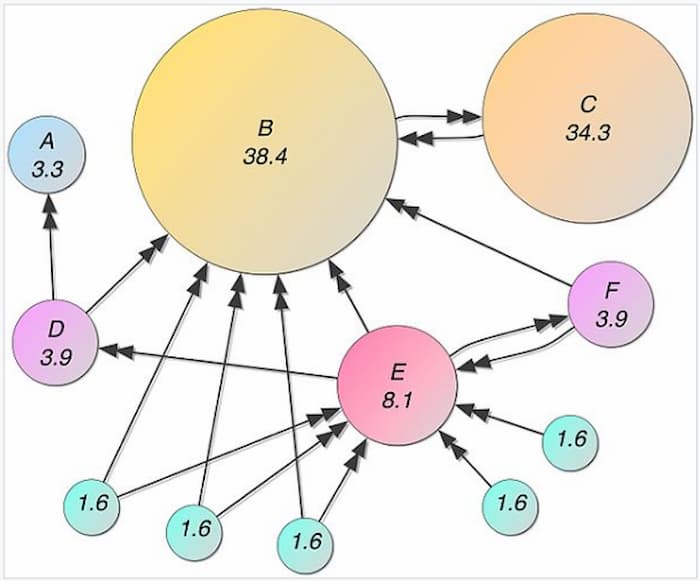
To perform an SEO competitive analysis PageRank is estimated using analytical tools

Therefore, links from websites that have accumulated a large number of backlinks from other websites with high volumes of backlinks (authority websites) will have the most impact on a website’s authority rating (or PageRank) and ranking ability.

How do you measure domain authority?

Google stopped publicly displaying PageRank in 2016 in an effort to reduce page sculpting tactics and rank manipulation. In the absence of PageRank, companies like Moz, Ahrefs and Majestic developed their own system for assigning authority.

Moz: Domain Authority and Page Authority (DA and PA)

Ahrefs: Domain Rating and URL rating (DR and UR)

Majestic: Trust Flow and Citation Flow (TF and CF)

Although none of these units of measurement is the exact formula Google uses to determine PageRank, they provide a gauge for determining the authority of a site. Each authority rating is based on the quality and quantity of the linking websites. Whichever form of measurement you use it’s wise to keep it consistance in an SEO competition analysis.

What’s the difference between domain authority and page authority?

Domain authority refers to the strength of the domain as a whole. It’s a measure of the total backlinks that are pointing to all of its pages.

Page authority refers to the strength of a page only. Page authority is derived from the backlinks that are pointing to it as well as the inherent authority passed on from the domain.

The advantage of high domain authority is its ability to rank. As a result, its pages will inherit a minimum amount of authority when they are published which means because of the authority the domain carries, the pages will not need as many backlinks (if any at all) to rank for a keyword it’s targeting.

Related reading: How to Make Your Site Appear First On Google

For example, brand new websites start with a DA of 1 (using Moz system of measuring domain authority). When it first publishes a page, it will need to acquire backlinks to compete with a website that has a DA of 50 since it’s newly published pages mostly likely start with a page authority with a DA between 20 or 30.

Websites with high domain authority rank for more keywords mainly because they have more backlinks.
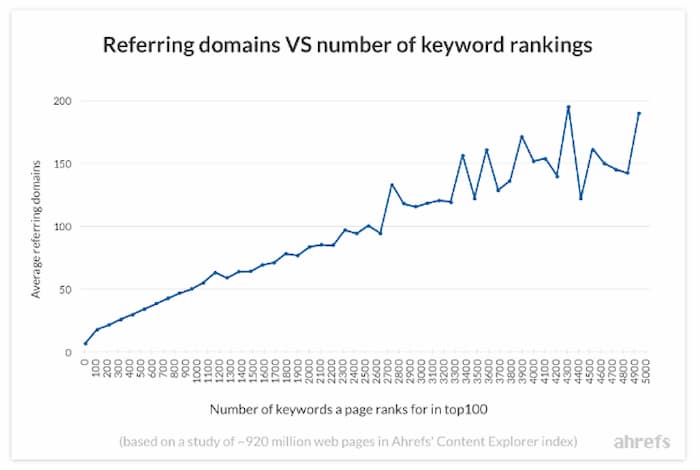
This chart shows the number of ranking keywords increases with the number of referring domains

Tools to compare domain authority

One of the most convenient ways to compare domain authority directly from the results page is to use a plugin that gives you a quick summary of the pages on the SERP. Each of the major analytic tool companies offers their own version but Mozbar seems to be among the most popular because they offer a free version that gives you the DA, PA and number of backlinks, which is exactly what you need to start your comparisons for your SEO competition analysis.

Use plugins for a high-level SERP assessment

Here is an example of how the SERP looks when using the Mozbar.
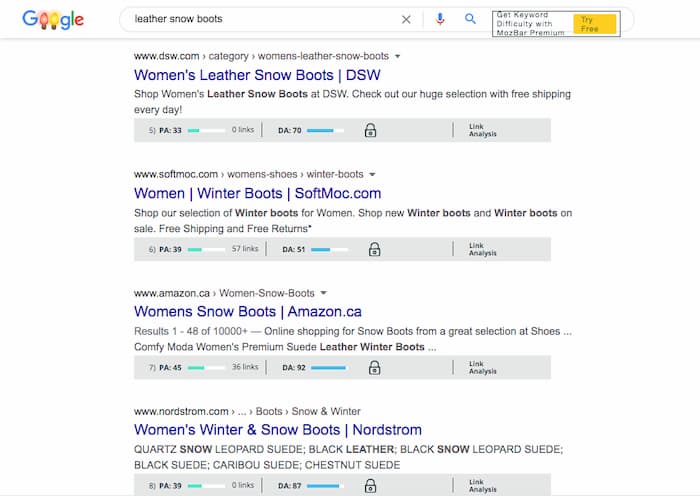
Example of Mozbar used in an analysis of the SERP

You can immediately get an idea of the domain authority, page authority and the number of backlinks for each website in the top 10 results. Of course, this is at a high level to give you an idea of whether you should look deeper into detail.

Ahrefs also provides a toolbar with more capabilities; however, you need to subscribe to their service to get the features.

If the websites on the SERP are comparable to your own, you can look at the top five domains individually to come to a greater understanding of what types of links are being used to rank the page. 

Backlink Analysis

Whenever you’re assessing a competitor’s backlink profile, you should take note of the referring domains, the types of links and the domain authority of the linking sites. You’re looking for possible opportunities to get these links yourself, while also trying to establish a strategy for your own link building campaign.

Referring domains

The number of referring domains is an important metric in your SEO competition analysis because it paints a clearer picture of the strength of the domain. In the situation where two domains have the same number of backlinks, the one that has more referring domains is going to have more authority (depending on the quality of the links of course). The website with less referring domains means they received multiple backlinks from one site in particular, which wouldn’t be as strong an indication of the popularity of the website.
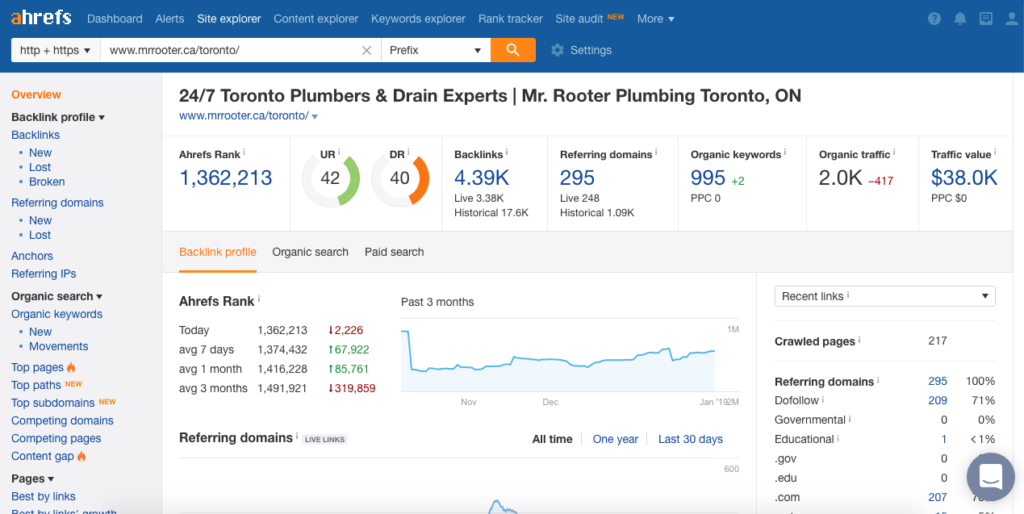
Image of Ahrefs dashboard to illustrate the number of referring domains.

Gauge the number of backlinks needed in your link building campaign

This aspect is important to note when assessing your competitors link profile. If there are a high number of referring domains, you’re going to need to build a prospect list that yields comparable numbers. Surpassing the number of referring domains can put your website out in front of the ranking.

Find likely linkers

Another aspect of comparing referring domains to the total number of backlinks is determining who are the websites most likely to link to your content. When there is a high number of backlinks compared to referring domains, it means there are websites linking more than once to your competition.

You may be able to reach out to websites that are linking multiple times to your competitor’s pages since you share the same topics. If they are enjoying your competitors’ content you can look up the pages that they’ve linked to and use the skyscraper method to publish something similar but better.

You would then reach out to the likely linkers and them about your improved version of content and ask them to give you a link.

Identify low-quality links

Although you never aim to use low-quality websites in your link building campaign it’s important to identify them during an SEO competition analysis to uncover opportunities. If you find that a page is ranking from a lot of low-quality links, you may be able to outrank it with just a few quality links.

Reverse engineering how your competition is maintaining their top ranking provides insight into how you strategize your SEO campaign.

Content gap analysis by keywords

One of the best ways to identify relevant content to rank a page is to find the keywords that a competing page ranks for that you don’t. In order for a page to rank for a keyword, it has to have content that satisfies the intent of the search.

 When you find unique keywords a competing page ranks for and you don’t it’s an opportunity to optimize for that term to improve your page’s ability to satisfy search intent. The additional content will not only add another keyword to rank for but create more relevance for your initial target keyword.

Traffic analysis

The traffic a website receives determines the success of generating leads and revenue. You can learn a lot about how a company generates revenue by analyzing both their organic and paid traffic.

Organic traffic

Organic traffic mainly comes from content that ranks, as well as direct searches for a business. Run a report on the non-branded terms that a website ranks for to see whether there are new opportunities for your website to rank.

You can run a keyword gap analysis on the top 5 domains you compete with in order to streamline this process. Most major analytic tools offer this option. Here’s a screenshot from SEMRush on their version.
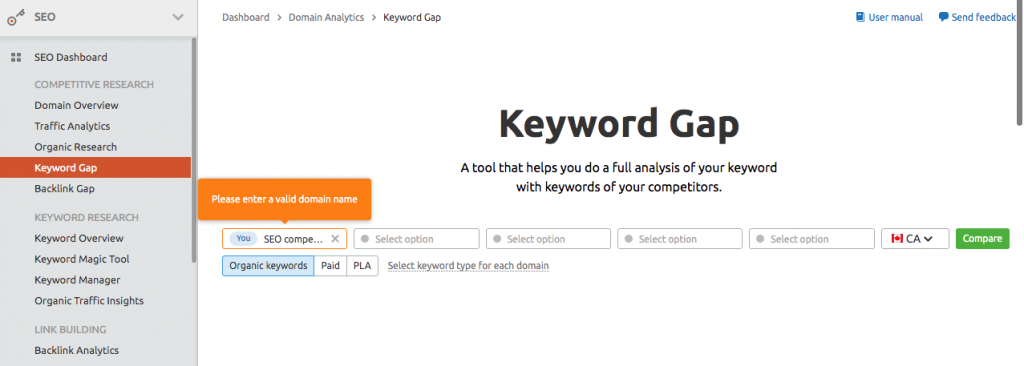
Learn how to perform a keyword gap analysis as part of your SEO competition analysis

Paid traffic

Here you will find some of the highest converting terms that you may not find from a regular keyword report. Look to see what keywords are in your competition’s paid traffic report because they are obviously making money on those keywords if they’re paying for every click to their website.

You may want to create a landing page optimized to target these terms as they’re usually transactional terms that users are typing into search engines. 

Sales script

One of the things to look out for is the way your competition is writing ads. If an ad is successful in attracting a high number of clicks, it most likely has wording that’s working to attract users’ attention. Promote a higher click-through rate by using similar phrases to generate a higher CTR.

Identify and duplicate content type

It’s advisable to follow the most predominant type of content that ranks on the first page of the search results. Remember that search engines place a high priority on a website’s ability to answer search intent. If there is a popular content type that populates the first page, it’s because search engines are favouring that format.

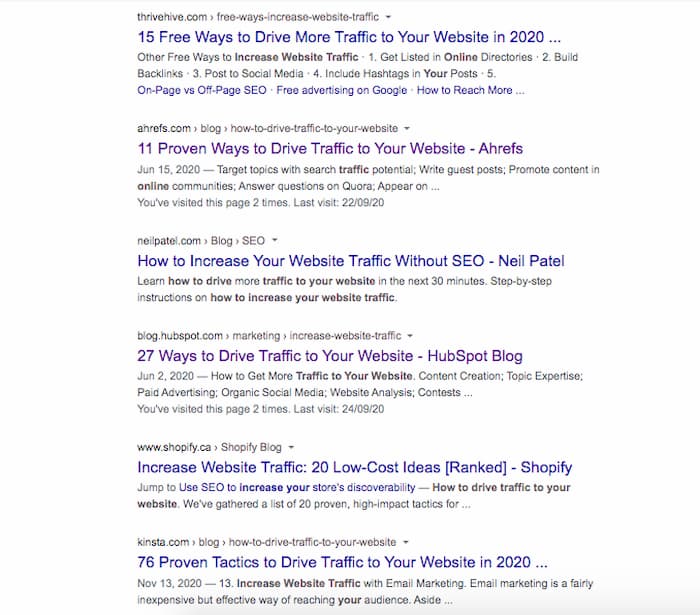
For example, if 5 of the top 10 results are list-styled forms of content, you would improve your page’s chance of ranking if you followed suit. If you search the term “How to drive traffic to your website” you would see that 8/10 pages are numbered lists. 
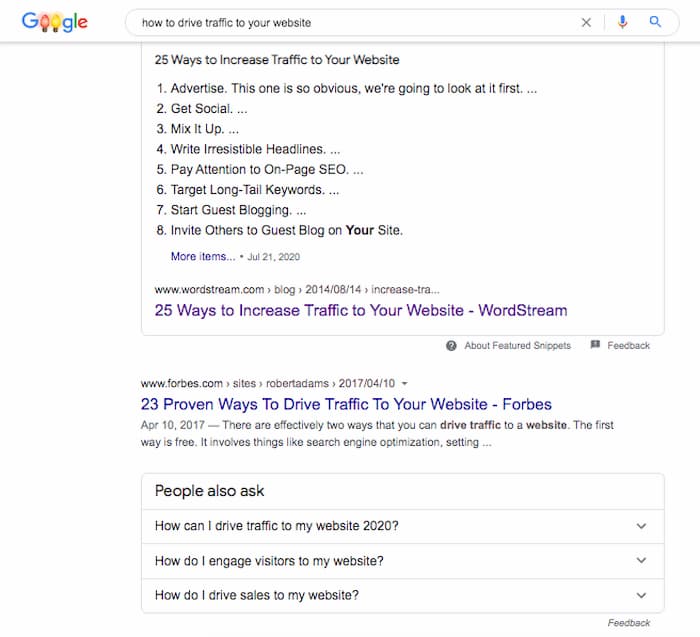
Example of list-styled content type identified during an SEO competitive analysis
More evidence of list-styled content found in an SEO competitor analysis

If you wanted to rank for this keyword, you would have the best chance at ranking by writing a list-style piece of content, like 33 Ways To Drive Traffic To Your Website.

Similarly, if you’re seeing guides or in-depth pieces of content being published, it’s a clue to the level of detail you need to commit to your content.

It’s next to impossible to rank a 300-word article when every page on the top 10 is over 3000. There’s obviously content being covered in a long-form article that would be impossible to cover in a few paragraphs.

Exceed the standard of quality set by an SEO competitive analysis

If you’re not familiar with 10X content, it basically is content that is 10 times better than anything else on the SERP. Aim to produce 10X content in every aspect of your website’s development to destroy your competition.

A strong analysis of your competition provides insight into how to overtake their positions. Follow the step outlined and you’re well on your way to enjoying the success top rankings bring to your business.

If you don’t have time and want to know how we would do it, give us a call or email us for a proposal. We provide a thorough competitive analysis as part of our SEO services for each of our clients.

Christian Carere
Christian Carere

Christian Carere is the owner and founder of Digital Ducats Inc. in Toronto and heads the SEO team at Austin Bryant Consulting in Plano, TX.  Christian has been published on publications such as Search Engine Watch, Venngage, Small Biz Daily, Grasshopper, Data Box, Socialnomics, and Mention.
old.digitalducats.com/

Written by Christian Carere · Categorized: Web development

Nov 27 2020

SEO KPIs To Benchmark Campaign Performance

Ultimately, the goal of every SEO campaign is to increase the revenue that a company receives from its website. Unfortunately, hitting that goal can take upwards of a year to see real results. Establishing SEO KPIs help you understand whether your SEO campaign is moving in the right direction.

There are several different aspects to tracking your website’s progress, but the most important metrics will be those that are in line with your website’s overarching goals. The following is a list of SEO KPIs that you can use to monitor your site’s performance and benchmark the progress of your SEO campaigns.

Organic traffic by source

The source of your traffic is an important SEO KPI because it’s necessary to know exactly where your traffic is coming from and what’s working to increase the volume of monthly visitors to your site. This can be traffic from social media, organic search, direct (when people enter your URL directly) or referral traffic (when users follow a link to your site).

The idea is to build the volume of your organic traffic up to tap into the largest source, Google search. You want the flow to come from users who are looking for businesses like yours. 

Measuring the increase in organic search volume gives you insight into improved SERP position on existing pages and/or an increased number of keywords ranking.

Best performing pages

You can identify the best-performing pages of your site by comparing the traffic that each page receives. This can be important information for guiding your decisions on what topics to build around as well as where you need to improve.

The best pages are typically the ones with the most traffic, although if you have high converting pages, it’s also another way of looking at which pages perform.

Go to behaviour, site content and all pages in Google Analytics. Here you can select the number of pages you want to be displayed and sort the results from largest to smallest volume of visitor’s traffic.

Conversions by source

This KPI is important to note because you want to see what pages are converting the most visitors to clients. To measure conversion, you need to set it up in your analytics.

Select how you want to classify a conversion by choosing the pages or buttons that need to be pushed to consider a conversion completed. For example, if you want to track sales, then you would need to assign the PAY button on your checkout page as a completed conversion.

You can also use contact forms, contact pages and click to call buttons as completed conversions.

Knowing which pages convert at the highest rate will also give you an idea of how to guide the traffic on your site. 

Build more internal links to the pages that convert the highest from the pages that receive the most volume to increase conversion rates.

Bounce rate

The bounce rate refers to the number of visitors that land on your site and leave without interacting further with your website. This is a measurement that’s usually associated with poor user experience, poor page speed, poor content and demonstrates low user engagement.

Lowering your bounce rate can be done by guiding users to more relevant pages within your website. Adding more internal links will immediately give visitors more options to choose from when they land on your page, rather than backing out of it.

Improving page speed is proven to reduce the bounce rate.

Faster page is a SEO KPI for improving conversions and click-through rate

Page speed

If you’re in the retail business this is an important KPI because it directly affects sales. Improving page speed for Amazon resulted in saving millions of dollars in abandoned checkouts.

The page speed of your page is an indication of the overall performance it has for providing a good user experience. The faster your page loads, the more you’re going to make from visitors staying on your site.

Average time per session

The length of time a user spends on your page is also a KPI for user engagement. If the dwell time on your pages is much longer than your competitors, it shows that you’re able to hold your audience’s attention and therefore have content that satisfies search intent.

In the same respect, if the dwell time on your page is shorter than the competing pages, you’ll need to consider updating pages to compete at a higher level.

If you’ve implemented a new content strategy and are updating pages on your site, then the length of time that visitors are spending can be an indication of the effectiveness of your campaign.

Click-through rate

Here is an important KPI to watch for since this is a measurement of the number of clicks your site receives based on the number of impressions your site generates in the search results. In other words, if you’re ranking for a keyword, whenever a search is made on Google using that keyword, it would count as an impression.

To improve the click-through rate, you need to improve your page’s position in the search results. For example, if you’re on the third or fourth page of Google, you may get thousands of impressions. However, your click through rate would be extremely low because barely anyone ever makes it past the first page of results.

When your goal is to improve the traffic your website receives, the click-through rate can be an indication of the progress you’re making in the SERPS.

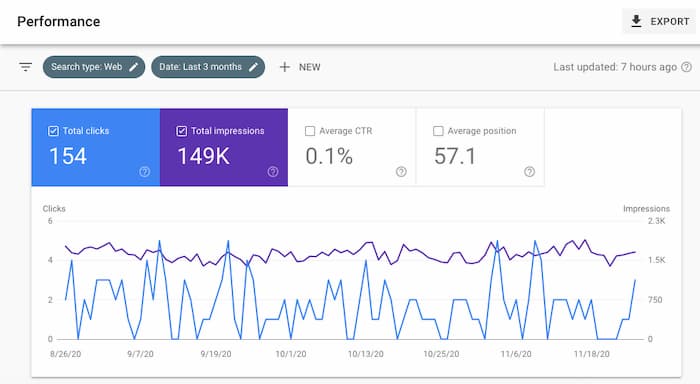
You can find your click-through rate in Google Search Console.

Click-through rate is one of the SEO KPIs that indicate improvement in SERP position

Referring domains

A measure of site popularity can be made from the number of websites that link to your content. This has been an established ranking factor that promotes more search visibility and improves SERP position (when the links are from quality, relevant websites).

If the goal is to improve authority and ranking ability, you can use the number of referring domains your website is accumulating as an SEO performance indicator. The more quality website you have linking to yours, the more ranking ability you develop.

Domain authority

The domain authority is an important SEO KPI because it indicates the strength of your backlink profile. If you’re engaged in a link building strategy, you want to see the domain authority gradually rise.

Of course, domain authority can be measured as DA by Moz, DR (domain rating) by Ahrefs, Trust and Citation Flow (TF and CF) by Majestic and SEMRush also has its rating system for measuring the strength of a URL.

Whichever system you use, stay consistent with it when comparing progress. Each company has its methods and formula, but at the end of the day, they are primarily based on the quality of backlinks your site had pointing to it.

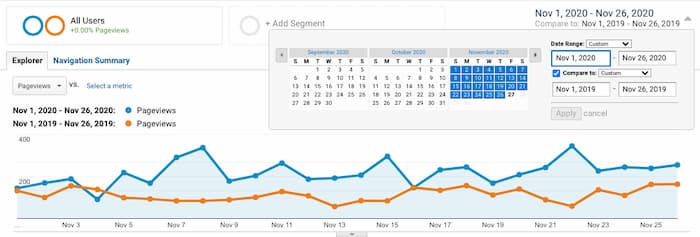
“Compare to” function

Using the compare to option on Analytics can help put things into perspective on how your site is performing based on specific periods.

Comparing the previous year’s data to the current year is good for avoiding seasonal or cyclical differences that may occur naturally in your industry.

For example, if you sell outdoor furniture in a country that has four seasons, your sales in each season will vary greatly. You can’t accurately compare traffic reports from spring to winter months because the winter months will naturally have a much lower search volume.

Comparing the current year vs. the previous year gives you an idea of how much your website has improved its performance. You can compare the data from previous years’ traffic, conversions, bouncer rates or any SEO KPIs relevant to your current SEO campaign.

Benchmark your progress with key performance indicators

It can be frustrating when you’re paying for results without seeing any. Establish the SEO KPIs that are most relevant to your SEO campaign to make things clearer on the different stages of the development of your website.

Knowing what to expect and when to expect it can make things much easier to manage and create more confidence in the plans you’ve set into motion. Without signs of progress, playing the long game can be extremely frustrating.

Give us a call to help develop an SEO strategy that will drive more traffic and increase the revenue your site generates regularly. We promise to have a set of SEO KPIs you can monitor throughout your website’s development.

Christian Carere
Christian Carere

Christian Carere is the owner and founder of Digital Ducats Inc. in Toronto and heads the SEO team at Austin Bryant Consulting in Plano, TX.  Christian has been published on publications such as Search Engine Watch, Venngage, Small Biz Daily, Grasshopper, Data Box, Socialnomics, and Mention.
old.digitalducats.com/

Written by Christian Carere · Categorized: Web development

Nov 12 2020

How To Perform An SEO Site Analysis

One of the first steps to improving the traffic your website generates is running an SEO site analysis. We’re not talking about an SEO audit that takes a few days where your analyst is digging up the body of Jimmy Hoffa, which is called a forensic SEO audit. The SEO site analysis you need will report the overall health status of your website in terms of performance, keywords, content and backlinks.

This is an important step in the process of ranking your website since a Google SEO audit can uncover issues that may affect future efforts to improve search visibility.

Can you imagine going through months of work on your keyword research and then publishing content and building links to find out that it all could have been avoided? If your pages are taking 30 seconds to load, it doesn’t matter how good your keywords, content or backlinks are-the page will never rank in a top position because it’s super slow.

There are often underlying issues on a website that drag down a website’s overall performance. By eliminating those issues before starting a campaign, you get a more accurate glimpse into your website’s current status.

Cleansing your site of these technical issues also gives you a better idea of the impact your efforts will have on developing your website.

If you’re wondering how to audit a website, the following is a collection of procedures we use here at Digital Ducats in order to get a clear picture of a client’s website status. Most of these tools you can use to check your SEO yourself as they all offer a free trial or version. 

Check for indexing issues

A major function of SEO is making sure that the pages of a website are actually listed on Google. If your pages are not being indexed it means you have absolutely no chance to appear for keywords because none of your pages are even being shown on Google’s index.

One of the simplest ways to see if your pages are indexed properly is to check in Google Search Console. If you haven’t registered your website in Google Search Console, you should stop reading and do this now.

I’ll wait.

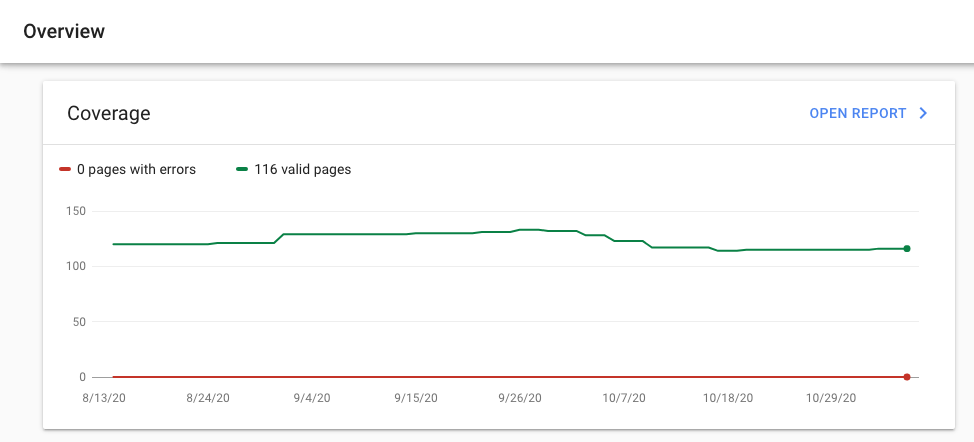
The reason this is so important is that the information about your website that’s found in the search console is equivalent to looking under the hood of a car. You can get loads of information about how your website is functioning and find important data-like in this case, how many pages are properly indexed.

Search console offers the number of pages indexed as part of your SEO site analysis

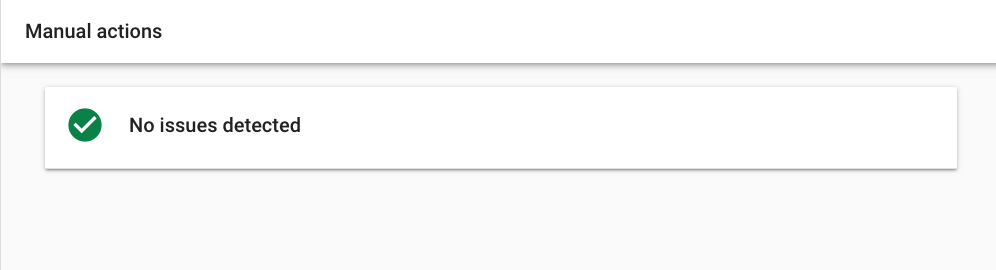
If your website were to receive a manual action (Google penalty) your pages would be removed from Google’s index. You would receive the notification of a manual action here in the search console.

Image of search console tab that shows there's no manual action that would affect my site from showing up on Google is part of your website audit

You can also check on your pages to make sure there are no errors being generated, but we’ll touch on that subject later in this article. The focus now is confirming you have indexed pages. There is also a quick way to do this with a Google “site search.”

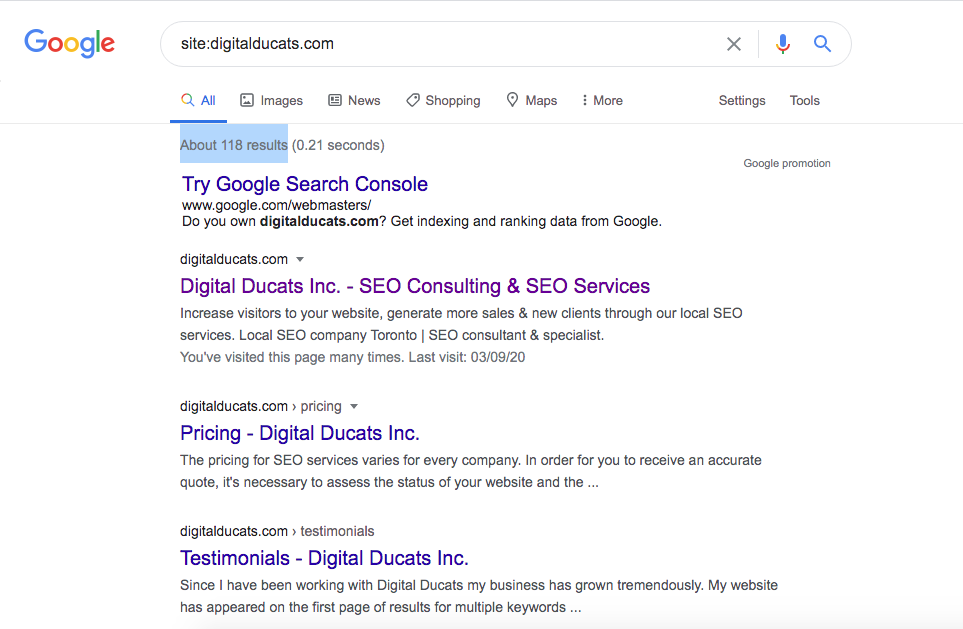
Type in the following: site:[yourdomain.com] to see how many results are produced in the search results. The number of results indicates how many pages of your site are indexed. This should match what you found in the search console.

Using a site search will generate the number of pages indexed on Google which is valuable insight for your SEO site analysis

If for any reason (after performing a site search for your domain)you don’t see your pages showing up that would indicate an indexing issue. This would mean you’re not anywhere on Google and you would need to dig deeper into finding out why. 

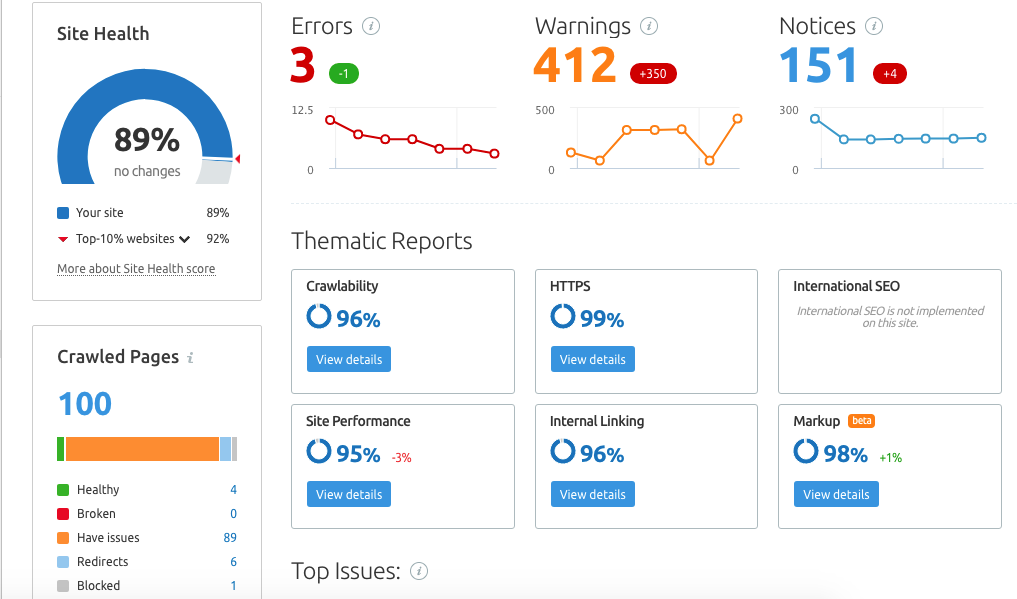
In this case, everything looks good but we’re going to crawl the site to make sure that Google’s data matches up with a third-party crawler. Use SEMRush, Moz or Ahrefs to get a full site analysis and report on your website’s overall health.

Website health check with third party crawler

The bonus to using software like SEMRush is that you have a lot of information available at your fingertips. Running a simple audit will report the issues that need repairing and report the number of pages that were crawled. Additionally, the report generates a list of sitewide status code errors (broken links, unavailable pages, etc) so you can easily find and fix each issue. 

As it turns out, there are 16 more pages on Google that SEMRush didn’t find. If we look deeper into that we can probably chalk it up to pages that were deleted and redirected as well as blog and category archives. 

SEMRush website audit summary

We can finally conclude there are no indexing issues.

Check my website SEO 

The report will also list whether there are other site errors that may or may not affect ranking. A large number of 404 (broken links) would be a problem that needs attention.

A broken link presents a problem because when a user clicks on a link and is taken to an error page, it’s considered to provide a poor user experience. 

So many ranking factors are based on the idea of promoting a more enjoyable user experience. Therefore, a bunch of broken links will drag down the overall quality of your user experience.

This can affect how search engines view your site and result in a drop in search visibility.

Other insights gained from the site audit include reporting problems with your structured data markup, internal linking, HTTPS status which results in a score for your overall site performance.

Test page speed

The time it takes your pages to load can impact the search visibility of your website. Let’s revisit that issue about user experience for a minute. Search engines want to display the BEST websites on their first page of search results. If users have to wait 30 seconds for your pages to load there are most certainly better options than yours.

In fact, the goal for every website should be to load the first contentful paint in 2 seconds or faster.

XXX

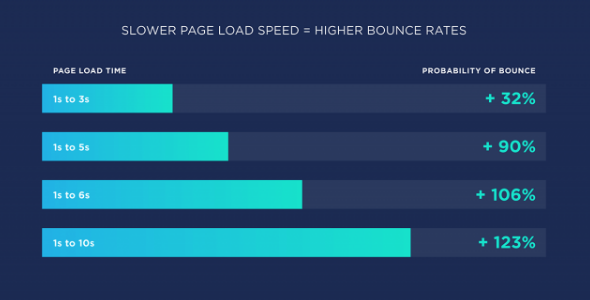
Any additional time your pages are taking to load will in fact cost you a big percentage of the visitors that land on your page. Here are the actual stats for the percentage of people that leave your site when it takes too long to load ( measured as the bounce rate).

Slow page speed will affect your SEO score

Despite the fact that search engines will drop your site if it’s excessively slow, you have to consider the actual number of people you’re losing to user experience. Page speed is an SEO issue that should constantly be tested and maintained.

You can check the page speed of your website by using any of the following tools:

  • Google PageSpeed Insights
  • GT Metrix
  • Pingdom

Every issue that’s slowing down your pages is listed in the report that’s generated once you run an URL through these tools. Unfortunately, the free tools often require you to run one page at a time. If you’re using a paid version you can get a report on the speed of each individual page in one shot.

Keyword rankings/Organic traffic generation

If you want to improve the quality of traffic your site generates, you need to know what keywords are generating its current organic traffic. An organic keywords report will show you the pages that currently hold positions in the top 100 search results.

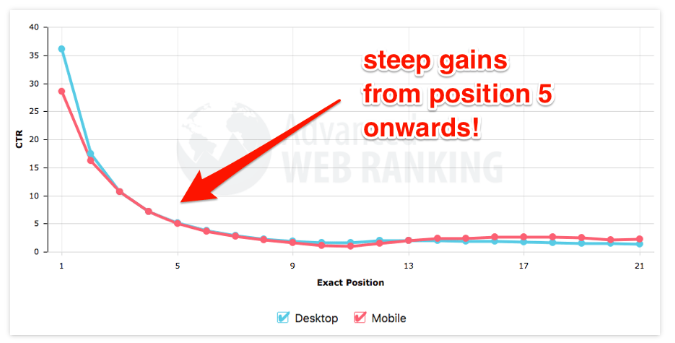
Identifying the keywords that are ranking will give you an idea of how to focus your optimization efforts. If your site ranks in the top 5 for a high volume keyword, every spot you move up towards the top position means a massive increase in traffic.

Check for current keyword rankings as part of an SEO website audit

By identifying the current rankings you can prioritize efforts on the keywords that will make the most impact for both short-term wins and long-term goals.

Compare keywords with competing websites

In order to get a more accurate glimpse into the niche in which you compete, use the URLs of the top ranking websites in your industry. You can either search for your top keyword and use the URLs of the website that appear in the top 5 positions.

By discovering unique keywords your competition ranks for in which your website does not, you can get an idea of any gaps in content your site has compared to theirs. The logic behind this analysis is that if your competition is ranking for keywords that are also important to your business, there is either content or backlinks that are getting them that keyword ranking.

Many tools offer a content gap analysis function to make it easy to highlight the unique keywords your competition ranks for, rather than slugging it out in an excel spreadsheet.

Review general on-page optimization factors

Sometimes the simplest answers are the most effective. You can check for simple on-page optimization errors to see whether there are some quick wins available that would change the keyword target for each page.

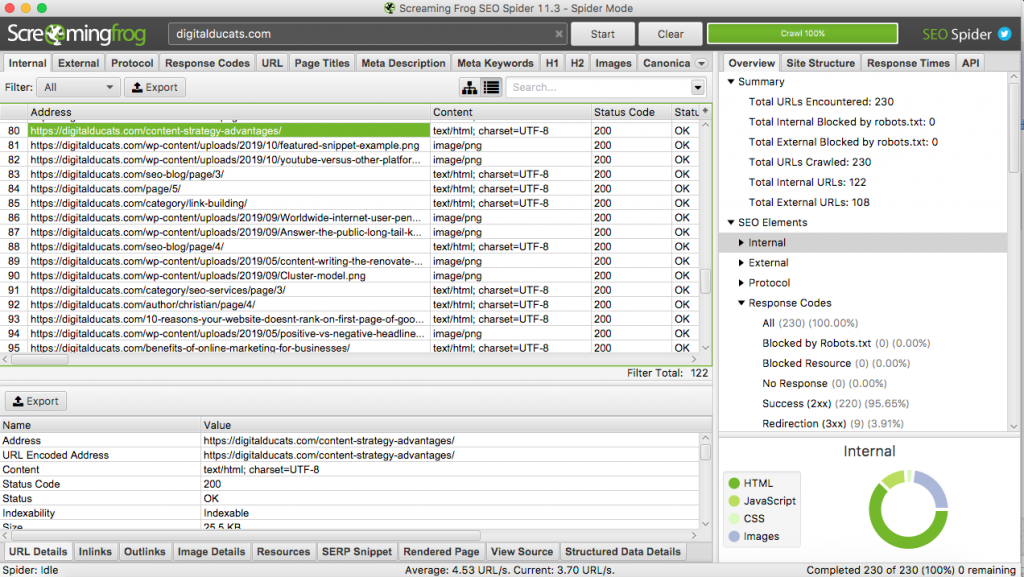
Screaming Frog reports any missing or duplicate metadata so you can have a quick list of items to go in and fix.

Screenshot of screaming frog running a crawl report in an SEO audit

You can also get this information from SEMRush and similar software.

Topical organization

The topical organization of a website can be an asset/strategy for improving your search visibility. By structuring your website in an easy to understand format, you can highlight the most important categories, services and products on your website.

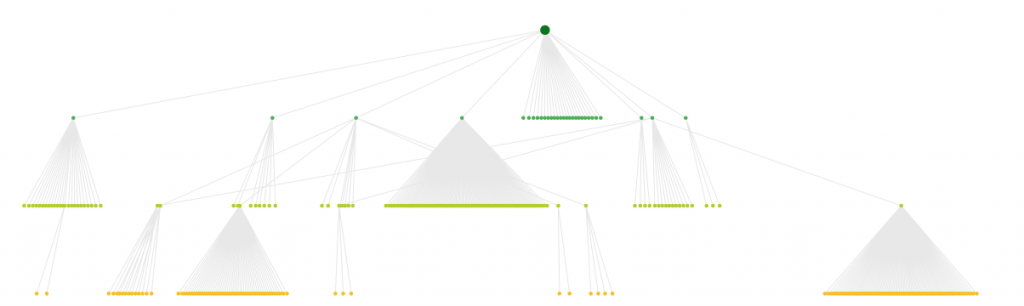
Sitebulb is software that generates a visual image of your website’s topical organization. This can be extremely beneficial for understanding where there are any inconsistencies, orphaned pages or lack of organization.

Example of data visualized to illustrate topical organization in your SEO site analysis

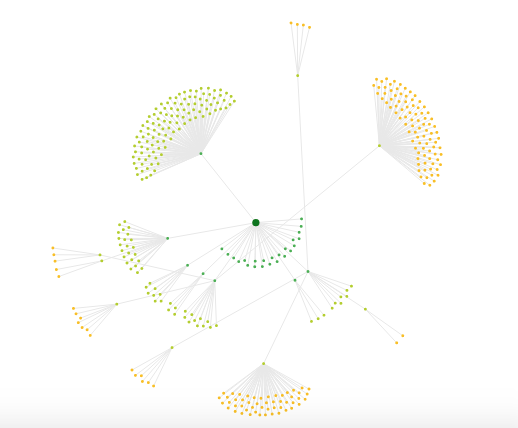
Using the radial view makes it easier to see whether the pages on your site are within 4 clicks of the homepage.

This radial view of pages makes it easy to see how far pages are from the homepage in your SEO audit

The topical organization of your site will often reflect the quality of your internal links. It’s best practice to link related content to cluster your topics. Pillar pages are those that are most linked to and serve as a hub of information between clustered content.

Pillar pages also end up ranking for competitive phrases and a larger number of keywords because they cover a wide range of subtopics within a keyword theme. The topical organization of your site can change the depth and level of expertise that is assigned to a website, creating more ranking ability from increased authority.

Backlink audit

Link building has seen quite a few drastic changes over the course of time. There have been so many link manipulation filters baked into the search algorithm that auditing your backlinks are a necessary part of identifying any causes that would decrease search visibility.

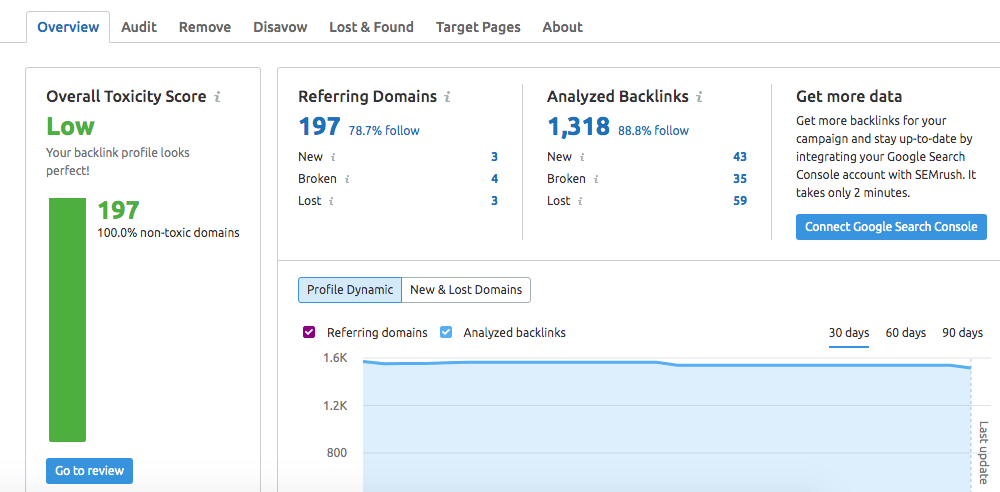
Running a backlink report will list all of the links that are attached to your domain both the homepage and inner pages. Here’s a report from SEMRush that lists the link toxicity of a domain.

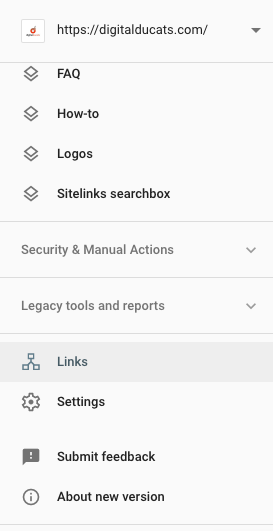
You can also pull up your links on Google search console, however, they report that they only list a sample of links. You may not see every backlink listed on their report.

Ahrefs seems to be the best at detecting backlinks. Their crawl rate is higher than any other software so they seem to have the freshest and most accurate reports on backlinks.

A backlink audit is simply looking for any low-quality links that would adversely affect ranking. The typical characteristics of a low-quality backlink the following:

  • Low domain authority
  • Little to no backlinks
  • Unrelated to your content
  • Unrelated to the theme of your website
  • Advertises paid options

Toxic links will affect your search visibility but you have to also factor in poor link building practices. Google’s stance on link building is essential that it should not be manipulated for the purpose of improving ranking.

This covers a wide range of practices that can be used to influence the optimization and authority of a website. Evidence of poor link building that can result in a loss of search visibility are:

Excessively repeated anchor text

  • Excessive linking from one website
  • The primary source of links come from one method of link building
  • Lack of variation in anchors 
  • Lack of variety of link type
  • Anything that looks fabricated or automated

If your website has been exposed for participating in what Google has deemed a “link scheme” or your website has too many low-quality links, your website will most likely be suffering an algorithmic filter penalty.

Google has historically come out with many different updates that specifically target the different forms of content and link manipulation. If the algorithm detects any type of suspicious links or link building your site is automatically pushed down in the search results. When you reverse what you’ve done, your rankings will return to where it was previously.

For this reason, a backlink audit becomes absolutely necessary before starting any type of SEO campaign or strategy. Many sites have been able to improve traffic exponentially by lifting an algorithmic penalty that was imposed due to poor link building.

Perform an SEO website audit periodically

It’s best practice to periodically check on the health of your website. Changes happen all the time as links are lost and added and content is published and deleted. It’s important to know what your site’s status is at all times to prevent any losses in search visibility.

Start every SEO campaign with an SEO audit to ensure your efforts are accurate and don’t end up in vain. The more information you have about the inner workings of your website, the more impact you have on increasing traffic and lead generation.

Christian Carere
Christian Carere

Christian Carere is the owner and founder of Digital Ducats Inc. in Toronto and heads the SEO team at Austin Bryant Consulting in Plano, TX.  Christian has been published on publications such as Search Engine Watch, Venngage, Small Biz Daily, Grasshopper, Data Box, Socialnomics, and Mention.
old.digitalducats.com/

Written by Christian Carere · Categorized: Web development

Nov 11 2020

Why Doesn’t My Site Show Up On Google?

There could be a number of reasons your site doesn’t show up on Google. Identifying the cause could mean increasing your revenue by thousands of dollars periodically. Here we’re offering you a systematic approach to isolating the problem and applying the correct solution to win you a spot on the first page of Google.

Find the reason(s) why your website doesn’t show up on Google and you will have identified the strategy to take over the top positions for important keywords to your business.

  1. Failure to answer search intent
  2. Your keyword is too difficult
  3. You’re keyword stuffing
  4. You haven’t optimized your meta tags
  5. Too many poor-quality links
  6. Your website lacks credibility and authority
  7. Your website has thin content
  8. Your pages are orphaned
  9. You’ve received a manual penalty
  10. Your pages are super slow
  11. Poor user engagement
  12. There’s been a Google update
  13. There’s a Google glitch
  14. Poor choice of anchor text links
  15. Too early to rank

#1-Failure to answer search intent

One of the first considerations (for why your site doesn’t show up on Google) is whether your content completely satisfies the user’s intent for the search. Search intent is a crucial issue because it’s the underlying mandate for a search engine to determine the best response to a search query. Your content needs to satisfy exactly what the user is searching for when they type in a specific keyword. 

Satisfying search intent is more than just coming up with your version of content you believe users are looking for when they type in a keyword. It also has to do with what search engines see as the best type of content that answers search intent. 

It’s true, there’s a possibility you may be in sync with what users are looking for, but if your pages aren’t ranking you need to look to the top ranking sites to see how they’re satisfying intent.

First clues are in the titles and headlines you see in the SERP. Do the titles indicate a predominant style of content that’s appearing as top results? How many are ultimate guides? How many are “Best-of” lists that provide a user with options?

Pinpoint the way the top ranking pages are satisfying intent and make sure your content covers every aspect and more in the topics that are covered.

Publish content that is 10 times better than what already exists. The skyscraper method has proven to be one of the most effective strategies for outranking and outperforming pages that compete for similar keywords.

#2-Your keyword is too difficult

Many business owners make the mistake of attempting to rank for a keyword without checking the level of difficulty of the keyword. If your website is in its early stages of development, there may be search terms that are not realistic and should be avoided for less competitive options.

Assess the average domain authority

The difficulty of a keyword can be assessed by reviewing the average domain authority held by the competing websites. Domain authority is a form of measuring the ranking ability a domain has that is based on the quantity and quality of links it has accumulated.

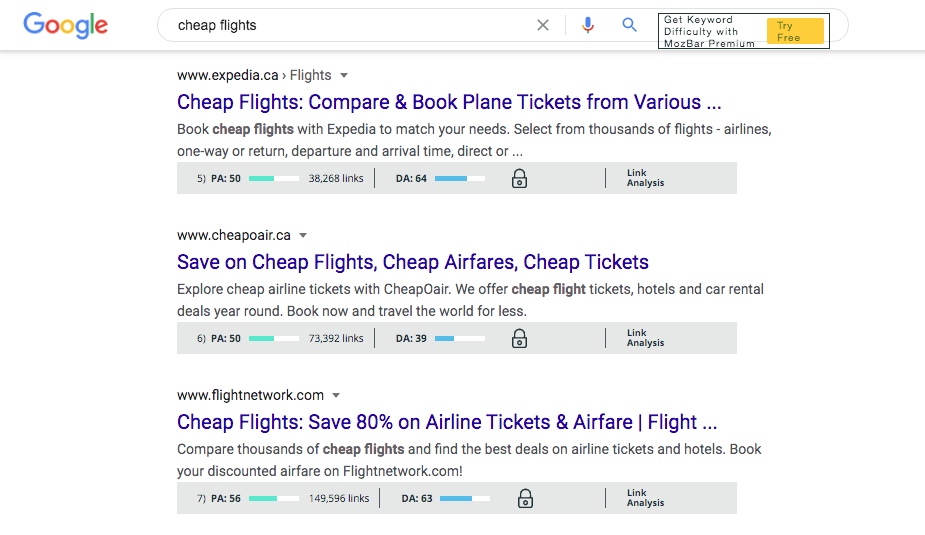
Example of why doesn't my site show up on Google when its up against high authority websites with thousands of backlinks

Suppose you were attempting to rank for the search term cheap flights. Your website would be competing with giant authority domains like Expedia and The Flight Network. These websites have been around for years accumulating thousands of backlinks and are considered trusted brands in the industry.

It wouldn’t be realistic to target a keyword that is so competitive without having some sort of competitive advantage that puts you on an even playing field. 

Get an idea of the average backlinks pointing to the ranking pages

Search engines don’t rank websites, they rank pages. When you assess the first page of search results, take into account the number of backlinks pointing to each of the ranking pages.

A common trend is that the more domain authority a website has, the fewer links they need to rank its pages. You can use backlinks to increase the page authority of your site in order to compete with domains with greater authority (see image above where Cheapo air has double the backlinks but equal page authority as its competition).

If a website has a similar domain authority to yours, you may be able to beat them by acquiring better backlinks.

You can use Moz to find the backlinks that any given website has pointing to their pages. Make a judgement call on whether it’s realistic to attain the same or more quality links to your page.

Make sure your content meets and exceeds search intent

Even with equal links and domain authority, your content needs to measure up to what’s out there. Make sure your page is able to compete with the competition in the depth of coverage, UX and overall quality.

#3-You’re keyword stuffing

If you repeat a keyword in excess throughout the body of content, it may the reason why your (site doesn’t show up on Google. This is called keyword stuffing and will land you an algorithmic penalty see the Panda update) that prevents your website from ranking highly.

Check to see how many times your keyword is repeated within the body tags of your page (doesn’t include title or URL). Keep your keyword ratio below 2% to avoid over-optimization. If you’ve optimized your meta tags, an exact match keyword need only be sprinkled a few times naturally throughout your content.

#4-You haven’t optimized your meta tags

Place your keyword in the most important parts of the page that search engines use to determine the most important keywords for your page. 

Include your target keyword in the title, URL a few times within the body of text as well as in the alt tags of any images on your page.

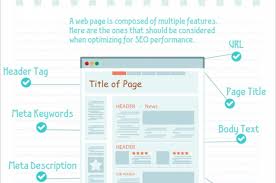
example of on-page optimization where the lack of it answers the question: Why doesn't my site show up on Google?

Use keyword variations in your subtitles and throughout your content to provide more contextual relevance.

#5-There are too many poor quality links

If you have too many poor quality links search engines may devalue the authority of your domain. A low quality link are backlinks that:

  • Have no strong relationship to your content.
  • Are considered easy to get, such as directory links, profile links, links from forums.
  • Have no backlinks itself.
  • Have low domain authority.
  • Have been penalized

The Penguin update changed how Google assesses link quality and could be the reason why your site doesn’t show up on Google.

#6-Your website lacks credibility and authority

One of the major reasons to acquire backlinks is to build the authority and credibility of your content. Backlinks are a major indication of the popularity of your website.

A backlink represents one website vouching for the content, products or services of another. The accumulation of backlinks therefore builds credibility in terms of many instances of websites vouching for your content.

If your website doesn’t have enough quality referring domains, your credibility for publishing trustworthy content is considered low since there’s no real proof or evidence to say otherwise.

Editorial links from high authority websites that are in the same field of expertise are among the best types of links you can receive. You can build credibility much quicker with much fewer links from sites like these than from low authority websites.

#7-Your website has thin content

Websites that have very little content on their site tend to rank poorly. Without content, it’s hard to get pages to surface at the top of search results for keywords. 

Search engines categorize and compare websites to one another in the same niche. 

Compare a website with 520 pages of content vs. your website with 3 blog posts. Which one would be more capable of satisfying search intent? Which website appears more trustworthy as an expert in its field?

It’s publicly known that Google reviews specific websites manually to score them on the E.A.T. principles. Expertise, Authority and Trust play an important role in being able to present the top results of a query to users.

There’s some speculation that EAT is baked into the algorithm to an extent already although no one can say for sure. What we do know from documented evidence is that websites that have libraries of relevant content will more often than not outrank websites with thin content.

#8-Your pages are orphaned

Search engines find and index new pages that are submitted in a sitemap or when they crawl websites and discover new pages by following links. If there are no inbound links (internal or external) pointing to your page and it’s not in the sitemap, your page is considered to be orphaned.

Every page on a site should be connected in some way. Ideally there should be a way to get to any page on your website within four clicks. Sitebulb provides a visual way to see how your website is linked through a directory radial such as this: 

In order to make sure your pages are indexed, they should be included in a fresh sitemap and submitted to Google. Use Google search console to submit new sitemaps as a way of telling Google to index new pages.

It’s best practice to link to new pages you publish in order to connect related content, spread link equity and improve your website’s internal click-through rate. This also allows your pages to be found and indexed faster than waiting for Google to process your sitemap.

If you already have links pointing to those pages, make sure they aren’t marked as nofollow. The nofollow attribute will tell search engines to ignore the link and withhold any transfer in authority that a followed link would give that page.

#9-You’ve received a manual penalty

There are two types of penalties that are commonly referred to; Manual actions and algorithmic penalties. The second, algorithmic penalties are really not penalties per se and are actually just filters baked into the algorithm that can be reversed when you’ve isolated the cause. Manual actions, however, are more severe and usually result in your website being removed from the index.

Image of search console tab that shows there's no manual action that would affect my site from showing up on Google

You can check Google search console specifically to see if any manual actions have been given to your domain. If you received one, you will have specific instructions from Google on why you got it and how to correct the issue.

#10-Your pages are super slow

It’s been years already since Google publicly announced that page speed is an official ranking factor that can affect the search visibility of your website. If your pages are taking too long to load, no one will want to stay on your pages and as a result Google drops your website in ranking.

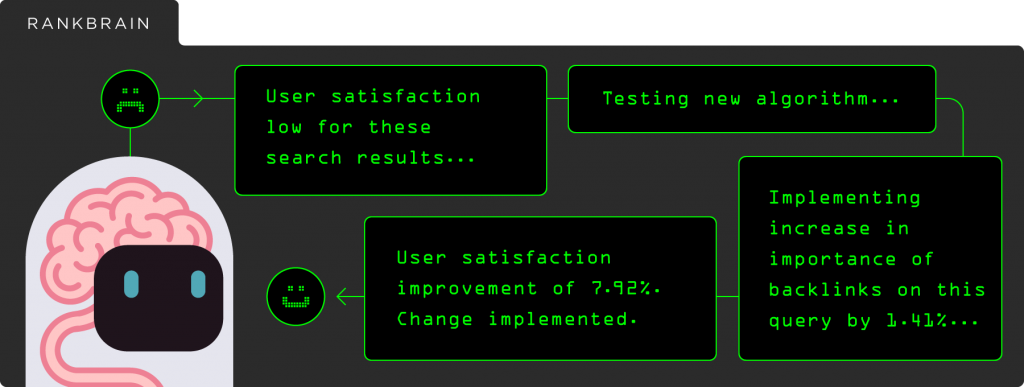
Rankbrain, Google’s AI that facilitates ranking, measures this user engagement statistic as part of the overall placement of your website. If most of the people landing on your page are backing off of your site immediately, your website is demonstrating signs of a poor user experience and low engagement. That signals Rankbrain to boot your site down in ranking.

Rankbrain is a major reason why your site doesn't show up on Google
Image source: Backlinko.com

You can test your page speed using GTMetrix.com to see if your page clocks in under the recommended time of 2 seconds to the first contentful paint.

Almost every page speed tool generates a report on the elements that are blocking your site from loading quickly. Improving your page speed becomes a matter of being able to execute the corrections that are listed in your report.

#11-Poor user engagement

User engagement is a growing factor in the ranking algorithm. Your site is always being compared to other websites (especially if it’s on the first page of results) to see how users are reacting to your content. If the user engagement on your website underperforms in comparison to the competition, your site will continue to slide down and off of the first page of search results.

Poor user engagement is indicated by the bounce rate, dwell time, pages visited per session and the expected click-through rate vs. actual click-through rate.

You can improve all user engagement stats by adding internal links, increasing page speed, adding images and features that would entice visitors deeper into your website.

Adding a video is a proven way to increase the length of time that visitors spend on your website.

Improving your headlines, meta-descriptions and adding structured data markup for rich results are also a way to improve the number of clicks that users are making to your site from the SERP. By making your search listing more attractive your page receives more attention, resulting in more clicks to your site.

Improving the overall user experience will increase the user engagement statistics your website generates and drive up your keyword ranking.

#12-There’s been a Google update

In the past, Google updates have turned the entire internet upside down. If Google implements a major update that changes how they rank websites, you could be looking at an algorithmic filter keeping you off of the first page of search results.

Updates like Panda represented major changes to how Google was assessing on-page content. Any website that was caught keyword stuffing was instantly penalized algorithmically and lost search visibility from its current rank.

Penguin changed how Google viewed high quality backlinks vs. low quality backlinks. Entire businesses were lost overnight when Penguin first hit the internet.

Avoid any drastic changes to your websites ranking by following Google’s best practice guidelines. If you’re not engaged in any blackhat tactics that violate these rules, you won’t be at risk to massive changes when an update kicks in.

#13-There’s a glitch in the matrix (Google of course!)

It’s been reported that Google updates the algorithm multiple times on a daily basis. Google is constantly adjusting the way its search engine is running. Just because they have a stranglehold on the search engine market doesn’t make them impervious to mistakes or glitches.

There are many moments throughout the year where rankings get completely shuffled for a period of time. In most instances the shift in rankings don’t last more than a day or two before returning to normal.

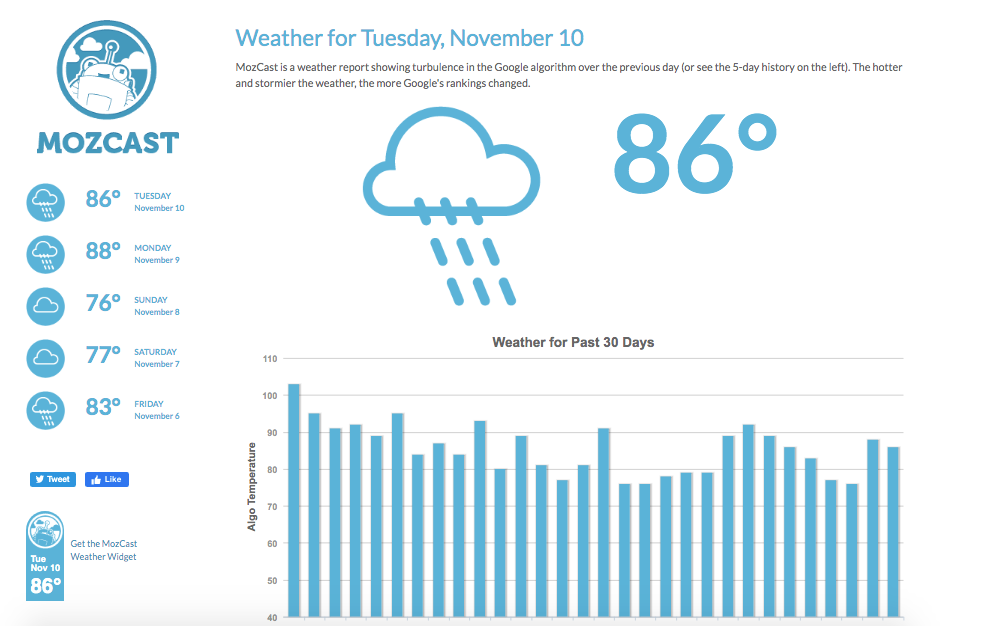
For more clarity on what’s happening in terms of changes in ranking, you can check out Mozcast. The tool tracks a large cross section of websites and bases its score on their fluctuation in rank. The measurement ranges from 1-100, where 100 is extremely volatile and 1 is absolutely no changes.

Image of Mozcast, which shows the reading at 86° for Nov 10. Not quite a potential reason why my website doesn't show up on Google

Nothing can prevent glitches from happening; you just need to ride them out. Eventually order is restored so before you go sounding alarms, check out the Mozcast to see if the entire internet is getting a shakedown.

#14-Poor choice of anchor text links

The anchor text you use when pointing links to your website can have a large impact on your search visibility and be a reason why your site doesn’t show up on Google. Too much of one type of anchor text can lead to over-optimization. Not enough descriptive anchor text and you come up short on properly optimizing your page.

Keep in mind that Google wants to see links build naturally. The Panda update is essentially a filter baked into the algorithm that corrects the excessive use of anchor text links with a drop in search visibility.

Although internal links may not have as much impact as external links, you should still be aware of the anchor text you use to link internal pages. Vary your anchor text links and avoid using too much of any one keyword.

For more guidance on how to structure your anchor text link ratios, it’s always a good idea to see how the top-ranking pages have done it. Learn how to use anchor text links to enhance the ranking power your pages have rather than hinder them.

#15-You’re being too impatient

Just because you publish an article and stick a link on it doesn’t mean it will blaze its way to the top of the search results. Give your links and content a little time to be crawled, indexed and climb its way up in ranking.

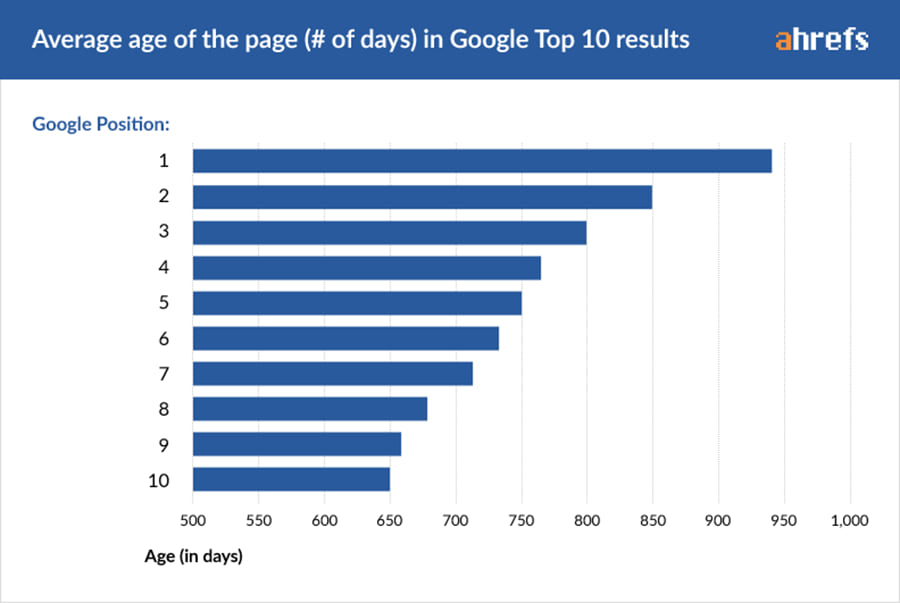
A study was done on the number of pages that rank on the first page and the results showed that it’s difficult for pages to rank on the first page in less than a year.

Ahrefs chart on the average number of days to show up in each position on the first page of Google. You asked why doesn't my site show up on Google and impatience may be your answer

Of course, there’s an exception to every rule. Low competition keywords can rank in as little as a few weeks if you have all the right pieces aligned.

The point is to have realistic expectations for where you’re currently ranking and where you should be ranking in the search results. If you’re not there yet, check yourself before you wreck yourself. You might not have given your work enough time to blossom, which is why your site doesn’t show up on Google.

Related reading: Benefits of Online Marketing For Businesses

Christian Carere
Christian Carere

Christian Carere is the owner and founder of Digital Ducats Inc. in Toronto and heads the SEO team at Austin Bryant Consulting in Plano, TX.  Christian has been published on publications such as Search Engine Watch, Venngage, Small Biz Daily, Grasshopper, Data Box, Socialnomics, and Mention.
old.digitalducats.com/

Written by Christian Carere · Categorized: Web development

Nov 09 2020

The Advantages Of An Internal Link Building Strategy

Every website needs a link building strategy. Most people who are familiar with link building will immediately think of external links and the many link building tactics that have become the norm for acquiring backlinks. The truth is you need an internal link building strategy in order to capitalize on the many benefits it provides to your website.

What are internal links?

An internal link is the hypertext link between two pages located on the same domain. They provide contextual meaning through descriptive anchor text and lead visitors to related content.

Example of internal link structure with three pillars and interlinked content

Internal links provide link equity by passing on page authority.  Like any other link, topical relevance is a big component for providing a quality internal link.

For example, the relationship between a web page about dog training that links to a page on dog tricks is obvious. They are topically relevant and therefore the traffic that travels between pages is likely to be engaged with the content on both sides of the link.

Good things happen when you have a strong internal link structure. Increase the optimization of your pages by linking pages that compliment each other with relevant topics.

Enhance your pages optimization

The link target becomes more optimized through descriptive anchor text. It’s recommended to avoid exact match anchor text in excess and to avoid using the same anchor text to the same page. 

Over-optimization is a risk you can avoid by using long-tail descriptive anchor text.

The linking page also enhances its optimization by showing a direct relationship to related content. Search engines don’t rank based on keywords anymore, but based on keyword topics.

When your page demonstrates stronger depth in the keyword topic you’re covering, you gain more credibility for covering a keyword topic in breadth.

Google discovers new pages by following links

When a search engine crawls your website, they find and index new pages by following links. You can index new pages on your site much faster by providing a link to its page from existing content.

Without linking to your content, the only other way for a search engine to find the page is to have it listed in your sitemap.

When a page has no internal or external links and is not listed on the sitemap it’s considered an orphaned page since it has no way of being discovered.

For websites with a high number of pages, an internal link building becomes a necessary part of getting your pages indexed since there is a limit to the crawl budgets Google assigns to your website.

Increases user engagement statistics

As you may or may not know, the user engagement statistics your website generates are used as a way of determining whether users are enjoying your site and whether it answers the user’s intent.

Increased Dwell time

For instance, the time that the average visitor spends on your website can tell search engines whether users are engaging with your content. Google uses Rankbrain specifically for this aspect. 

If your site has an average time of 5 minutes while the competing websites are at one minute, your website is going to move up in rank. It becomes obvious that users are finding your content useful and worthwhile checking out.

Improve the dwell time of your website by linking to as many related articles and pages within your content. It needs to be related to each other of course so that people can explore other related topics that will capture their attention.

Internal links improve time on site, reduce bounce rate and increase the number of pages visited per session

Improved click-through rate

The internal click-through rate on your site is also a user engagement statistic. The average number of pages visited per session is the name of the official column you can look in to see this metric on Google Analytics. If your site demonstrates a high value in this area, it means visitors are clicking through to additional content because they’re interested in what they’re finding.

Decreased bounce rate

The bounce rate is the percentage of people that immediately back out of your page after landing on it. A higher bounce rate means that fewer people stay on your site and click through to internal pages. The lower your bounce rate the more visitors are staying on your page and engaging with your content.

Although high bounce rates can indicate that visitors are either not liking your content, they can also result from a lack of internal links that leave a user with no way to move further into your website. By adding internal links you provide another path to access more pages within your website. The addition of internal links therefore reduces the bounce rate.

Internal links can generate more conversions

A lot of good things happen when you’ve implemented an effective internal link building strategy properly. The increased click-through rate and increased dwell time contribute to getting more content in front of your visitors. This leads to more confidence in your brand and ultimately more conversions.

The links you place in your content should lead visitors towards a conversion goal you’ve set for your website. Set up your goals in analytics to track how well your website is accomplishing this task.

Whether your goal is to get a phone call, contact form, sign up for a newsletter or purchase your product, you can set it up in Analytics. 

Use internal links to lead visitors to high converting pages and contact forms throughout your content.

Internal links build authority in a keyword topic

Use your internal links to create topic clusters. A topic cluster is composed of a pillar page, which is the main keyword topic. The pillar page will cover a keyword topic in breadth but not depth. Rather than go into detail it will link to smaller articles that have a narrow focus on a smaller subtopic but dive into greater detail. 

Topic cluster content structure is the perfect model for your internal link building strategy

The smaller articles should link to each other where it’s appropriate, and all of them will link to the pillar page. The pillar page links to the smaller articles, which creates the topic cluster model.

Technically, the pillar page accumulates authority because of the number of links pointing to it from the cluster content. This establishes the keyword topic as a pillar of your website which helps your website show up for more keyword related searches.

Use internal links to increase the user experience

At the root of all ranking factors lies user experience. Implement an internal link building strategy to create more entry points to your pages and allow users to explore more related topics that interest them.

Link to topically relevant pages to create topic clusters while improving the user experience. The additional effort you provide in establishing our website in your major keyword topic will pay off in dividends.

User engagement is a powerful ally to have in your corner, so keep your users happy by offering links to more content they’ll love and you’re guaranteed to enjoy more success in the search results.

Christian Carere
Christian Carere

Christian Carere is the owner and founder of Digital Ducats Inc. in Toronto and heads the SEO team at Austin Bryant Consulting in Plano, TX.  Christian has been published on publications such as Search Engine Watch, Venngage, Small Biz Daily, Grasshopper, Data Box, Socialnomics, and Mention.
old.digitalducats.com/

Written by Christian Carere · Categorized: Link building, On-page optimization, Web development

  • « Go to Previous Page
  • Go to page 1
  • Interim pages omitted …
  • Go to page 5
  • Go to page 6
  • Go to page 7
  • Go to page 8
  • Go to page 9
  • Interim pages omitted …
  • Go to page 14
  • Go to Next Page »

Footer

Need professional SEO advice?

Give us a call to learn more about how we can help your business

Call for a consultation Request a proposal

Request a free website analysis and proposal for your company by filling out the ” Request a Proposal” form.

  • Privacy Policy
  • Terms Of Service
  • Cities we’ve served

© 2026 · Digital Ducats Inc.