• Skip to main content
  • Skip to footer

Digital Ducats Inc.

SEO Consulting & Services

  • Home
  • About
    • SEO Consulting
  • Services
    • SEO
    • Local SEO
  • Contact
    • Pricing
    • Write For Us
  • Blog
You are here: Home / Archives for Web development

Web development

Nov 04 2020

Why Web Design & SEO Are Inseparable

Web design and SEO are inseparable. Without a website, you can’t have SEO and what’s the point of having a website, if no one can find it? Incorporating SEO at the earliest stages of your website’s development is a smart decision that will save you an enormous amount of time, money and resources.

Search engine optimization involves a lot of moving parts but when you isolate the fundamentals, you can incorporate these aspects into your website design from square one. This article will detail the necessary design elements that impact how search engines view and rank your website.

Choosing your domain

Choosing your domain may sound like an easy task, but there are specific features that you should take into consideration. To give your website the most competitive advantage you should consider optimizing your selection as well as choose the correct domain extension and protocol.

Incorporate a keyword

If the opportunity presents itself, choose a descriptive domain that summarizes your brand and the products and services you offer. When you’re competing against a bunch of other websites for the same keywords, the added edge in having a keyword or two within your domain results in increased search visibility.

This isn’t absolutely necessary, as you can optimize to compete without it, but it provides a competitive advantage in local SEO. If your website represents a specific location, you can get the upper hand in appearing for localized search results. Google tends to display keyword-optimized businesses in the local pack.
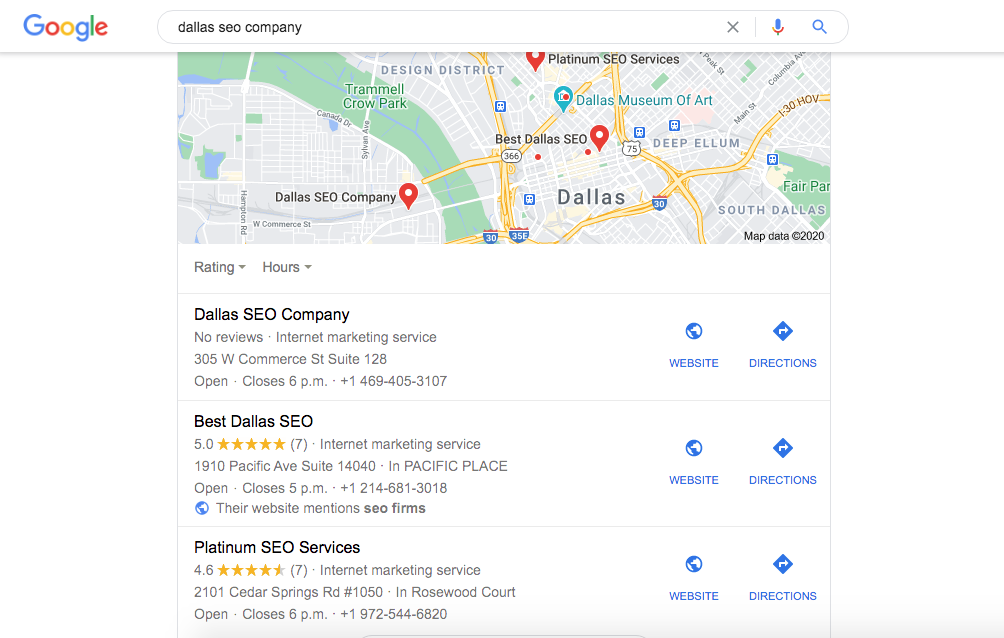
Example of how keyword in business name is favoured by Google in local SEO

You can see examples like this in every niche. With a keyword within your business name and URL you’re company is optimized to appear in the Local Finder for keyword related searches.

Domain extension

The second part of your domain selection is choosing the domain that you want to represent your business. In Canada, local businesses use .ca’s to rank highly in localized search results.

Of course, .com’s are the best option for the US and work well for global search results. They also work well in Canada but when you want to focus on appearing for search results within your country choose the appropriate extension for the best results.

Domain protocol

Choose the protocol that every version of your domain will redirect to so there’s only one domain with canonical URLs.

For example, consider the following options for domain protocols that can be entered for one website:

  • example.ca
  • http://example.ca
  • www.example.ca
  • https://www.example.ca
  • http://www.example.ca

All of these versions of your URL should redirect to one URL only. This will avoid confusion and any potential duplicate content issues.

Choosing a hosting company

The company you choose for hosting should be reliable and offer your site fast server response time. The time it takes for your pages to load will directly affect user engagement metrics, which we’ll get into later in this article regarding page speed.

Choose a hosting company with a data centre that’s in your country or close to your location. It makes no sense to choose a company in India when all of your traffic is originating in Canada.

Keyword research

This becomes a crucial aspect of your website design because you need to incorporate the most important search terms your clients are using into your site architecture, URL structure and content strategy.

By establishing the search terms that will drive the most traffic to your business you can embed these terms into the very fabric of your website. This affects how you silo your website with descriptive URLs for categories, subcategories, products and services and how you plan your content.

The keywords that represent your business should be determined in the planning phase of building your website. This ensures that your website takes the right direction from the very start by targeting the terms that will drive the most traffic with visitors that convert into clients.

Site architecture and URL structure

The way your website is organized should resemble that of a filing cabinet. Your website is the filing cabinet, the drawers are the categories, the folders are the subcategories and the files are the pages.

Filing cabinet

–Drawers

—-Folders

——–Files

For example, Woo commerce template for websites that sell retail products looks like the following:

Homepage

–Categories

—-Subcategories

——–Products

Your site architecture needs to make sense for both search engines and users. This level of organization makes it easy to assign a hierarchy of pages and assign value to the most important aspects of your business.

URL structure

The URL structure should follow suit with your site architecture with descriptive terms that indicate where a user is on your website. Each level of depth that a user goes into should be divided by a subfolder so the can get to where they’re going within four clicks as well as find their way back to where they came from.

Example.com

Example.com/services/

Example.com/services/SEO/

Example.com/services/SEO/link-building/

Using descriptive words in your URL structure makes for a more user-friendly and search engine-friendly website. Depending on the CMS you’re using your URLs may be automatically generated which can result in the following:

Example.com/rtsh%7j

Example.com/12-04-2020/lghtn345

This type of structure has no order and no meaning to users or search engines. Plan the URLs before building your website to avoid sloppy and nonsensical URLs.

Navigation

The navigation on your website needs to be clear, concise and take a user to all of the most important parts of your website within a few clicks. Your homepage is where most users will land so it’s necessary to have the means to get to all the important places quickly and provide a way for users to find those places without thinking.

Confusing sign post to signify what happens with bad navigation in your website design

Think of creating your website’s navigation as if you were putting up signposts. You want traffic to be guided to their destination with the least resistance. If your website navigation forces people to think or sends them the wrong way, it makes for a poor user experience and you will lose visitors.

Mobile usability

We live in a mobile-first era which makes mobile design the most important version of your website. Although this varies in importance with industry, Google indexes the mobile version of your website first. Your website is reviewed and assessed based on the mobile version since more than 50% of users search for information on a mobile device.

Responsive vs. mobile-friendly

Websites have been made responsive for some time, however just because a site is responsive doesn’t mean that translates into being mobile-friendly. There are other elements to being mobile-friendly that need to be taken into account.

A mobile-friendly site is a site that’s easy to use on a mobile device and provides a good user experience. It’s possible to have a responsive website without it being mobile-friendly. It’s important to address these issues, which can be identified using Google’s mobile-friendly test.

Page speed

The speed at which your pages load plays an important role in how your site is viewed by search engines and users. Most people are too impatient to wait for a page to load for more than a few seconds. In fact, Google states that after 3 seconds of load time, visitors are five times more likely to leave your web page.

From an SEO perspective, this reduces user engagement statistics. The overall dwell time is reduced, the bounce rate increases and the click-through rate is lowered. The effect of slow page speed has a negative impact on your search engine results.

This mainly stems from the fact that what’s good for a user is also good for search engines. If people are leaving your site before the pages even load, it signifies a poor user experience. Your site would seem unpopular and therefore would get pushed down in the search results.

Mobile friendly attributes

Make your site mobile friendly to improve your websites SEO. If your website is not easy to use, you’re going to lose visitors.

An example of a poor usability issue is when the text is too small. This causes users to “pinch” the screen to read the text, which also leads to scrolling side to side. Making changes to the mobile attributes of your website will affect the way users view your site and whether they continue to use it, or seek out an easier website to use.

Simple mobile attributes like button functionality is a major issue in the usability of your website. If buttons are too close together and users are clicking on the wrong ones, it can be frustrating and lead to the loss of visitors.

Test the mobile-friendliness of your site to determine what changes need to be made. Not only will you improve your website for users, but the changes will affect how your site is displayed in the search results.

Marketing funnel

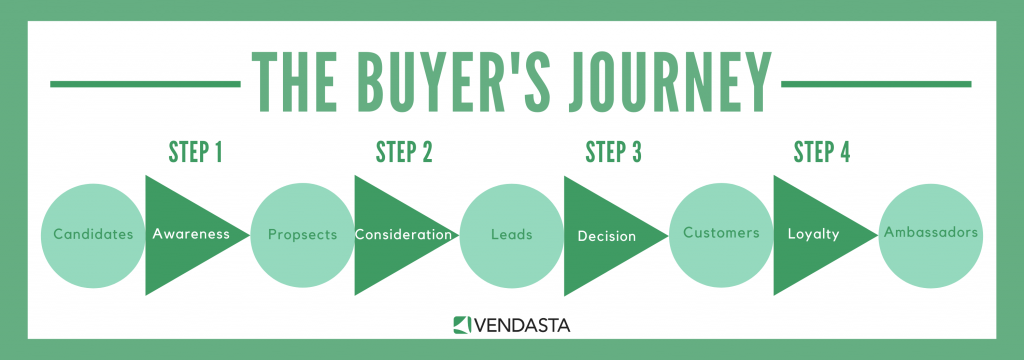
A major aspect to how you structure your content is how you address users at each stage of the buyer journey. The keywords you plan on using to drive traffic should be represented by content that creates awareness, consideration and influences decisions.
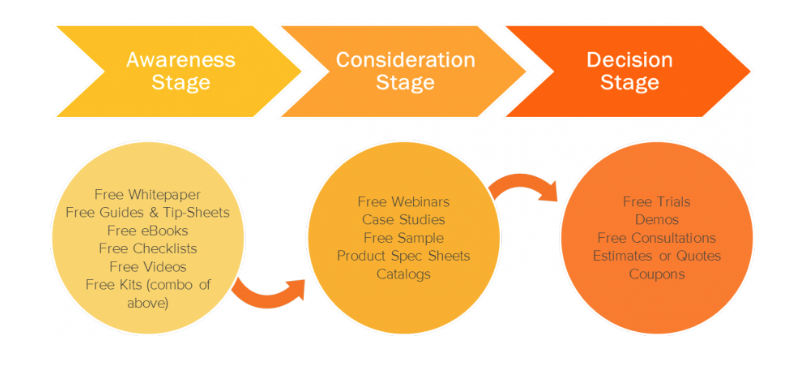
the buyer journey and the content to include when incorporating SEO with web design

Content that’s published at the awareness stage includes ultimate guides, top ten lists, etc. Content that’s published at the consideration stage includes case studies, original research, etc. Content at the decision stage includes product pages, service pages, free trials and consultations.

A visitor that lands on your website should be guided through all three stages of the buyer journey. This planning takes place in your keyword research.

Publish the bottom of the funnel content at the beginning stages and work your way up. This way you can facilitate those that are in the later stages of the buyer journey to make a purchase. You can then expand your reach as your site develops more content.

On-page optimization

Here’s where a lot of the magic happens for a website’s search visibility. The communication you have between your website and the search engines can make the difference between a highly successful website and a site that generates a mediocre performance.

Use your keyword in your h1 headline

The H1 tag you’ve assigned to your pages is a major clue for summarizing the most important content to users and search engines. Use your keyword in the headline to target that search term.

Stick to titles that are less than 60 characters long, since anything longer will be truncated in the search results-especially on the smaller screen sizes.

Include your keyword in the front end of your headline so that’s displayed no matter what happens. You can attract more clicks to your website with an optimized headline that tells users your page is about what they’re searching for.

Include your keyword in your URLs

The URL of your page helps to describe to users and search engines that your content is targeting the very search term that they’re using. Keep your URL under 90 characters, with a maximum of five words in the slug (extention after the .com).

Meta description

The meta description is not an actual factor that search engines take into account when ranking your web page, however, it does influence the click-through rate. The meta description is all about winning the click to your website. BY writing an accurate and captivating description you can encourage more visitors to land on your page.

It’s best practice to include your keyword near the beginning of the meta description. Users are more likely to notice the keyword and be drawn to your search listing (especially since Google highlights it with bold text in a search result).

If you don’t’ include a meta description, Google will extract snippets from your content to summarize your page. In some cases, they may represent your page the way you want, and in others, you would do better to write it in your own words.

Image optimization

Although search engines can identify images, they still rely on the information you provide to categorize images properly.

Use descriptive words in your filename to contribute to a better understanding of what your image is about.

The alt tags are still the main area that needs to be optimized with your keyword. Avoid keyword stuffing and use natural sentences to explain what the image represents.

Using captions will also add to the context of your images.

Keep in mind that images don’t just enhance the on-page optimization of your content, but also appear in image searches. Adding descriptive metadata will improve the number of searches your image can appear for, creating another stream of traffic to your website.

As always, make sure you reduce the file size of images and use compression. If you’re using a plugin you can implement lazy loading to decrease the time it takes the page to load the items above the fold.

Structured data markup

The more communication you have with search engines the better. Enhance the way your page is read and displayed by deploying Schema through structured data markup.

Schema.org was invented by the major search engines as way of making a universal language for identifying entities. There is a category and markup for almost every item on a web page.

You can further a search engine’s understanding of your website, and the type of content your publishing by using structured data markup. As a bonus, there are a number of rich results that your page could be eligible that provide an enriched search result.

Rich results

Users are naturally attracted to enhanced search results. Rich results add to the marketability of your search listing to attract more attention and therefore win more clicks to your page.

The most popular types of rich results that you can influence with structured data are:

  • FAQ
  • Reviews
  • How-to
  • Q & A
  • Events/Showtimes

If you’re able to implement the correct structured data markup from the start, you will drive more traffic to your website through higher click-through rates.

Incorporate SEO at the earliest stages of web design

It should be obvious how important it is to have SEO in mind when designing your website. The performance of your site should be the major concern since design alone will not contribute to your bottom line.

Start with the fundamentals of web design and SEO at the earliest stages of web design and enjoy the rewards of a website that drives traffic and generates leads and revenue on a regular basis.

Christian Carere
Christian Carere

Christian Carere is the owner and founder of Digital Ducats Inc. in Toronto and heads the SEO team at Austin Bryant Consulting in Plano, TX.  Christian has been published on publications such as Search Engine Watch, Venngage, Small Biz Daily, Grasshopper, Data Box, Socialnomics, and Mention.
old.digitalducats.com/

Written by Christian Carere · Categorized: Web development

Oct 23 2020

SEO Basics: Search Engine Optimization Made Simple

What’s the point of owning a website if no one can find it online? Your website is your means for educating an audience and generating leads. You can’t drive new business unless new users are landing on your pages. At a bare minimum, you need to apply SEO basics.

Here’s an old SEO joke: Where do you hide a dead body so no one can find it?

A: On the second page of Google!

More than 90% of users click on the first page of search results. That means that if your website appears anywhere other than the first page, you’re missing out on more than 90% of new client opportunities.

What is search engine optimization (SEO)?

SEO is the process of improving the search visibility of a web property for specific keyword search queries. The process includes a number of different tactics and strategies that are intended to improve the likelihood of a web page being displayed as the best solution to a search result. Ideally, this results in the page appearing at the top of the search results.

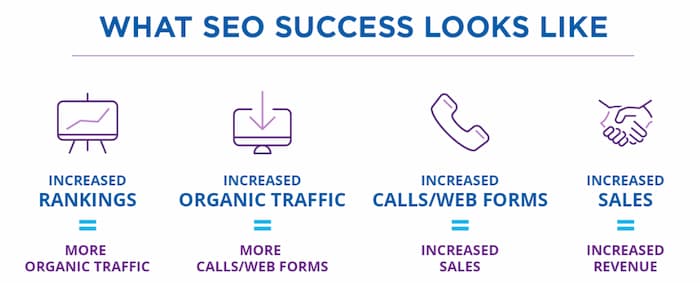
SEO success means increase in organic traffic, leads, sales and revenue
Image source

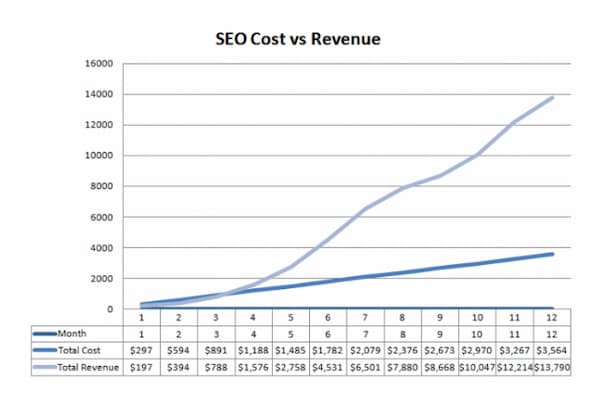
The overarching goal of SEO is to increase revenue

The ultimate goal of SEO is to increase revenue by driving more traffic to a website. Search engines assess the quality of web pages using a number of different factors. Improving the SEO of a web page increases the number of positive ranking factors that lead to higher search engine rankings and increased search visibility.

SEO basics: A chart showing cost vs. revenue where revenue is compounding overtime
Image source

SEO separates your content from the masses

Did you know that there are over 2 million WordPress blog posts published each and every day? That means that more than 20 blogs are published every second. Considering the vast number of blog post being published, how can you publish an article and expect people to find it?

That’s where SEO comes into effect. For every person who searches Google, they are required to enter a word or phrase that describes what they’re looking for. When your page is optimized to answer the intent of a user (referred to as search intent), your answer is more likely to appear on the search engine result page (SERP).

What is user intent/search intent?

Search intent is the underlying reason a user initiates a search. Satisfying search intent refers to the content that will put an end to a user’s search. This concept is extremely important to SEO because Google has been able to accurately interpret user intent and assess web pages to determine whether they are able to satisfy search intent.

Optimize for search intent to increase user engagement

To be the best solution to search query, your page not only needs to be optimized for the query, but it needs to be accurate and adequate in the content it serves. If users click on your page and then back off of it, it indicates low user engagement. The metric used to measure the number of users that land on your page and back off is known as bounce rate.

(Click here to read 9 Ways To Reduce Your Bounce Rate)

This is an important user engagement statistic because it alludes to whether users find your page relevant to the search query. When people refuse to stay on your page for more than a second, but they spend time on a competing page, the competing page will more than likely rank ahead of the page no one wants to spend time on.

For this reason, keywords and content play a massive role in determining how search engines assess your page and display it in the search results.

How does SEO work?

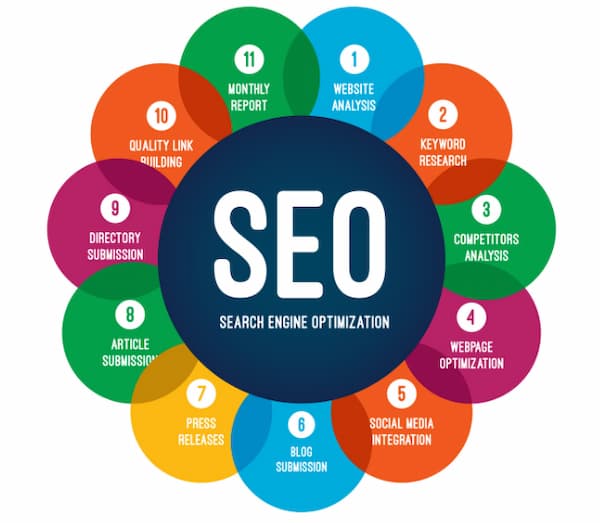
SEO is a process that combines keyword research, content creation, on-page optimization and off-page optimization, data-driven analysis and technical performance for the purpose of increasing traffic for lead generation. The end result is keyword-optimized pages that receive more visitors from improved search visibility.

An image showing 11 SEO basic strategies and practices
Image source

SEO identifies the traffic opportunities available and works towards implementation to achieve a regular flow of traffic from organic keyword rankings (and paid traffic) that results in more leads, new clients and increased revenue.

The role of keywords

The words that a user types into a search are considered keywords. SEO is primarily keyword based due to the way users search for information. A typical SEO campaign involves publishing pages that are optimized for specific keyword searches. This makes keyword research one of the most important aspects of developing an effective SEO strategy.

The keywords your website appears for should benefit your business by attracting visitors that have or will have intentions to buy the product or service you offer. What’s the point in ranking for a keyword when the visitors aren’t ever going to buy from your company? Keyword research is a process that results in the confirmation of what is actually being sought after in a search, and what content you need to provide to satisfy that intent.

Keyword research

Keyword research establishes the true search intent of a search phrase. It’s not just about avoiding a terrible mistake, but also identifying the content required that would propel your web page to the top of the search results.

If you’re going to rank in the best positions you need the best content.

The process involved in researching keywords requires you to go through a series of steps that provide hints and clues to what will make the best content for the search term in question.

Create a list of potential options

An easy way to start your keyword research is to make a list of the words that you want your website to be known publicly. These initial terms can describe your business and are most likely products and services.

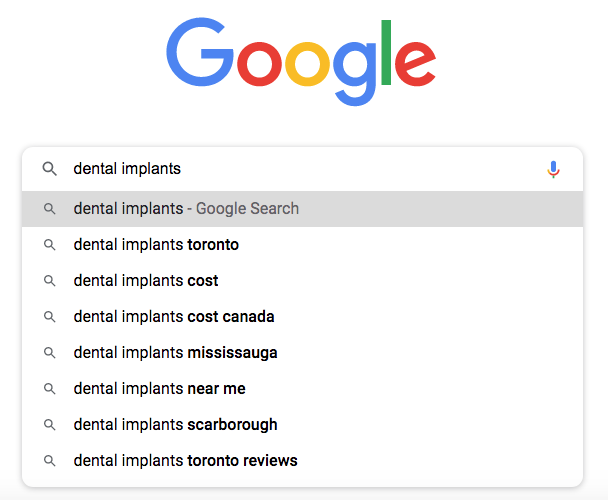
Generate more ideas with Google autosuggest

Type these phrases one by one into Google and write down any relevant keywords that appear in autosuggest.

Google autosuggest for a dental implant keywords

Confirm the business value by analyzing the organic results

For every keyword you consider targeting, you’ll need to check the 10 organic results to see if the competing pages are a match for your business. Google may surprise you with how it interprets intent. The organic results should be direct competitors in your industry.

If there are search listings that are NOT your competition it could be an indication your keyword has diluted search intent. Perhaps not all of the people searching your keyword will be interested in what you offer and another alternative should be considered.

There are endless ways in which you can come up with keyword options. To evaluate a keyword, ask these three questions.

Does the true search intent represent a high business value?

Search intent is the biggest factor because you need to determine whether the content that currently ranks for the keyword is something that would benefit your business. If there’s no value in the keyword then it doesn’t make sense to waste your time and effort in creating the content.

How much volume makes a keyword worthwhile?

You can drive 50K visitors to your site but if no one converts to a new client the volume of traffic from that keywords is useless. If you can drive 20 people from a keyword and 5 of them end up making a purchase, you’ll need to assess the number of resources needed to acquire those 20 people on a regular basis.

If the traffic from a keyword results in high ticket purchases, then even keywords with low monthly search volume are worthwhile in pursuing.

The bottom line: Volume is ony as important as the business value of the keyword in question.

How difficult is it to rank your content on the first page for that keyword?

In a perfect world, we want high converting keywords that have tons of monthly searches and zero competition. Since this is rarely the case for any keyword the strength of the competition needs to be weighed in against the business value and volume of searches.

If the websites on the first page have been around for years, there’s a good chance they’ve accumulated a lot of backlinks and have made a name for themselves in the industry. When all 10 organic results are competitors with massive domain authority, there is little to no chance for a newish website to rank ahead of them and so it would make sense to consider another option.

Find alternative keywords when the competition is difficult. You can choose a synonym or related keyword, or you can use a long-tail version of the keyword you initially wanted to pursue.

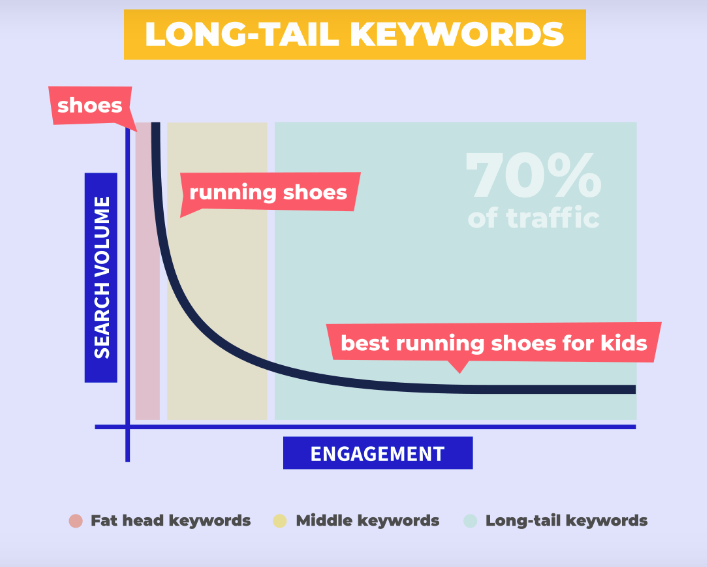
Reduce competition using long-tail keywords

Three or more words used as a search term are considered a long-tail keyword. The majority of searches made on Google (70%) are long-tail keywords.

Long-tail keywords make up the largest percentage in number of searches

Increase conversions by targeting long-tail keywords

Most people try to describe what they are looking for in more detail when they know what they want. This means that long-tail keywords convert at a higher rate than head keywords (one to three words used in a search term).

The more words a person uses to describe what they are looking for, the more you can provide an accurate match as a solution to search intent. The benefits of long-tail keywords are:

  • Higher engagement statistics
  • Higher conversion rates
  • Lower competition

The only downside to optimizing for a long-tail keyword is that they typically have less search volume. That being said, it’s better to get 10 people to buy your product out of 50 than it is to get 1 person out of 1000.

It’s much easier to nail search intent with long-tail keywords because the focus is much narrower.

For example, if a user were to search for summer shorts, there are a vast amount of options that this keyword could possibly mean. Does the user want spandex, cotton, nylon, a specific colour, style or fit?

If your website doesn’t sell every single option a visitor might be looking for when they search summer shorts, then driving traffic from this keyword would lead to high bounce rates and ultimately poor search visibility.

If your business only sells cotton shorts with various camouflage patterns, there would be no sense in optimizing for the keyword summer shorts, when you would have more success with terms like camouflage shorts or army shorts or more descriptive search terms.

When your products or service has a narrow focus, it’s a better approach to optimize for more accurate keywords.

Establishing a keyword strategy

Your keyword strategy should consist of keywords that are exact matches to your products and services to drive traffic with visitors with buyer intent. Your strategy should also include keywords that address the most commonly asked questions, common problems and the answers to those issues.

This type of strategy affords you the time it takes to rank for more difficult terms while ranking faster for long-tail phrases that ultimately lead to visitors on your main pages.

By assigning keywords topically, you can address more relevant issues and then find the best keywords that match your business through data-driven analysis.

Keyword tools are the most convenient at this stage of the process and can help finalize your target keyword in the content you publish.

Content Creation

To get your content to rank and outperform competing pages, it needs to be the best response to a search query. A large part of creating content that performs is figuring out whether you’re going to publish something unique, or whether you’ll publish something that’s just better than what’s already out there.

Analyze the top ten results for clues on search intent

One of the biggest clues to establishing search intent is in the page titles of the top ten organic results. The titles will show you what type of content has the best possibility of ranking highly.

Take the search term, how to rank a website for example.

SEO basics dictate to analyze the SERP for clues that establish search intent

Out of 10 search results, 7 have titles that start with “How-to” indicating that the type of article users click on the most are how-to articles. This example is super obvious but the same holds true for any keyword in question.

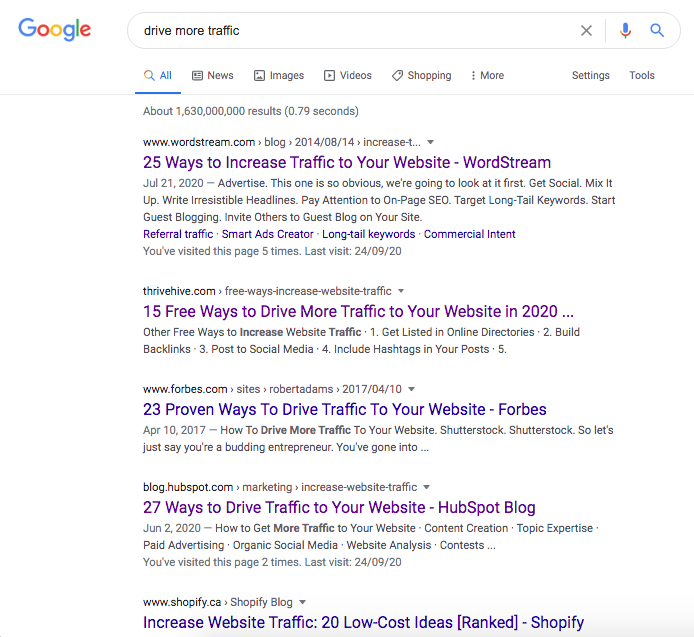
Another example is to try searching the term drive more traffic.

Basic SEO example of how a search term can indicate the best content type to publish for a keyword

Again, 7/10 search results have titles with numbered lists that detail the different ways to drive traffic to your website. Evidently, the best opportunity to rank for this search term is to produce an article with a numbered list.

Analyze SERP features to improve your solution to search intent

There’s no one who understands search intent better than Google. Take into account the various SERP features that appear for your keyword. You can use the appearance of SERP features as clues to publishing content that is optimized to satisfy user intent.

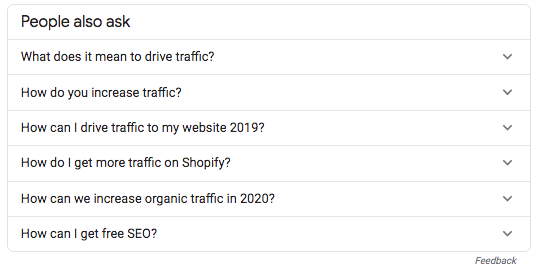
Extract topically relevant questions and answers from the People Also Ask Box

The People Also Ask box, for example, is packed full of topically relevant questions that people also search in addition to searching for your keyword. If you can provide the answers to those questions within your page, it’s one less search your visitor would have to make and one more reason for them to stay on your page.

Use the PAA box as a way to find topically relevant content

Incorporate the content from the PAA boxes to supercharge the number of topics your content covers as well as commonly asked questions. This content addition will make your page more user-friendly by directly answering popular questions.

Optimize your page with multimedia

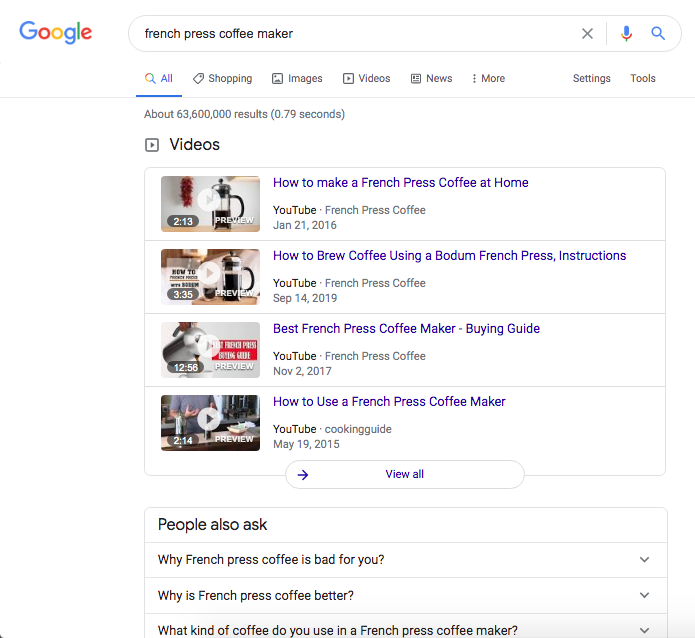
If any videos or images appear directly in the SERP, it’s an indication that users are actively looking for one or both types of media. When Google is displaying a carousel of videos at the top of the SERP, it would improve your pages ability to have a video on your page as well.

SEO basics indicate that when videos appear at the top of the SERP, including a video in your content will help satisfy search intent

Outperform existing content

In order to outperform existing content, you need an accurate idea of what will make your version better than what’s already ranking.

You’ll need to determine the areas in which you can create a better piece of content.

Look to outperform existing content by publishing more in-depth content to better answer intent. Create more user-friendly features that lead to longer dwell time, higher click-through and lower bounce rates.

Reverse engineer top rankings

Create 10x content (content that’s 10 times better than what’s out there) by covering the details of every topic and subtopic on your competing pages.

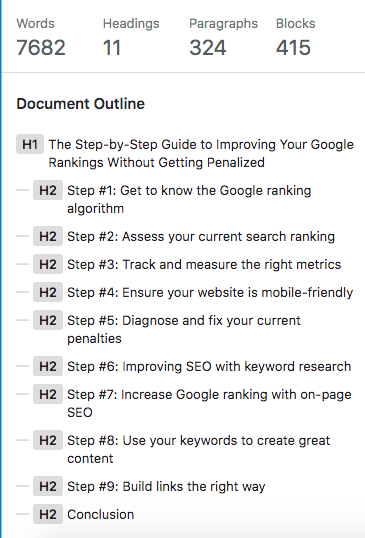
If you use WordPress, copy and paste one of the pages that rank in the top positions. Click on the information icon to get a full summary of their article for a clear perspective on the word count, the number of topics covered and the hierarchy of content.

A Neil Patel article that ranks on the first for the keyword How to rank a website
This top-ranking article was cut and pasted into my HTML editor to get a quick summary

The information can provide you with a birds-eye view of how your competitor has constructed their page.

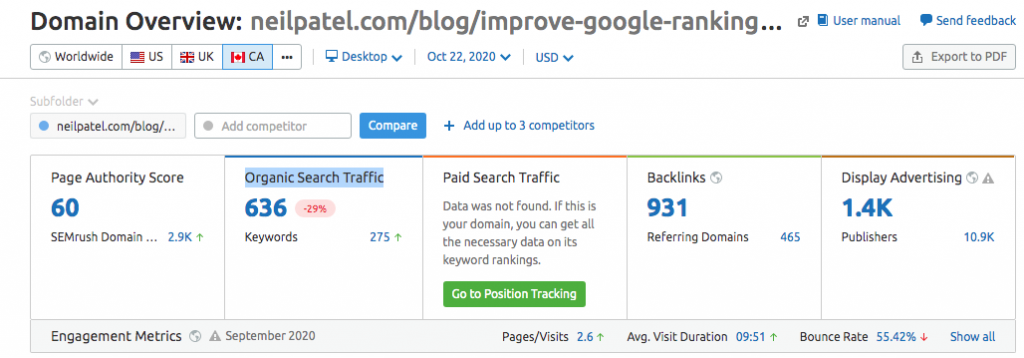
You can also enter a top-ranking URL in any analytic software that generates a keyword report. SEMRush will show you the value of organic traffic for any page.

SEO Basics dictate using a free software like SEMRush to acquire the domain overview

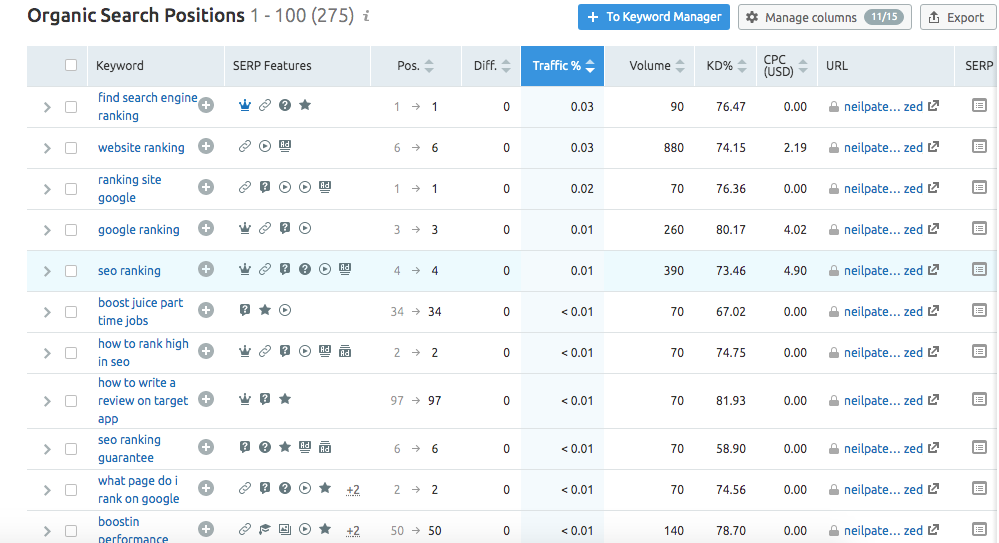
Click on the link and it will take you to another breakdown of all the keywords that URL is ranking for in the top 100 positions.

Keyword report for competition to identify content gap analysis

This report gives you insight into any gaps in content your page may or may not have. By identifying keywords you’re not optimized for, you also identify segments of content that will need to be added in order to meet and exceed the quality of the page that’s currently ranking.

Organize your site topically to enhance the performance of major keyword topics

SEO revolves around content because, without it, there wouldn’t be any SEO. Every page on your website should be optimized to target a specific keyword and play a role in driving traffic and converting visitors into clients.

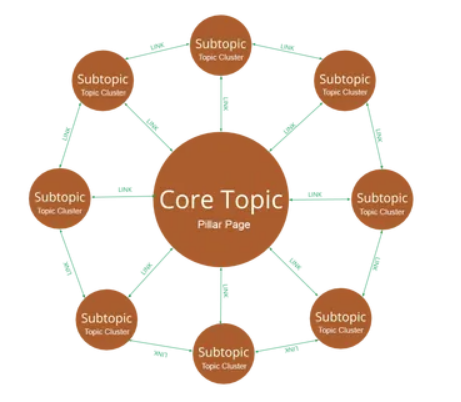
An effective structure to implement in your content creation is to create topic clusters. A topic cluster consists of three different components; pillar pages, cluster content and the links that bind them.

A pillar page is typically a major keyword theme and it covers all aspects of that topic in breadth, but never dives deep into detail. Rather than cover every detail within the pillar page, a pillar page will link out to more narrowly focused articles. These articles are considered cluster content.

Example of pillar page and cluster content

Cluster content, for the most part, targets a long-tail keyword and has a narrow focus on one specific topic. Cluster content goes deep into detail and attempts to fully answer the search intent associated with the keyword it targets.

A pillar page will link out to its cluster content and in return, the cluster content will link back to the pillar page. Cluster content will also link to related content within its cluster. This interlinking strategy is what forms a topic cluster.

The blueprint for your topic cluster is created within your keyword strategy. It begins with brainstorming the most important keywords to your website.

For every major keyword theme break it down into smaller subtopics.

Break down the subtopics into common problems faced by prospective clients. The collection of subtopics should adequately describe your business as well as provide ways for searchers to become aware of your product.

For example, if you were creating a top cluster for your dental practice, you might have the following pillar pages on your website: Cavities, Cleaning, Root Canals, etc.

For each of these pillars you would break down the topic into a number of different subtopics.

For cavities you might include the following as subtopics:

  • How to know if you’ve developed a cavity
  • Do filling cavities hurt after it’s finished?
  • How long does it take to fill one cavity?

Potential keywords could be how patients are describing the pain they have. Keywords posed as questions “Why does my tooth hurt when I chew?”

Whether they know it’s a dental issue or not, a person will type in the symptoms they’re experiencing. Your cluster content would be optimized to address this issue and explain how your services can help them with their problem.

This type of content would be considered top of the funnel content to create awareness in your service or product.

The content you publish on your site should start with the most important pages to your business. The pillars can be category pages, service pages, or landing pages to convert visitors to clients.

Build cluster content to lead visitors to these pages. This can often be done by targeting specific issues (long-tail keywords) as well as publishing comparative content that forces visitors to consider your company as the best choice.

On-page optimization

The contextual meaning of your content can be communicated through the metadata, text, images and structured data markup on your page. Using each of these aspects of your page allows you to highlight the most important keywords you intend to target in the search results.

Metadata

The metadata is extremely important because search engines will read and use this information to categorize your content. Including your keyword in the title, URL, image alt tag as well within the body of content will improve the optimization of your page for a specific keyword.

Text

Use your keyword sparingly in the body of your text. A common mistake website owners make is to repeatedly use the keyword excessive and unnaturally. This will over-optimize your page.

Make sure your keyword appears in the first 100 words or so and a few times within the body of the text. You can use keyword synonyms to enhance the optimization of your target keyword as well as promote a rank for secondary search terms.

Images

Despite the large leaps forward in technology, Google will still use the description in the alt tags as the primary clue for optimization. Use your keyword within the alt tag to enhance the optimization of your page, but this also optimizes the image itself.

Web pages aren’t the only means for driving traffic. Image sources can drive a huge percentage of your traffic if you’ve optimized them correctly.

Include the keyword in the filename, fill out the captions and give your image a descriptive title (avoid using the same words as in the alt description).

Structured data markup

The language of search engines, otherwise known as Schema, clearly communicates contextual meaning and other important information located on your web page. Schema.org has a list of entities that have been defined with appropriate markup and can be used on your page to break down any barriers of communication between search engines and your page.

Apart from providing a faster method of delivering accurate information, Google offers enhanced search results with the right markup. Google displays rich results for markup that informs search engines of reviews, FAQ sections, Q & A pages and How-to articles-just to name the top ones.

Rich results lead to higher click-through rates in the SERP by making your search result more marketable.

Off-page optimization

Anything that affects the optimization of your page, but doesn’t occur on your page is considered off-page optimization. This is largely the process of building external and internal links, but can also include improving technical performance.

Internal links

Internal links are among the easiest links to build because they are links to your page from within your website. Internal links create more link equity between pages, which can improve authority and ranking ability.

For example, suppose you have a page that converts visitors to clients really well. Let’s imagine it’s a product page for an incredible razor that does things that you only imagine in your dreams.

The problem is, it’s difficult to get external websites to link to your product page, so how do you get it to rank and generate traffic?

Enter internal link building.

Based on the topic cluster model, you can create content that external websites would be more likely to link to because they provide objectionable value. An article on 10 Ways To Reduce Shave Time And Frequency would be good content asset and has more rank ability then a page with just a product.

By building links from the pages that generate the most traffic, to the pages that convert at the highest rates, you can increase the number of visitors you convert as well as give your product page more authority to rank.

You can also use internal links to optimize for your target keyword by using a mix of exact match anchor text links as well as long-tail anchor text links and keyword synonyms.

External links

As one of the most powerful ranking factors, external link building can create a top-ranking page-even if your content isn’t technically “the best” stuff out there. With enough websites vouching for your credibility, you can literally rank a page for just about anything as long as you have really good links.

Using keyword-optimized external links will enhance the optimization of your page if done correctly. If you only use exact match anchor text, you may end up over-optimizing your web page. This will send your site back in the search results.

Using a mix of exact match, branded, naked URL and non-optimized anchor text will give your page a good balance of in your backlinks profile and promote a healthy ranking for your target keyword.

Social media marketing

Traffic generation is a huge component of SEO, which makes social media marketing an important aspect of your overall SEO strategy. Building a large audience can serve as a way to drive instant traffic to your web pages and get your content in front of a large number of people.

Despite the fact that links from social media don’t count as followed links, there is some value in the user engagement that social traffic creates. Google rewards pages that have high click-through rates, dwell times and low bounce rates.

The law of averages dictates that the more traffic you send to your pages, the more likely you are to acquire backlinks to high-quality content. Social media can drive the additional traffic needed to get you more backlinks.

The incredible number of users on Facebook is enough to make it an attractive source for marketing your business. Facebook is not the only platform that has proven success in building a business.

Retail sales and B2C marketing do especially well on Pinterest and Instagram. Your target demographic will influence the social media website you choose to implement in your marketing.

B2B sales may have more success with websites like Linkedin.

Social media offers a way to market your product for absolutely no cost whatsoever. If you can produce highly engaging, top-notch content you can build a massive number of followers with absolutely zero investment other than time and effort.

Of course, you can also dive into the paid aspect of social media marketing, after all, you’re targeting the same audience that you want to get reading your content. One of the most effective forms of paid traffic is using retargeting.

Retargeting ads will only re-appear to a user once the user has clicked through to your website. Once that happens, the pixel installed on your site will automatically upload a cookie into the user’s browser. Whenever there’s an opportunity for an advertisement to appear, your ad will reappear for however many times you stipulated in the settings.

This is a highly efficient way of getting people more familiar with your company, which opens them up more to doing business with you.

Technical performance

The technical performance of your website can be improved when you know where to make the improvement. In an effort to monitor the various technical aspects of your website, you can run an audit to determine the page speed, the number of broken links, missing metadata, missing pages, duplicate content and indexing issues.

Page speed

The length of time it takes your page to load can greatly affect user experience as well as your ranking (if it’s excessively slow). You can work on page speed by fixing both on-page elements as well as off-page elements.

Reducing the size of your files, compressing your images, and implementing lazy loading can greatly reduce the time it takes your page to load.

You can also use a CDN, inline the HTML, CSS and JavaScript in the header to reduce the time it takes to load. Leveraging browser caching is another one of many tactics that result in faster page speed.

Reducing errors

Every website eventually begins to generate errors with everyday use. Even if you don’t use your website at all and don’t update it, there will eventually be errors generated from incompatible versions of plugins, themes and browsers.

The accumulation of errors on your site can lead to a reduction in the ranking.

Many of the errors that result in a drop in ranking are based on user experience, such as broken links. When a user encounters a broken link, it’s frustrating and causes a slight problem in the fact that the user needs to back up and decide on where they’re headed again.

Having a missing page on your site results in a 404 error message. This can also look bad on your brand and your company could be misconstrued as having a low-quality website.

Fixing broken links and eliminating missing pages is one of many ways to improve the user experience and overall website performance.

Data driven results

Search engine optimization is a highly effective means of marketing for more reasons than just optimizing your pages to appear first in the search result. SEO involves recording, measuring and tracking results, which can give you better insight when making decisions.

Analytics

Google Analytics is one of the most comprehensive tracking software available that comes absolutely free. Once the tracking code is installed you can monitor the volume of traffic, the origin of that traffic and what those visitors did once they were on your website.

Each month you can see how much your traffic is growing and whether the traffic your building is impacting your bottom line. This can give you insight into the effectiveness of ranking keywords and gauge the impact of any SEO campaigns you’re currently engaged in.

Goals and conversions

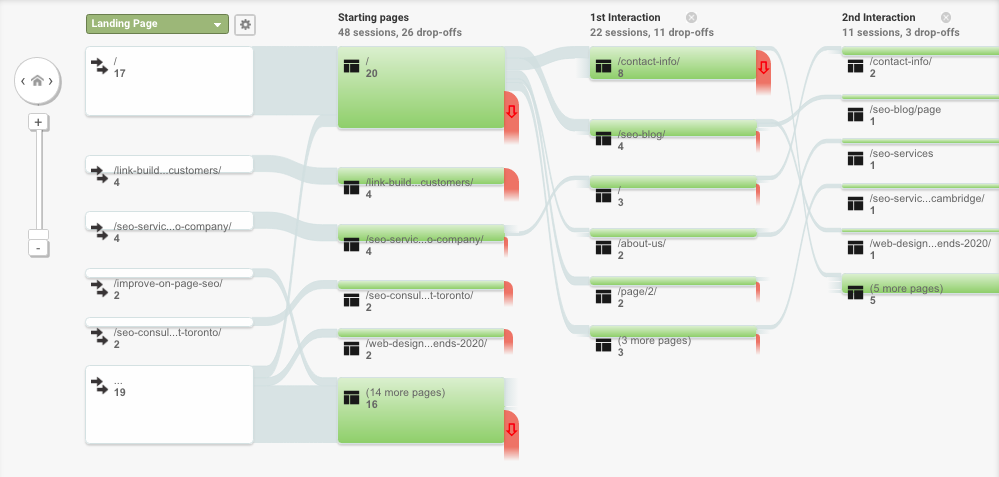
Creating goals and conversions in Analytics can contribute to establishing better paths within your site to guide visitors to a preferred action. You can track the pages that users click-through to as well as where they drop off.

Example of Google Analytics page flow for more advanced SEO

Creating goals is a way to measure the success of your SEO campaigns. By improving on the number of drop-offs you can lead a larger percentage of visitors to pages that help in achieving more conversions and complete more goals.

Compare past and current performance

You can also monitor the traffic on individual pages. This tool allows you to compare any time period with each other to see whether your traffic is above or below the past period’s numbers.

Search console

Search console (another free tool from Google) allows you insight into the performance and health of your website.

You can check to see what queries your pages are appearing for and of those queries how many clicks you earned to your website.

You can build more keyword ideas and content around successful keywords based on the information provided in this tool.

Technical error alerts

The search console informs you of technical errors on your website and will list the URLs of the pages that need work. If your page speed is abnormally slow you can see what pages need improvement.

If your site receives a manual penalty, the search console is the first place to look to confirm whether this has happened. In fact, it’s the first place to look if there’s a sudden drop in traffic since you can see the number of URLs you have indexed as well-just in case the unthinkable is happening and your pages were being taken off of Google’s index (it happens!).

Monitor backlinks

There is a list of the most linked pages as well as the websites that link to you’re the most. You can monitor what backlinks you’re receiving at the fastest time possible since there’s no search engine spider that would know you have a backlink before Google.

Make data-driven decisions

The SEO tools available are numerous and there are more than enough to extract the data you need to make the best decisions for your business. Having insight into the success or failure of specific efforts can save you time and resources in the future.

Analytical tools help to streamline your efforts in creating a more efficient and more effective website that generates traffic leads and new clients.

Implement SEO basics at the earliest stages of development

Search engine optimization is a long-term strategy that can sometimes have quick results. Learn the most important sources of traffic for your business and develop your website to tap into those sources.

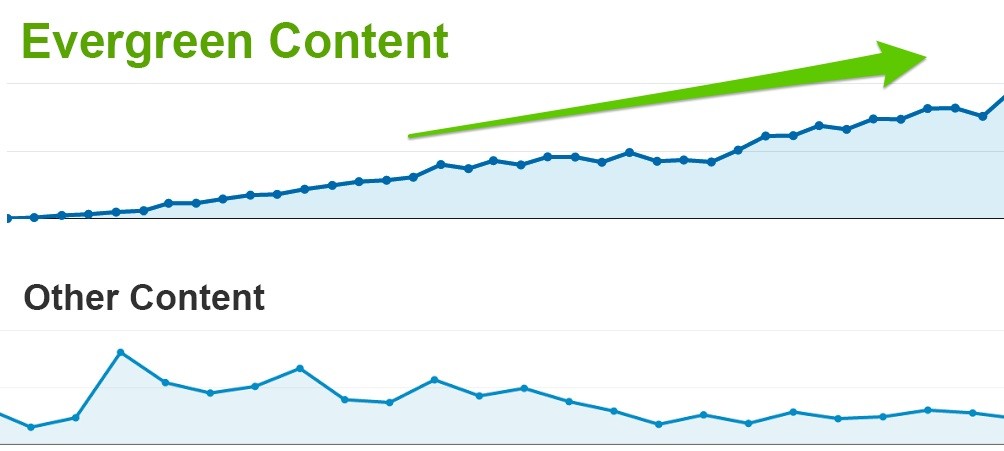
Authoritative content is by far the largest ranking factor when it’s optimized to answer search intent. Creating content assets doesn’t immediately translate into massive streams of traffic-there is a period for that content to settle and make its way to the top of the search results.

Example of how content builds traffic over time

Strategize your keywords, content and link building strategies. The earlier you begin, the sooner you’ll reap the benefits of a well optimized website that generates high converting traffic and contributes to more leads, and revenue.

Christian Carere
Christian Carere

Christian Carere is the owner and founder of Digital Ducats Inc. in Toronto and heads the SEO team at Austin Bryant Consulting in Plano, TX.  Christian has been published on publications such as Search Engine Watch, Venngage, Small Biz Daily, Grasshopper, Data Box, Socialnomics, and Mention.
old.digitalducats.com/

Written by Christian Carere · Categorized: Web development

Aug 27 2020

SEO Case Study: 200% Traffic Growth In 4 Months

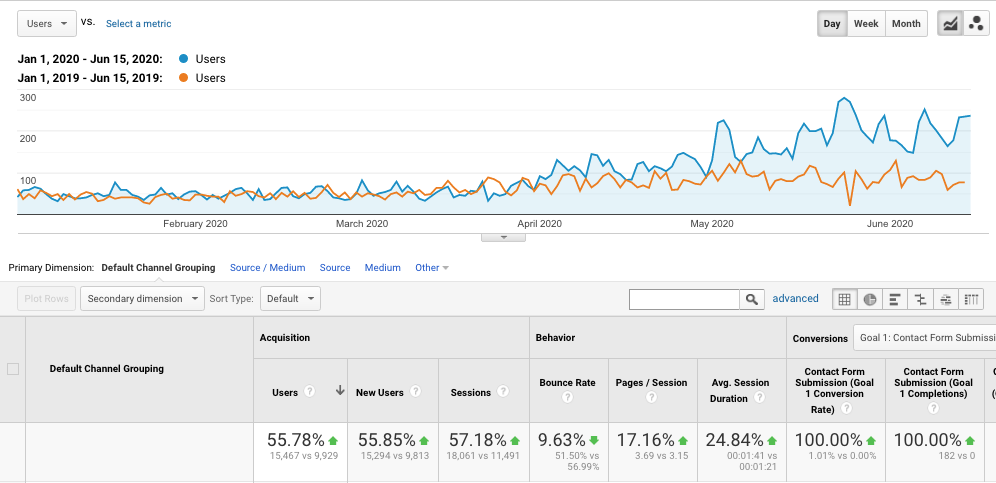
There’s nothing like good, hard evidence of how SEO provides a return on your investment. The following is an SEO case study on a local home goods supplier in which we achieved an increase in traffic of over 200% in just four months’ time.

Fourth month was a 200% increase in the number of users landing on the website

A brief history of the clients’ website

The company sells patio furniture, hot tubs, barbeques, billiard tables and more. The client began services with Digital Ducats after working with an SEO Toronto company for almost 5 years.

Their website had a number of backlinks and they had published content on their blog continuously during the last four years.

After a website assessment, it was determined that although they were ranking for some keywords, many of their pages were lacking on-page optimization. Most of their blog content was low-quality and not good enough to rank on the first page of Google.

The Google My Business profile was loosely put together and was lacking optimization wihch was resulting in low search visibilty in Google’s Local Finder.

The main objective

The ultimate goal for this SEO case study was to push the websites ranking up to the first page of search results. We wanted to create a stronger search presence for the keywords that would drive the most potential clients.

The objective was to increase revenue using a content-driven strategy. The goal was to build awareness and drive traffic using keywords to rank for content that satisfied users at the informational/research stage as well as the buyer stage.

The SEO strategy explained

A competitive analysis was performed on the top ranking websites in the niche. In order to create a more competitive website, we needed to establish how the competition had achieved its top ranking in terms of content, site structure, link building strategy and optimization.

The results of our keyword research provided the basis for the content that needed to be published to drive traffic with buyer potential. A content audit was performed to identify the pages that could be enhanced to rank higher.

The SEO campaign included:

On-page optimization

  • Meta tag optimization
  • Titles
  • URL structural analysis
  • Internal link strategy
  • Topical organization
  • H tags
  • Canonical references
  • Outbound links
  • Schema
  • Structured data markup
  • HTML code cleanup
  • SERP feature optimization
  • Page speed optimization
  • Mobile optimization
  • 301 redirections
  • 404 Error corrections
  • Robots.txt review
  • Sitemap creation and submission
  • Install Google analytics
  • Set up Google Search Console
  • Google My Business Optimization

Backlink strategy

When we first began work for the client, the backlink strategy was already mainly composed of directory links and citations. We started with:

  • Toxic link removal
  • Niche and local citations
  • Links from niche blog sites
  • High authority links from appropriately themed websites

SEO Case Study results

In between the third and fourth months, the traffic for our client had nearly doubled in multiple categories when compared to the same months from the previous year.

4 month SEO Case Study that resulted in doubling website traffic.

The number of keywords that our client ranked for went from 300 to 700 and we improved our client’s position on the first page for multiple search terms.

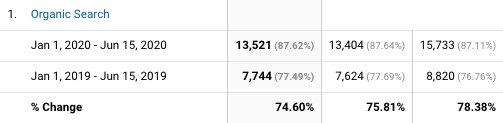
Organic traffic was literally doubled when compared to the same time period the previous year. The website had received 7744 visitors in the previous period which has increased to 13,521 visitors

Doubled traffic for home goods local business

Although the results for this client only took 4 months, it should be noted that the expected time to see the full results lies somewhere between the six to nine months range.

Digital Ducats Inc. is one of the best choices you can make for your business when it comes to investing in a marketing strategy that produces results.

Christian Carere
Christian Carere

Christian Carere is the owner and founder of Digital Ducats Inc. in Toronto and heads the SEO team at Austin Bryant Consulting in Plano, TX.  Christian has been published on publications such as Search Engine Watch, Venngage, Small Biz Daily, Grasshopper, Data Box, Socialnomics, and Mention.
old.digitalducats.com/

Written by Christian Carere · Categorized: Web development

Aug 06 2020

Local SEO For Dentists: A Guide To Client Acquisition

The significance of local SEO for dentists has continued to grow in the dental industry ever since Google became the new Yellow Pages. Google processes more than 3.5 billion searches each day and approximately 46% of all searches are made with the intent of obtaining local information.

When people want to find a local dentist, 87% of people will search on Google. Local searches are one of the highest converting sources of traffic. According to Google itself, 72% of people will reach out to a local business within 5 miles of their location after finding them in a search.

Whether you’re starting your first practice or you want to accelerate the number of clients that find you on Google, defining a local SEO strategy for your dental practice will increase the volume of traffic through improved search visibility.

Drive traffic with Google My Business

One of the first areas that should be addressed is your Google My Business profile. Consider this an extension of your website that is eligible for a top position in Google’s Local Finder.

Image of Google local finder, which is essential to local SEO for dentists

Only the top three businesses will be listed on the first page, however, getting your practice on the map and in front of an audience will start to get your website noticed. In order to move your listing to the first page into what’s called the “Local Pack”, you’ll need to follow a series of steps to make your profile more competitive.

Appearing in Googles local pack is a local seo strategy for dentists

How to optimize your GMB profile

Go to Google My Business to set up an account. You may be asked to enter your company name to make sure a listing doesn’t already exist.

First step to Google my business setup is find out of your business already exists

The next step is to choose the primary category to enlist your practice. This is an extremely important step for driving traffic that best fits your business so read all of your options.

GMB dentistry category selection is a local SEO ranking factor

You can always change your primary category so don’t feel like it’s a final decision. One way to confirm you’ve chosen the right category is to search for one of your keywords and see what category your competition is using.

The next steps should be self-explanatory. If you don’t have a website you can choose to “create a free website” for the time being and add the URL of your website at a later time.

GMB option to get a free website

List every service your practice offers. Include every procedure and everything you charge your clients to make your page eligible to show up in keyword searches.

Add custom services to your local business profile

Publish a professional and keyword-rich business description

Create a keyword-rich description that your prospective clients will read when they view your business. This is your message to people who are looking for your services so make sure you’re thorough, warm and welcoming and have described the range of services available.

Add interior, exterior and relevant images 

Upload as many images of your practice as possible. You can do this anytime but keep in mind you’re much more likely to convert visitors when they get a sense of who you are and the environment you’re working in.

GMB photos get a lot of views-especially the interior of dental offices. People want to see where they’re going. Use high-quality images that show the best aspects of your office. 

Example of interior image on a Toronto dentists GMB profile

There is a separate field to upload your logo.

Add logo section on GMB

Go to the info tab and add to every field that you’re able to provide information. A complete listing has much more information to connect you to potential searches from users.

You will need to verify your listing before any of your information becomes available to the public. Your listing will only be visible to you until you enter the verification code received on the Google postcard (sent within 12 days).

Pending verification notice on GMB profile

Building structured citations

In order to confirm the validity of your business information, you use citations on a variety of different websites. Structured Citations are considered review websites and directory listings because they offer a specific place to enter your business information.

Listing accurate NAP details are vital in establishing the credibility of your businesses’ local presence. Your name, address and phone number need to be consistent in every instance it appears online.

List your business on alternative search engines

Create profiles on the major search engines that offer local business listings. Duplicate your GMB profile information exactly as it is displayed on Bing Places for Business and Yahoo! Small Business (in the US). 

You can import the information from your GMB directly into your Bing account. This can save you loads of time and will eliminate the possibility of typos. Learn how to claim and optimize your Bing places for business profile.

Bing places for business option to import GMB profile for Toronto dentist listing

List your business on keyword related directories

You can search for directories that are directly related to your niche by using your keyword in a search. Check the first five pages of search results to see which directories appear.

Directories that appear in a keyword search are potential sources of traffic since users may be clicking on them to find more options for dentists. Here the first and second results for the term dentist in Toronto happens to be directories.

Example of to directories as top two results in a Google search

Apart from adding an additional position in which your website can be found, a directory that appears in a keyword search is also an indication of the relevance the directory has in the niche. 

Not only will appearing in the directory provide additional traffic, but acquiring a backlink the directory will improve the local authority your website has in localized search results.

List your business on local directories

Search for local directories by searching [your city] business directories. Google will display a list of city-specific directories that are unique to your location. 

List your business on major directories

Yellow pages are one of the top directories that feed into many smaller directories in Canada and in the US. Listing your business here is automatic because of the volume of traffic it receives as well as the fact it gets your info into multiple directories.

Every country has a different set of directories that will play a larger role in your optimization. Identify the top tier of directories to build profiles of your practice.

Choose three websites from each type of directory to give your company a diverse profile. Many of these directories will link back to your site to give it a good start in building a local backlink profile.

Be extremely cautious listing your website on directories you haven’t heard of that look spammy (filled with ads). If you list your website on directories with low authority and low traffic, you will end up hurting your site more than helping it.

You can check the quality of a website by using SEMRush (no account needed). Simply enter the URL in question and look at the traffic the site receives. Low traffic will indicate that the site will not help you receive any benefits from being listed on it.

SEMRush showing the low organic traffic flow of a Toronto business directory

Review management

Part of managing a local SEO strategy for dentists is creating a review strategy. Reviews are believed to contribute to your local business ranking. In fact, in the State Of Local SEO Industry Report 2020, 90% of marketers believed reviews impact your website’s presence in the local pack.

State of Local SEO Industry Report showing reviews are very important to ranking

In a poll that surveyed 1000 marketing professionals, Google reviews scored a second place in most important ranking factors for localized search results.

Put a review strategy in place so that you can keep reviews continuously coming in on a steady basis. It should be obvious that you need to acquire Google reviews, however, a good cross-section from other relevant review sites can also have a big impact on your local presence.

How to encourage more reviews

In order to encourage receiving the highest reviews, make sure you only ask people that are extremely satisfied with your work. A personal request goes a long way, however, people don’t always remember when they get home, so you may need a backup plan.

Include the request for a review on the receipt or in a thank you email after you’ve completed any particular service. Embed a link in your email with written instructions to simplify the process and serve as a reminder to your clients.

Respond to positive and negative reviews

If you’ve asked for a review and received one, thank your client. There is a way to do this on every platform and a simple expression of gratitude will go a long way. When other clients see your responses, it can be more encouraging for them to leave a review as well.

Negative reviews are bound to happen. Be sure to respond in a timely manner in order to show your best customer service. Publicly offering to correct a mistake or misunderstanding shows people you’re willing to go the extra mile to make your clients happy.

It also puts another spin on the situation apart from the disgruntled clients. Train your receptionists to include asking clients if they’re happy with the service. Having a system where reviews continually roll in is a great way to strengthen your local presence.

How to choose the best keywords for your practice

In order to drive the highest converting traffic, you’ll need to identify the keywords that suit your practice best. List the main services that you want your practice to be known for to create the major pillars of your site.

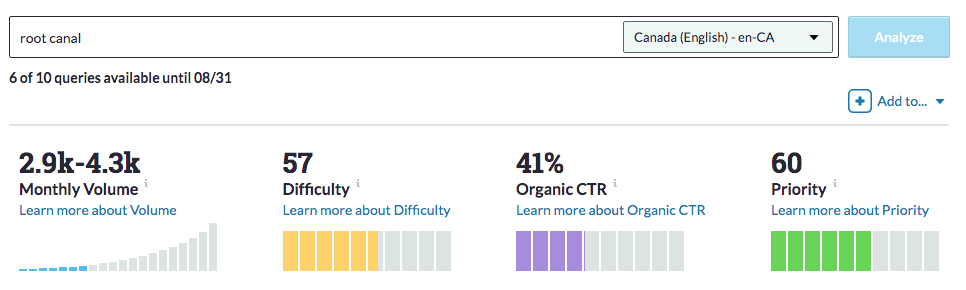
Using a keyword tool you can confirm the number of searches and the level of competition that each keyword possesses in order to finalize your decision. Here you can see the keyword root canal is a level 57 difficulty.

Moz keyword analysis for root canal

If your city us super competitive you may need to add a geo modifier in your title and URL to make your page hyper-local. By adding Toronto as the geo-modifier, this reduces the competition considerably.

Moz keyword analysis for root canal toronto showing drop in competition for local SEO by adding geo-modifier

Keyword tools can also give you insight into different ways to target the service that you’re offering. There is a list of options that are generated as suggestions to your keyword that you can use as alternatives or incorporate into your content to enhance the optimization of the page.

Keyword suggestions from Moz on root canal

Choose the keywords that offer the highest volume of traffic with the lowest competition. Whenever you consider pursuing a target phrase always use it a Google search yourself to see what results are displayed. You want to confirm that you’ve assumed the correct search intent that the keyword suggests.

For example, you should expect to see other dentist websites appear in a keyword search you’re considering to target. Anything other than your competition may suggest that the users are not looking to hire a dentist, but gather information or satisfy a different form of search intent.

Implement a content strategy that builds awareness and educates

A major part of driving traffic to your website is publishing content that is popularly being searched. SEO for dentists is not just about being found for one keyword, but also involves creating awareness and nurturing leads to build trust and confidence in your practice.

For example, someone who is nervous about getting a cavity filled may be searching Google for answers to questions they have about the experience. Creating a blog that answers these questions increases the number of visitors on your site. 

This approach to answering commonly asked questions not only goes a long way with potential clients but is also rewarded by search engines. Using a topical content structure to build on the depth of your services is a powerful way to drive more traffic from Google.

For every service you have, there are different stages people go through before committing to a dentist. These stages can be categorized as awareness, consideration and decision.

Buyer journey showing three stages

Some people may not know why they’re feeling pain when they bite into a pineapple. Your blog can address the potential causes of tooth sensitivity, cavities and provide the options for a solution. 

For many new patients, the information provided on your blog is the help they needed to overcome something minor. When something becomes more serious, they are now thinking of your website as a source for dental services from the awareness previously built. 

Educating your clients is a crucial part of the SEO cycle that drives more traffic by creating awareness, educating and building trust in your dental practice.

Publish location pages to expand your business

Location pages create a local presence in neighbouring towns and cities. For instance, if you’re in Toronto but would like your practice to appear in Mississauga, a Mississauga location page would be a solution to appear in search results specifically for that city.

Location pages allow your business to expand beyond the limits of your own city. Localized search results are largely influenced by on-page optimization and a local backlink profile.

Although you may not show up in the local pack without a physical address, an optimized location page can get your website to appear in the organic results in any city you target.

Publish local content

Use your blog to publish city-specific content as it relates to your business. Creating content about your city creates strong ties to your locality and will contribute to local rankings.

An example could be keeping updates on the various stages of recovery your city is experiencing that has resulted from COVID-19. Relating this to your business operations and how it affects the residents of your city contributes to positive local optimization signals.

On-page optimization

Every page on your website should target a specific keyword. In order to give your page the best chance at appearing for your keyword, you should ensure it is placed in all the right places. Use a plugin such as Yoast to make things easier by alerting you if any of the major on-page optimization attributes are missing. 

Here are a few of the main aspects of on-page optimization:

Use a keyword-optimized title with H1 tags

Your H1 tag should contain your keyword because it describes to search engines the most important content on the page. Most content management systems will tag the title of your page with h1 tags automatically.

Your title is one of the most important parts of your page because it’s what appears in search results. Be sure to include your keyword in the front end of your title to ensure it’s not cut off or truncated on smaller sized screens.

Write a compelling meta description

Your meta description is another crucial part of advertising your page in the search results. The description you use should create an interest in clicking through to your page.

Write your meta descriptions using keyword-rich descriptions. The use of keywords communicates to the user that they have found what they’re looking for and promotes a higher click-through rate.

Again, keep your target keyword near the front end of your description.

Use your keyword a few times within your content

In order to show that your page is highly related to your target keyword, it should appear in your copy at least a few times. There’s no need to repeat your keyword more times than that since it won’t make your page any more optimized. In fact, unnatural use of your keyword or excessive repetition may result in adverse results to your search visibility.

Use your keyword in the first 100 words or first paragraph whenever possible.

Optimize your images

Save your images using your keyword in the filename. If you have multiple images, don’t overdo it, simply use keyword synonyms.

The alternative description (or alt tags) tell search engines and the visually impaired what your image is about. Use your keyword and keyword variations with the alt tags of images you post. In this example of an image in WordPress, you can see the keyword improve on-page SEO highlighted in the area assigned for the alt tag.

Example of using alt tags on WordPress image

Use the correct dimensions for the images you post. If you have images that are 2000+ pixels, the chances are you won’t need an image that large. Reduce the file size to exactly what is required on your site will increase your page speed from reduced server requests and a smaller file.

If you’re using WordPress, install a plugin called Smush to compress your images. You can also implement “lazy loading” which delays images beneath the fold from loading until you scroll down towards them resulting in faster page speed.

Interlink your content

Using internal links can enhance the optimization of every page on your site. When you have a page that references the content on another page, you can use an anchor text link to connect the pages.

The text you use to link the pages should be descriptive in order to increase a search engine’s understanding of the content on your page. Use both optimized and un-optimized anchor text to interlink content on your website.

Building authority, credibility and ultimately ranking ability

If you’re no stranger to SEO for dentists, you might already understand the significance of building backlinks to your website. In order to build authority and credibility, your website needs “referrals” or “votes of confidence” from other websites. These come in the form of backlinks.

The main concept that ties ranking in with a strong backlink profile is that other websites find your content so valuable that it’s worth sharing with a link. 

In order to get the most from your backlinks, you need to focus on getting links that improve your credibility in your expertise, and in your locality. Acquiring backlinks from local sites in or related to your industry are considered the most powerful types of links.

Leverage the power of unstructured citations

An unstructured citation is an instance of your name, address or phone number being posted to another website-even though there is no set place for it to be listed.

For example, a directory listing is a structured citation because there are specific places to enter your information. A blog post that mentions the name of your practice is unstructured because the name of your company is used contextually within the content of a page.

List your professional resources for unstructured citations

Write a list of twenty people that you know have websites and are related to the dental industry. Ask the following questions:

  • Who do you order supplies from?
  • What companies do you work with?
  • What other dentists may support you with a link from their website?

Exhaust your network for likely candidates because the people who already know you are most likely to link to your site.

Search Google or link opportunities

Another method of identifying links is to search Google using specific command operatives such as inurl. 

You can look for sites that offer resource links and guest posting opportunities by telling Google to search for websites with a keyword in their URL.

For example, the command teeth whitening + inurl:links displays the following websites with pages that link out to other websites:

resource links for local SEO

Join a professional association

You can also become a member of professional associations. These sites will often link back to your site with a highly relevant backlink. Here’s an example of a profile from the Dental Industry Association Of Canada:

professional association profile

One practice that requires a bit of caution but is highly effective, is spying on your competitor’s backlink profiles. Enter the URL of a top-ranking website into an analytic tool like Moz to get a glimpse at the websites that are linking to the top websites ranking for your keywords.

competitor analysis by moz

Keep in mind that although you may find a lot of backlinks that point to a top URL, not all of them will be good for your site. In fact, some of those links may not be good for your competition either.

Make your decision based on relevance to your niche, city and whether the site gets a decent volume of traffic. You don’t want to go through the effort of getting a link on a graveyard site because Google won’t give you too much credit for those anyway.

Tracking and monitoring your progress

In order to adapt and grow, create measurable goals for your website. This cannot be achieved without tracking the performance of your website on a monthly basis. Two of the most powerful tools you’ll need also happen to be free of cost.

Make use of webmaster tools using Google search console

Just as you would open the hood of your car to see the engine, you open Google search console to see what’s going on with your website. Search console tracks the performance of your site as well as alerts you to any problems that it may be experiencing.

Familiarize yourself with the performance tab functions to see what pages are ranking. You can see your top-performing pages, how many times they appeared in searches and how many clicks they received.

sarch console performance tab

You can also monitor any errors that are being generated from your site that might affect page ranking.

search console errors

Google analytics

Although Google search console can show you a lot of information, you need Google Analytics for more specific details in reporting. Here you can customize reports, set goals and monitor goal conversions.

An example of a goal conversion could be to get visitors to make a call or book an appointment. You can set this up in Analytics by going to Admin, Goals, New Goal.

Goal setting in Google analytics

You can also see how your users are navigating your site.

Google analytics page flow

There are also comparative reports you can run to see whether your website is generating more traffic at any given block of time. You can compare previous years, previous months or any specific periods of time.

Option for comparative reports in GA

Tracking results is your only way of knowing whether your SEO efforts are paying off. Despite the advanced capabilities of Search Console and Analytics, if you’re interested in tracking your website’s rankings, you’ll need a separate rank tracking software such as Moz, Ahrefs, SEMRush, Rank Tracker, etc.

Capitalize on Local SEO for dentists and increase your revenue

Defining a local SEO strategy for your dental practice is one of the wisest decisions you can make for our business. SEO is one of the few marketing strategies that is growing in popularity and will only get more competitive as time passes. 

Take control of your companies growth by implementing the practices outlined in our guide. Build a local presence for your dental practice to guarantee the long-lasting success and growth of your business.

Christian Carere
Christian Carere

Christian Carere is the owner and founder of Digital Ducats Inc. in Toronto and heads the SEO team at Austin Bryant Consulting in Plano, TX.  Christian has been published on publications such as Search Engine Watch, Venngage, Small Biz Daily, Grasshopper, Data Box, Socialnomics, and Mention.
old.digitalducats.com/

Written by Christian Carere · Categorized: Local SEO, Toronto SEO, Web development

Jul 18 2020

What Is A Location Page And How Do I Publish One?

A location page is a location-specific page that ranks in a city, state, province or country that is built specifically for the location you target. Location pages are used to improve your local presence in another location.

If your business is capable of providing service to multiple areas (service area business or multi-location), this is an excellent method of creating a local presence in the city you’re targeting.

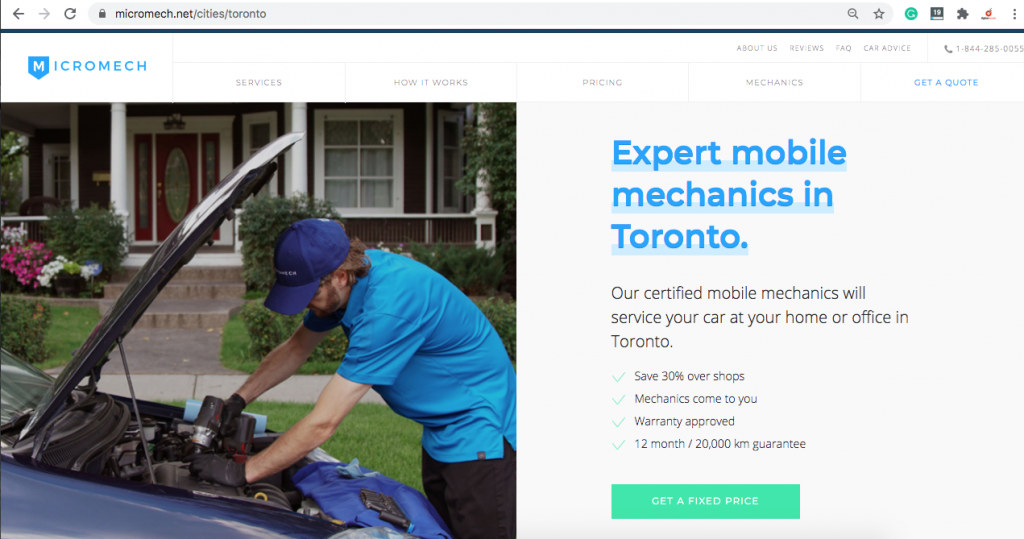
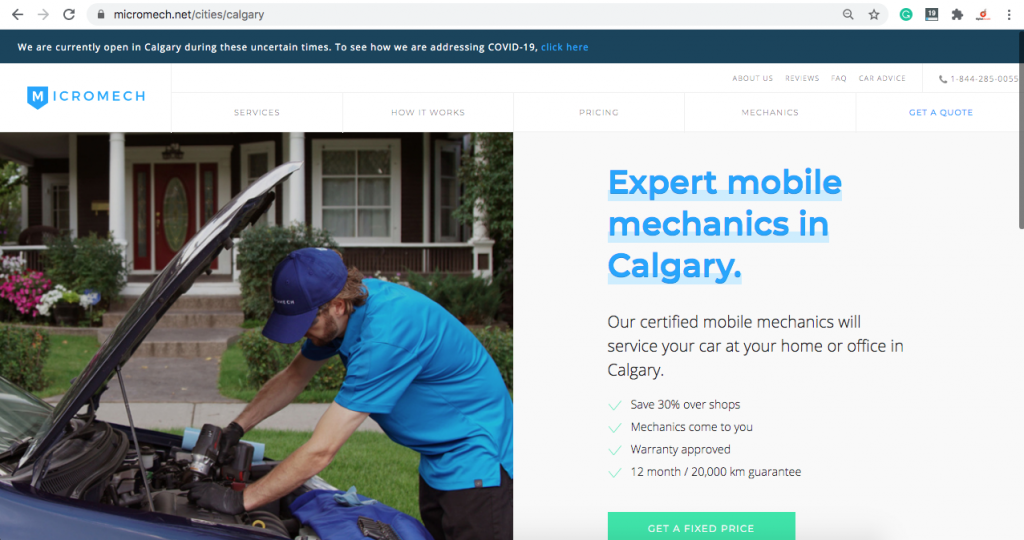
Let’s say, for example, you’re a mobile mechanic. You have a garage located in Scarborough ON, however, you’re able to service the Greater Toronto Area. 

Rather than optimize for searches just within Scarborough, you can build a location page to target searches for Toronto, or any other city surrounding Toronto as well.

Here is an example of a mobile mechanic location page for Toronto.

A location page for a mobile mechanic servicing Toronto

Here is another page on the same site for Calgary.

location page for calgary

This company is taking advantage of ranking in multiple cities to expand the areas in which they can do business. Here is a look at the service areas this busienss covers:

Multiple location pages targeting cities across canada

Whenever a user in another city searches for your service, your location page will have a much better chance of ranking on the first page.

Location pages are an aspect of local search engine optimization to expand your company’s reach and increase the revenue your business makes.

Why be tied down to one location if your company is capable of doing more business in more cities? It’s a similar concept to setting up franchise locations except your using web properties to stake your claim in other cities.

9 tips for publishing location pages

Location pages share similar characteristics that allow them to rank highly. To see your location page rise in the search results, address the following areas:

Target the most effective keyword

It’s impossible to optimize a page without doing any research on the keyword you’re targeting. Keyword research provides insight into the value of your target phrase and the level of competition you will be facing.

If you’re going to go through the trouble of ranking a location page, make sure it’s worth it. Your target phrase should drive enough relevant traffic to generate revenue. Choose the best keywords to target by going through the proper steps for keyword selection. 

Identify and satisfy the intent of the search

Establish the true intent of the search phrase to understand the type of traffic that is driven to your site. Keyword research helps to establish what visitors are looking for when they type in a particular search phrase. When your page satisfies the intent of the search there’s a better chance of ranking highly in the search results.

Are the pages that currently rank for your keyword informational, transactional, navigational or commercial?

The chances are most location pages will need to include a bit of everything. To completely take your prospects from and introduction to conversion, requires careful content planning.

Each competing page that ranks is major clues to how search intent is begin defined by search engines. This typically is a direct correlation to what users are looking for as well.

Optimize your page in all the right places

Optimize your page to target a specific search term that includes the city you’re targeting. Include the target keyword in the page title, URL and a few times within the content. Any images should have the keyword and keyword variations in their alt tags.

This is the bare minimum for basic on-page optimization, however, it goes a long way in local SEO. You can enhance your on-page SEO a number of ways but using the basics is a must for every location page.

Make your page hyper-local

Make your page hyper-local to the target city. If you can mention landmarks, or make city-specific references, it will tie your page to the locality. Link out to local sites and resources. Prove to search engines that you’re familiar with the area and cater to local residents.

Post name, address and phone number on your page

If your company has a physical location within the city, post the NAP details on the location page.

For service area businesses, a unique phone number with the city area code will help to optimize your page.

Use structured data markup

Use structured data markup wherever possible to help search engines better understand your page. This will also make your page more attractive to users and entice more clicks if you can generate rich results.

FAQ structured data markup is an example of a rich result. This snippet gets users to understand more about your business directly from the SERP. The extra space your search listing takes up attracts more attention and pushes your competition down the page.

faq rich results on a whitby location page

This type of rich results allows you to link to interior pages of your site. Help people to better understand what you can do for them with your product or service.

Reviews are another major type of rich result that is insanely popular.

Structured data markup makes your search listing more attractive with rich snippets. Although Schema.org has over 800 different categories to use, Google only offers about 30 types of rich results.

Implement structured data markup to increase the click-through rate and drive more traffic to your site.

Use an internal linking strategy

The linking strategy you use to build the authority of your page begins internally. Use descriptive anchor text and link from related pages to your location page. This builds the profile and authority of your location page.

In the same respect, link from your location page to relevant pages on your site. The links should help your visitors understand what your business offers.

This linking structure forms a basic topic cluster and highlights your location page as a pillar within your site. This linking structure will contribute to a more authoritative location page.

Build external links carefully

Use extreme caution when building the ranking ability of your location page with external links.

SEO best practices are to build links as natural as possible. Any unnatural link building patterns will be ignored and possibly have adverse results on your location page.

For example, it’s common for local businesses to have backlink profiles mainly comprised of directories and review sites. Local links will have the greatest impact on your location page.

You can indirectly link to your location page by linking to blog posts that in turn link to your location page. The link equity is transferred as a second-tier link. This builds more overall authority to your site and helps power the authority of your location page.

Publish local content

The content you publish on your blog has a large impact on how your site is viewed in a specific city. Search engines will take city-specific posts into consideration when they assess your site. Create blog posts that have very location-specific references to create more relevance in the city you’re targeting.

Link your city-specific blog posts to your location pages to include them in your topic cluster. This ensures that search engines connect your local SEO content to your location page.

Use location pages to build an empire

The beauty of creating an effective location page is that your business is able to expand the market in which it competes. You’re company is essentially setting up a new branch in another city by creating a page that ranks for your keywords.

When growth is your goal, create location pages to increase the traffic your site generates with visitors from different cities and locations.

Christian Carere
Christian Carere

Christian Carere is the owner and founder of Digital Ducats Inc. in Toronto and heads the SEO team at Austin Bryant Consulting in Plano, TX.  Christian has been published on publications such as Search Engine Watch, Venngage, Small Biz Daily, Grasshopper, Data Box, Socialnomics, and Mention.
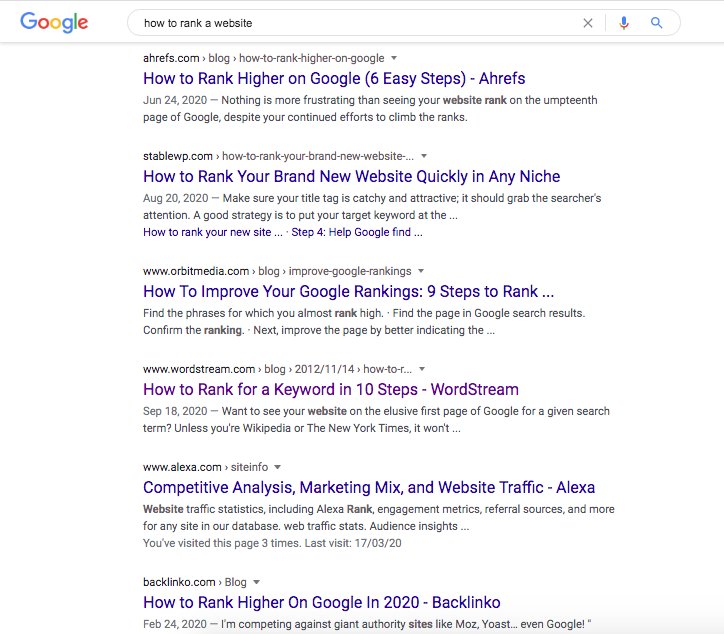
old.digitalducats.com/

Written by Christian Carere · Categorized: Local SEO, Web development

  • « Go to Previous Page
  • Go to page 1
  • Interim pages omitted …
  • Go to page 6
  • Go to page 7
  • Go to page 8
  • Go to page 9
  • Go to page 10
  • Interim pages omitted …
  • Go to page 14
  • Go to Next Page »

Footer

Need professional SEO advice?

Give us a call to learn more about how we can help your business

Call for a consultation Request a proposal

Request a free website analysis and proposal for your company by filling out the ” Request a Proposal” form.

  • Privacy Policy
  • Terms Of Service
  • Cities we’ve served

© 2026 · Digital Ducats Inc.