• Skip to main content
  • Skip to footer

Digital Ducats Inc.

SEO Consulting & Services

  • Home
  • About
    • SEO Consulting
  • Services
    • SEO
    • Local SEO
  • Contact
    • Pricing
    • Write For Us
  • Blog
You are here: Home / Archives for SEO strategy

SEO strategy

Oct 03 2023

The Importance Of Email Marketing Campaigns

Email marketing is one of the oldest digital marketing strategies that has proven to stand the test of time. No matter what your industry is, start building an email list as soon as possible to assist in the growth of your business. Here you’ll learn the importance of email marketing campaigns and how they become revenue-producing assets to your business. 

Email marketing campaigns are one of the oldest yet most effective digital marketing strategies

What is an email marketing campaign?

An email marketing campaign is a series of emails designed to educate, inform, entertain and delight any audience. The ultimate goal is to drive traffic back to your website as well as increase the number of sales your business makes regularly.

What’s an email list?

An email list is a collection of email addresses obtained through opt-in forms on your website, social media, or any digital publication you’ve posted online. Subscribers must enter their information and confirm that they agree to have you send emails sent to their inbox.

What content do you send in an email marketing campaign?

The type of content strategy you use will depend on the industry and niche your business is in. Typically, email campaigns consist of monthly newsletters, discounts, sales promotions, educational content and company updates.
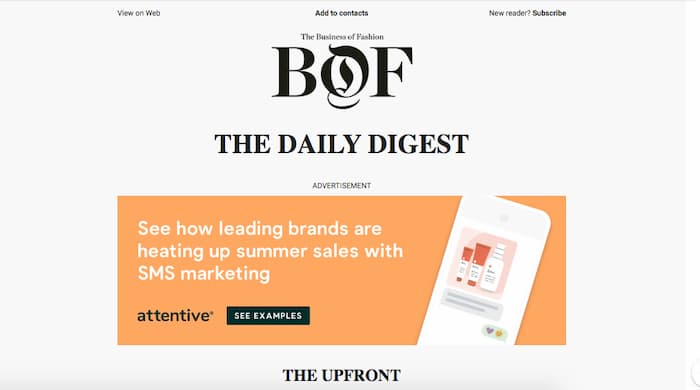
Newsletter example from an email marketing campaign

There are laws in place that protect people’s privacy as well as the type of content you can send. For example, you must offer an unsubscribe option in every email you send and honour that request should someone opt out of your list. There are penalties and fines for those who don’t abide by the laws that govern commercial email.

Read more about the CAN-SPAM Act and the compliance guide that deals with issues and requirements that must be met within your email campaigns.

AI email marketing

What is AI Email Marketing?

AI email marketing, also known as artificial intelligence-powered email marketing, involves utilizing AI technologies and algorithms to optimize and enhance various aspects of email marketing campaigns. It combines the power of artificial intelligence and machine learning to automate, personalize, analyze, and improve the efficiency and effectiveness of email marketing strategies.

Here are some ways AI is utilized in email marketing:

  1. Personalization: AI algorithms analyze data about individual recipients to create personalized email content, subject lines, and offers. This can lead to higher engagement and conversion rates.
  2. Segmentation and Targeting: AI helps in segmenting email lists based on various criteria, such as demographics, past behaviour, preferences, and engagement patterns. Tailored content and offers are then sent to each segment, improving relevancy.
  3. Automated Campaigns: AI can automate email campaigns by determining the optimal time to send emails, frequency, and even the type of content to be sent to each recipient. This saves time and ensures timely and relevant communication.
  4. Predictive Analysis: AI can predict future behaviour and preferences of recipients based on past interactions. This information is valuable for crafting targeted campaigns and offers.
  5. A/B Testing Optimization: AI can automate and optimize A/B testing by analyzing different elements like subject lines, images, layouts, etc., and identifying which variations perform the best.
  6. Content Generation and Optimization: AI can assist in generating email copy, suggesting subject lines, and even creating personalized product recommendations based on customer behaviour and preferences.
  7. Optimizing Send Times: AI algorithms can analyze recipient behaviour and engagement patterns to determine the best times to send emails for maximum impact.
  8. Customer Journey Mapping: AI can help map out and optimize the customer journey, ensuring that emails are sent at appropriate stages to nurture leads and encourage conversions.
  9. Feedback Analysis: AI can analyze responses and feedback from recipients, extracting valuable insights to enhance future campaigns and strategies.

AI-powered email marketing aims to improve engagement, increase conversions, reduce manual effort, and ultimately enhance the overall effectiveness of email campaigns through data-driven decisions and automation.

Click here to read more about artificial intelligence sending email.

Benefits of email marketing

  • Increase traffic
  • Increase revenue
  • Establish authority
  • Build relationships
  • Learn about your audience
  • Biggest ROI in digital marketing

Increase traffic

As a traffic generation tactic, email marketing works beautifully with a large list of interactive subscribers. At the click of a button, you can inform your entire list about new content, discounts, promotions or sales that you’re offering on your website.

With thousands of subscribers on your list, your website is literally Google-proof since you can generate traffic without ranking for a keyword. 

Of course, in order to build a list in the thousands, you need to have visibility in the search results, and social media or have access to a source of traffic for users to opt-in.

Increase sales

Email lists are excellent tools to use to increase the sales your business generates. With a subscriber opting in to receive emails, it gives you more opportunities to get your content, products and services in front of their eyes.

Generally, it takes between 6-8 touchpoints to generate a qualified lead. Email marketing gives you the ability to reach your prospects more times than you could without having an email list. The additional touchpoints keep your company fresh in the minds of your subscribers.

Not only do email marketing campaigns contribute to generating new clients, but they also provide a way to generate repeat sales from existing clients who have already purchased from your company.

Establish authority

An email list offers you the opportunity to demonstrate the expertise of your company to your audience. Whether it’s through a monthly newsletter or an in-depth blog post you want to promote, you have the ability to get this content in front of your subscribers.
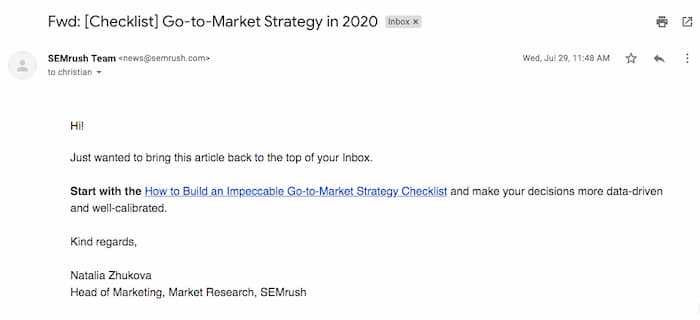
An email to inform about an in-depth blog post
An email with link to an in-depth blog post

When you’re consistently publishing top-notch content, you establish your company as an authority in your industry. The most popular form of content to establish authority is real-life case studies of how your company has helped a client.

When readers can relate to a real-life situation and see how they could also benefit from your services it becomes a powerful marketing tool. With a list of avid readers, there are plenty of opportunities to show how effective your products and services can be for your clients.

Build relationships

Active subscribers to your email list give you the opportunity to build relationships. When your subscriber sees and reads content from your company regularly, you become familiar with them.

Apart from just sending content that educates or is offering some sort of sales, you can also invite them to take part in events and giveaways. The ability to contact your list allows you to give back to your subscribers as a way to express your gratitude for their loyalty.

The give and take between you and your list builds relationships, brand loyalty and advocacy. When your clients feel like you’re looking out for them, you’ll have their support and loyalty for a lifetime.

Learn about your audience

Just about every email marketing tool gives you a summary of statistics on the success of your campaigns. Track valuable metrics such as the open rate and click-through rate to learn more about what topics and content your subscribers are most interested in.

The open rate of your email campaign can indicate the quality of your email subject line. An email that gets a super high open rate means your audience is highly interested in the topic you’re emailing about. This can be an indication for potential titles of articles that would also attract a high click-through rate on your website.
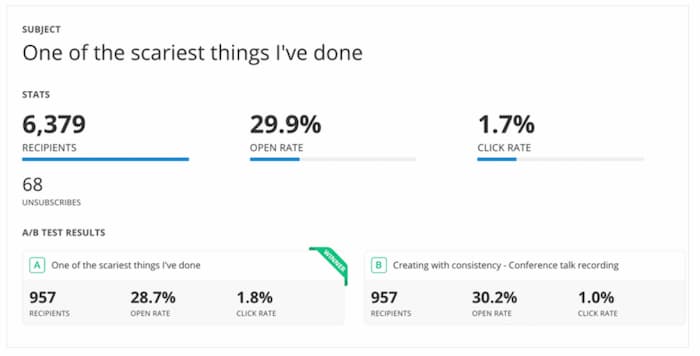
Email analytics to measure the success of an email campaign

Within the dashboard of your email marketing tool, you will also find the click-through rate of the email that was opened. Again, if a high number of users opened the email and clicked through to your website, you’re obviously providing content that is highly targeted to their interests.

If people deleted your email without clicking through to your website, you might want to consider changing up your email for something more engaging.

Surveys

The best way to learn what your audience likes is to just ask what they want to see more of to find out firsthand what their interests are. Creating surveys is an effective way of generating statistics and finding out the preferences of your audience. You can create more content based on your findings, and present the results using visual content-which typically generates more backlinks and earned media.

Biggest ROI in digital marketing

On average, email marketing produces the largest ROI in the digital marketing industry. The cost to start and maintain an email marketing campaign is so low that it’s not uncommon to see a 3800% return on your investment. For every $1 you invest you get $38 back.

The email marketing software is inexpensive. You can get free plans to start out or purchase plans that run as much as a few hundred bucks a month once you have a large list of subscribers.
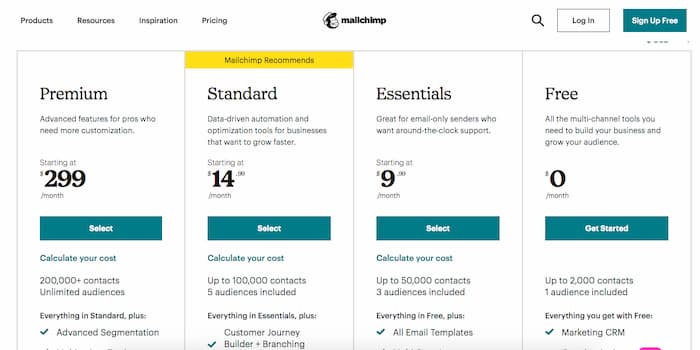
Mailchimp pricing

The biggest cost involved in an email marketing campaign is creating content. You’ll need to content to attract users to sign up for your list. Whether that’s through posting to social media, publishing blog posts, or offering gated content in return for contact info. Then you’ll need content to send out to your list once they’re subscribed.

Tips for creating an email marketing campaign

  • Post an opt-in form everywhere you can
  • Segment your list
  • Automate your campaigns
  • Don’t spam your list
  • Never stop learning about your audience

Post an opt-in form everywhere you can

This is pretty self-explanatory, however, you want to have as many ways for people to become subscribers as possible. That means having an opt-in box in the sidebars of your website, in the footer, in your social media posts and using a popover on your pages.

Segment your list

Make sure you’re segmenting your list into the most appropriate categories for your subscriber. You need to ask them right from the start what type of content they are most interested in receiving.
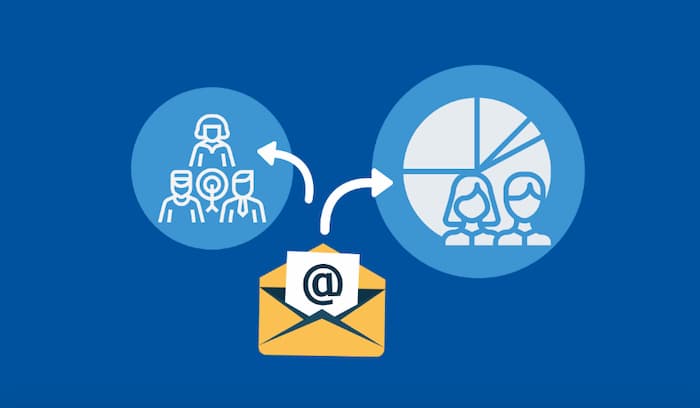
segment your email list to personalize the content you send

Regardless of whether you are super-niche-oriented and only talk about one product or topic, you can still find out whether your subscribers want to get a specific type of email. 

Give them the choice to receive offers, discounts, promotions, case studies, company updates or other content that you may be producing.

Personalize your email as much as possible in order to keep the interest of your subscribers. You don’t want your email getting the delete button because your subscriber gets tired of the content you send. Make sure you’re addressing the needs of your list by asking them right from the start about the content they would be most interested in.

Automate your campaigns

Use automation as much as possible to create a content schedule for new subscribers and existing clients. For new subscribers, establish a sequence of emails that introduces them to your product and company or the topic that they’re interested in reading about.

You can set your email marketing campaigns to send out an email on a set schedule whenever someone opts in to your list.

Don’t spam your list

The fastest way to lose a subscriber is to constantly bombard them with emails asking for sales and purchases. Avoid sending too many “hard sell” emails and mix up your schedule with content that helps to build trust.

Going for the kill too early and too often comes off as spam mail. You will quickly be dismissed as spam if you’re not offering value to your list members.

Never stop learning about your audience

Always be on the lookout for changes you can make to your campaigns. Whether it’s following up with your list, asking them for feedback or monitoring the engagement metrics your emails generate, make sure you’re making adjustments.

When you can continually add value and make the necessary changes to accommodate your audience better, you continually add value to your campaign. This approach leads to loyal subscribers and brand advocacy.

Build your email list ASAP

An email list can take a while to build up enough subscribers to the point where you can see the results in your revenue. It’s not always a straight shot to build a big audience and be successful with your content. There’s a learning curve to how you maximize your results.

Start building your list at the earliest point of the development of your website to provide the additional traffic, revenue and new clients your website generates regularly.

Christian Carere
Christian Carere

Christian Carere is the owner and founder of Digital Ducats Inc. in Toronto and heads the SEO team at Austin Bryant Consulting in Plano, TX.  Christian has been published on publications such as Search Engine Watch, Venngage, Small Biz Daily, Grasshopper, Data Box, Socialnomics, and Mention.

old.digitalducats.com/

Written by Christian Carere · Categorized: Content strategy, SEO strategy, Web development

Apr 29 2023

React SEO: Best Practices To Make It SEO-friendly

Search Engine Optimization (SEO) has become essential to any online presence. It not only impacts the success of a product or service in the marketplace but also affects the revenue and efficiency of any business owner, directly or indirectly. React websites face unique challenges when it comes to SEO due to the complex nature of the framework.  

With mobile users accounting for nearly 59% of all global website traffic, businesses recognize the importance of having effective digital marketing strategies that can expand their reach and draw in a larger audience than originally anticipated. Single Page Applications (SPAs) offer a viable solution to this problem, allowing companies to boost their reach and gain access to untapped markets.

Understanding Google Bot WebPage Crawling 

Learn how to make React SEO work for you

To optimize the SEO of a React web app, it is essential to comprehend how Google bots work and the common difficulties React solutions encounter. Google utilizes bots to rank websites, scanning your website’s pages and discovering new ones. You can avoid having too many bot requests by specifying the pages you want to be crawled in the robots.txt file. 

React applications are single-page applications, making it hard for the bots to crawl the pages. Technologies like React Helmet and server-side rendering can be used to ensure that the bots can access and index the pages effectively. It is also important to structure the React web app to enable bots to access the content easily. It can be done by organizing the content logically and using the appropriate HTML tags.

Google Bot crawls webpages by following the links on a page and then downloading the page it finds. It is done by using a process known as web crawling. The bot then reads the content of the page and stores it in an index, which is then used by the search engine to provide relevant results when a search query is made. It is important to note that the bot only reads the HTML code, not the JavaScript code, which can make it difficult for React websites to be indexed correctly.

Why is SEO Compatibility Important?

Search engine positions are incredibly vital nowadays. Studies show that 95% of all web users go to websites displayed on the initial page of Google’s results. If you want your app to be noticed by those who will utilize it, you must enhance it to be search engine friendly.

A recent study revealed that the top 5 search engine results page (SERP) listings account for over 65% of all web traffic. It demonstrates the significance of achieving a high ranking on Google.

Major SEO Challenges for React SPA Pages

When the crawler first visits a React single-page application, it is greeted with a blank page. The application elements appear on the screen as the HTML and JavaScript codes are slowly loaded.

In addition, various other issues must be addressed for a React single-page application to succeed. Let us discuss some issues:

1. Site mapping

A sitemap is a document outlining the structure of a website, including its videos, pages, and other branches. It helps Google easily crawl through the site and understand its contents. Unfortunately, React does not have a built-in method for generating a sitemap. If you use React Router to manage a route, you must find an external tool to generate a sitemap, which may require some effort.

2. Blank First Pass Subject 

React apps are known to rely heavily on JavaScript, which can make them difficult for search engines to crawl and index. It is because React uses an “app shell” model, where the HTML page does not contain meaningful content, and instead, JavaScript must be executed to display the page’s content. 

It means that when Googlebot visits the page, it sees an empty page, and only after the page is rendered does it get the content. It can create a significant delay in indexing thousands of pages.

3. Metadata of the Webpage 

Meta tags are helpful for social media sites and Google to show correct thumbnails, titles, and descriptions for a certain page. However, these websites rely on the tag of the web page to acquire this data. 

When a website or app does not use JavaScript for the landing page, React renders all the content, including the Meta tags. It makes it difficult for individual pages to modify their metadata as the app shell stays the same for the entire website or app.

4. Loading Period and User Interface 

Completing JavaScript tasks can be incredibly time-consuming, from fetching to executing to parsing. It is even more challenging when network calls must be made to gather the desired information, resulting in extended loading times for users. 

When assessing page rankings, Google considers this as long loading times can adversely affect the user experience and result in a lower ranking.

Methods to Make React SEO-friendly 

making react SEO friendly

React websites can be optimized for SEO during development, ensuring they are search engine friendly. Incorporating React for SEO best practices into the design and coding of websites will help to boost their rankings and draw in more organic traffic. Let us discuss some of the tricks to developing React apps with an SEO-friendly approach.

1. Prerendering Technique

Prerendering is a good way to ensure that a React single-page application complies with search engine protocols. It involves pre-generating and storing the HTML and CSS scripts and storing them in the cache memory. 

An algorithm then checks if the website request is from a user or a Googlebot. The browser will load the HTML file as usual if it is a user. If it is a bot, the HTML script stored in the cache memory is rendered instead, significantly reducing the loading time and eliminating the possibility of a blank page appearing.

Pros: 

  • Simple implementation
  • Compatible with trending websites innovations 
  • Requires less codebase variation
  • Executes every JavaScript file by translating it into static HTML.

Cons: 

  • No free services 
  • It takes longer time for large data files
  • You need to generate a new version of the page each time you change its content.

2. Isomorphic React Practices 

Isomorphic JavaScript Technology can automatically recognize if JavaScript is enabled or disabled on the server side. If disabled, Isomorphic JavaScript can take over on the server side and deliver the resulting high-quality content to the client-side server.

Once the page is loaded, all the necessary content and features are instantly available. With JavaScript enabled, the website behaves like a dynamic application, with multiple components that load quickly. It results in a smoother user experience compared to a regular website, providing a more enjoyable single-page application experience.

3. Server-side Rendering 

To develop a React Web application, you must know the distinctions between client-side and server-side rendering. Client-side rendering involves the browser receiving empty HTML files with limited or no content. In contrast, server-side rendering is a process where the server responds to a request with a completely rendered HTML page. Having a grasp of these two concepts is essential for creating a React Web application.

JavaScript code downloads the content from the servers and makes it available on the user’s screen. However, client-side rendering can create difficulties for search engine optimization (SEO) as Google’s web crawlers can either not see the content or see less content that has not been indexed correctly.

In contrast, server-side rendering provides browsers and Google Bots with HTML files that come with the complete content. This makes it easier for Google Bots to index and achieve higher rankings.

Pros: 

  • It offers optimization for social media pages 
  • Top-notch SEO compatibility 
  • Provides immediate page availability 
  • Improves UI features and functioning

Cons: 

  • Slower webpage transition 
  • Complicated catching functions
  • Costly than other methods

Tricks to Maintain the SEO Compatibility of React Webpages 

SEO compatibility of React

When crafting a SPA, developers can utilize one of the popular JavaScript frameworks such as React, Angular, or Vue. According to a recent survey, React is the most popular. Here are some of the tricks to develop SEO-friendly React websites. Let us start with the following:

  • Utilizing the URL Cases 

Google bots can be tripped up by pages with different URLs depending on the case of the letters, such as /envision and /or Invision. To avoid this issue, it’s best practice to use lowercase when creating URLs.

  • Less Use of <a href> 

A common mistake in developing SPAs is to use a <div> or a <button> to modify the URL. Although this is not a fault of React itself, it can pose a problem to search engines like Google. Google bots process URLs and look for additional URLs to crawl through <a href> elements. If the <a href> element is missing, Google bots won’t crawl the URLs and pass on PageRank. To ensure Google bots can identify and crawl the URLs, it is important to include <a href> elements for the bots to detect.

  • Constantly Solving the 404 Code

If you encounter an error on any page, it will likely display a 404 code. To fix this, it is best to update the files in server.js and route.js as soon as possible. Doing this can drive more traffic to your website or web app.

Final Words

Single-page React applications provide excellent performance, smooth interactions similar to native applications, a lighter server load, and easy web development. SEO issues should not prevent you from leveraging the React library, as strategies are in place to combat this problem. Additionally, search engine crawlers are becoming more sophisticated yearly, so SEO optimization may eventually become a non-issue when using React.

Jigar Agrawal profile pic
Jigar Agrawal

Jigar Agrawal is Digital Marketing Manager at eSparkBiz Technologies. He is passionate about anything related to Digital Marketing. Wants to unlock the world of technology and Social Media where every day there is a chance for new possibilities as well as innovation.

Written by Jigar Agrawal · Categorized: Local SEO, SEO strategy, Small business marketing, Technical SEO, Toronto SEO

Jul 18 2022

Local SEO vs Global SEO: What’s the Difference?

When you design a website, you have to decide which target market you are trying to reach. There are two types of SEO that can help you achieve this: Local SEO vs. Global SEO.

A good SEO strategy is essential for any business that wants to be successful online. But what’s the difference between local SEO and global SEO? And which one is right for you?

Here’s a look at the difference between the two, and how they can help you achieve your website goals.

The Search Engine

Before we get into the difference between local and global SEO, let’s take a quick look at how search engines work.

A search engine is a tool that allows users to find websites and information on the internet. When you type a query into a search engine, it uses algorithms to find the best results for you. These algorithms are constantly changing, which is why SEO is an ongoing process.

The search engine result pages (SERPs) are made up of organic results and paid results. Organic results are the websites the search engine has determined most relevant to your query. The paid results, on the other hand, are the websites that have paid to appear in the SERPs for a specific query.

The majority of clicks go to organic results, so it’s important to focus on SEO if you want your website to be successful.

What is Global SEO?

Global SEO is the process of optimizing your website for global search results. This means that when people search for keywords related to your business, your website will appear in the search results regardless of their location.

For example, if you’re a business that sells shoes, you want to appear in the search results when someone types “shoes” into the search engine.

It doesn’t matter if they’re searching from the United States, Canada, Australia, or any other country—you want your website to be one of the first results.

To do this, you need to optimize your website for global search engines like Google, Yahoo, and Bing. This can be a challenge because you have to compete with other businesses that are also trying to rank for the same keywords.

But if you can get your website to rank high in the global search results, you’ll be able to reach a larger audience and increase your chances of getting more website visitors.

What Is Local SEO?

Local SEO is the process of optimizing your website for local search results.

If you have a brick-and-mortar business, or if you serve a specific geographic area, then local SEO is essential.

When people search for keywords related to your business, you want your website to appear in the local search results. For example, if you own a bakery in Los Angeles, and someone searches for “bakery Los Angeles,” your website will appear in the search results.

Local SEO is important for any business that wants to be visible to local customers. And it’s especially important for businesses that have a brick-and-mortar location.

If you want people to be able to find your business when they search for relevant keywords, then you need to optimize your website for local SEO.

Why are the SEO Strategies Different?

global SEO has no regional limitations
[Source: Unsplash]

The strategies are different because the goals are different.

Local SEO is focused on getting your website to rank high in the local search results. When people search for keywords related to your business, your website will appear in the search results regardless of their location.

Global SEO is focused on getting your website to rank high in the global search results. This means that when people search for keywords related to your business, your website will appear in the search results regardless of their location.

How to Find the Local Traffic?

To find your local traffic, you need to use keyword research tools like Google AdWords Keyword Planner and Google Trends. Enter your keywords into these tools, and they will tell you how many people are searching for those keywords in your area.

You can also use these tools to find related keywords that you can target with your SEO efforts.

Once you know which keywords to target, you can start optimizing your website for local SEO.

To better understand your audience, customer behavior, and the competition in your area, you can always turn to the best big data company. That way, you can develop a comprehensive and effective local SEO strategy.

How to Optimize for Local SEO

There are a few things you can do to optimize your website for local SEO. First, make sure your website is responsive. This means that it should be viewable on all devices, including mobile phones and tablets.

Second, claim your business listing on Google My Business. This is a free listing that allows you to control how your business appears in Google’s local search results.

Third, add your location to your website. Include your city, state, and zip code on your contact page, and make sure your location is included in your website’s title tags and meta descriptions.

Fourth, create local content. This means writing blog posts about topics that are relevant to your location. For example, if you own a bakery in Los Angeles, you could write a blog post about the best bakeries in Los Angeles.

Fifth, build local links. This can be done by listing your business in online directories, or by working with other businesses in your area to create cross-promotional content.

Local SEO is an important part of any business’s SEO strategy. If you want people in your area to find your business when they search for relevant keywords, then you need to make sure your website is optimized for local SEO.

How to Optimize for Global SEO

In order to optimize your website for global search, you need to do two things: create high-quality content and build links from high-authority websites.

Content is still king when it comes to SEO, so your first step should be to create informative, well-written, and keyword-rich content. Once you have strong content on your website, you need to start building links from other websites.

Link building can be done in a number of ways, but some of the most effective methods include guest blogging, infographics, and directories.

Guest blogging is when you write a blog post for another website in your industry. This is a great way to get your name and your website in front of a new audience.

Infographics are visual representations of information. They are popular because they are easy to share and they can help you rank for multiple keywords.

Directories are online listings of businesses in a particular industry. Getting listed in directories can help you build links and improve your visibility in the search results.

Global SEO is a bit more complex than local SEO, but it is still an important part of any business’s SEO strategy. If you want people from all over the world to find your website, then you need to make sure your website is optimized for global SEO.

The Effect SEO Strategies Have on Each Other

The main difference between local SEO vs global SEO is the focus of the optimization efforts. However, the strategies are not mutually exclusive. In fact, it’s often beneficial to use both strategies together.

For example, if you want to rank high in the local search results, you need to make sure your website is responsive and that you have claimed your business listing on Google My Business.

But you also need to create local content and build local links.

Similarly, if you want to rank high in the global search results, you need to make sure your website is responsive and that you have included your location in your title tags and meta descriptions.

But you also need to create high-quality content and build links from high-authority websites. The bottom line is that both local SEO vs global SEO is important, and you should use both strategies if you want to achieve the best results.

Where to Start?

local SEO relies more on local links
[Source: Unsplash]

The first step is to assess your current SEO efforts. Are you focusing on local SEO or global SEO? 

If you’re not sure, then take a look at your website and see if it’s optimized for both local and global search. Once you know where to focus your efforts, you can start implementing the strategies we’ve outlined above.

Depending on the size of your business and your budget, you may want to consider hiring an SEO agency to help you with your optimization efforts.

An experienced agency will be able to help you assess your current SEO strategy and make recommendations for how you can improve your results.

The type of business you own could also tell you whether you need global or local SEO.

If you have a physical location that people can visit, then you need to make sure your website is optimized for local SEO. However, if you don’t have a physical location or if your customers are located all over the world, then you need to focus on global SEO.

No matter what type of business you have, it’s important to use both local and global SEO to ensure that your website is visible in the search results.

Having a strong SEO strategy is essential for any business that wants to be successful online.

Conclusion

Local SEO vs Global SEO are two different but equally important types of SEO. Depending on your business, your goals, and your budget, you may want to focus on one or both types of SEO.

If you’re not sure where to start, take a moment to assess your current SEO efforts and see where you can improve.

Harold Ader
Harold Ader

Harold Ader is a digital marketing specialist and freelance blogger from Manchester, writing exclusively for DigitalStrategyOne. In his spare time, you can find him in the garden or kitchen.

Written by Harold Ader · Categorized: Local SEO, SEO strategy

Jan 23 2022

How To Choose A Good Domain Name For Your Business

Choosing a domain name may seem like the easiest part of your journey, make no mistake, the selection and securing process are layered with pitfalls that can affect the future of your business. There is literally a list of considerations to ponder before deciding (hence the existence of this article!). Learn how to choose a good domain name for your business and you will be one step closer to experiencing success on the search engine result page.

Approximately 37% of all domains are .com but does that make it the right choice for you? Here are a few things to consider when you’re both choosing your domain and setting it up with your registrar.

Choose a name that’s easy to remember

Try to pick a name that best represents your brand but is simple to remember. It’s a great name when people can simply type it in and go directly to your website. It helps when the domain has something to do with the product or service you provide.

More often than not, a shorter domain is better.

One or two words are ideal.

Three words are acceptable.

Four words are overkill.

Using keywords vs. a brand name

Consider the SEO strategy when you’re deciding on the domain name of your website. If you’re in an intensely competitive field, you may want to avoid choosing the name of your business as the domain. Without a big budget, it may be difficult to rank your website for a keyword(s) that could literally be worth hundreds of thousands a year.

For example, to rank a lawyer’s website for the top keywords in a big city it would be advantageous to use big keywords that get thousands of searches a month. Look at the search result page for DUI lawyers Toronto.

how to choose a good domain for your business website

Two of the top five results include the keyword (or partial-which works well too) within the domain name. The third domain at the bottom does not have an exact match but Google recognizes the search intent and has matched this domain to the keyword search.

Note that none of these domain names mentioned is NOT the name of their law firm.

Avoid hyphens & stop words

Stay away from using hyphens and stop words that could lead to confusion or mistakenly landing on someone else’s website. Stop words are words that separate keywords but are generally filtered out by search engines.

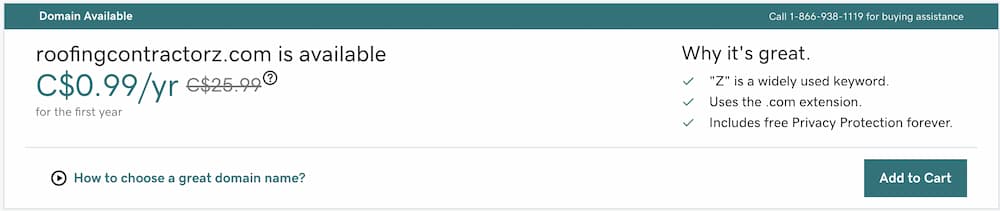
For example, plumbing-contractor.com is actually a pretty good domain name however, it would be better to get plumbingcontractordallas.com because

a) Plumbing is a service industry that’s limited to specific service areas (unless you’re a national franchise). and

b) You can still rank for plumbing contractor AND people won’t land on someone else’s site if they forget the hyphen.

There is SEO value in incorporating hyphens when you’re competing for a competitive keyword but it’s better to avoid it whenever possible.

Stop-words or adding letters and numbers to your domain is an SEO technique that can be useful. The problem is it doesn’t look very professional. Depending on the purpose of your site, consider whether you business is best represented by a domain like this:

domain with letter at the end

Choose a top-level domain (TLD)

TLDs are the domain extensions that are widely recognized and considered at the top of the list of options. These used to be the only TLDs during the first days of the internet:

  • .com
  • .net
  • .org
  • .int
  • .gov
  • .edu
  • .mil

Each of these TLDs represents a category that the content of the website fell under. Now there are over 1000 new extensions to choose from including country code TLDs. Here are just a few examples of what you may have seen if you’ve been shopping:

  • .digital
  • .agency
  • .club
  • .today
  • .solutions
  • .co
  • .shop
  • .biz
  • .pet
  • .blog
  • .io
  • .coffee
  • .online
  • .me
  • .xyz
  • .live
  • .co
  • .store

So how do you choose a good domain name for your business website? In most cases, the best option is to go with a .com since people are 3.8 times more likely to assume that the end of a domain name ends in .com.

This is good for businesses operating in the United States and who target a global audience.

If your business only provides services or products within your country, then using a ccTLD (cc=country code) is the best option. Search engines recognize ccTLDs as local businesses and will give some preference to websites in a local search result within your country.

Map of the top level domain names by country code

You can go outside the norm and get creative with your gTLD (g=generic) when you feel there is a good way to create a unique and memorable name. If you’re selling coffee beans, it may be advantageous in the long run to register www.beans.coffee as your domain name.

Secure your domain to avoid disaster

When you choose a good domain for your business website, you’re laying the first level of foundation for your business website. You will undoubtedly put endless hours of work (or money) into developing it. Building a business isn’t a short-term project either. Stop for a second to think of what life would be like if, after 6 years of pouring blood, sweat, and tears into your site, it suddenly disappeared from your account.

No words can describe the horror of this situation. It is a complete nightmare to live through. Believe it or not, this happens to people more times than you ever thought was possible.

Here are a few tips to make sure this never happens to you.

Switch your domain to auto-renew

Sounds simple enough right? When the time comes for your domain to renew, the payment is automatically made, and you’re all set to go. Most people lose their domain because they let it expire. Think your domain is safe now? Nope! There’s more to this story.

Enter a secondary payment method

Adding a secondary method of payment creates a failsafe for things that can go wrong. Perhaps you renewed your credit card and the number changed. Maybe your card was at the threshold and the payment didn’t go through. Whatever you think is impossible to happen can eventually find a way to happen.

Enter a secondary email address

Normally when your domain is set to renew (or expire) you get multiple email notifications that count down the days to give you time to pay. It’s not unheard of for people to switch email addresses and forget to update their address with their domain registrar.

Changing the [email protected] address to [email protected] might be the dagger that kills your communication method between you and your registrar. If they can’t tell you your domain is expiring or your payment hasn’t gone through, you’ll lose your domain.

Always maintain ownership of your domain

Never allow an agency to purchase your domain for you. If the domain is in their account, they literally own the domain. It’s like buying a car in someone else’s name who also holds on to the pink slips. If there is a falling out and they want to hold your domain hostage, there’s not much you can do about it.

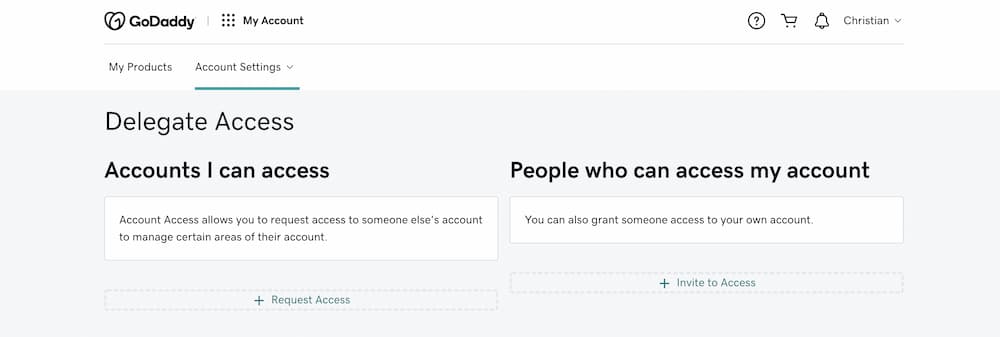
Delegate access rather than divulge login info

You can delegate access to employees and third-party companies who may need to point to nameservers, work on email accounts, or whatever. This way they can still access your account to do what they need to do but do not have the authority to transfer domains out of your account.

Option to delegate user access to employees when your domain is in the same account
delegate access when you choose a good name for your business that you don't want to risk losing

Lock your domain

You should have the option to lock your domain to prevent transfers to another registrar. It should be as simple as clicking a button or editing settings.

Enable two-step verification

Two-step verification is another way to control who has access to your registrar account. Every time someone (including yourself) tries to log in you will be prompted to enter a code. This prompt is usually sent to you via text, phone call, or email depending on your setup.

The shortcut to quick rankings

It needs to be mentioned that one of the quickest ways to achieve instant traffic and potentially high ranking in search engines is to buy a domain that has been around for a few years. One of Google’s ranking factors is trust. Aged domains are like fine wine. If they haven’t changed hands extensively, they get better with age.

That being said, this tactic is a well-known SEO tactic where we redirect the aged domain to a target domain that we want to rank higher. So you can use the domain itself (if there are no copyright infringements OR if it’s a generic name created for SEO you can use it for your own business. For example, https://seoallentx.com would be the perfect domain name if you wanted to rank for SEO Allen TX on Google.

Purchase from auctions and expired domain sites

You can find domains available for purchase on websites like Flippa.com and expireddomains.net. Afternic is an afterthought, so if you can avoid them-do it (I have personal grievances with this GoDaddy-owned lump of crap).

Businesses that are closing

If you know of any businesses that are scheduled to close their doors they could be in the market for selling their domain. Try to tender and offer personally before they list their domain on an auction site or it could be months before they actually sell.

Love the domain name you choose

At the end of the day, love the domain name you choose. If you’re going about your decision in the right way, you’re probably going to have that domain for a long time. You’re going to need to look at it every day and even if it’s a brand new domain it will gain value overtime just like your business.

Christian Carere
Christian Carere

Christian Carere is the owner and founder of Digital Ducats Inc. in Toronto and heads the SEO team at Austin Bryant Consulting in Plano, TX.  Christian has been published on publications such as Search Engine Watch, Venngage, Small Biz Daily, Grasshopper, Data Box, Socialnomics, and Mention.

old.digitalducats.com/

Written by Christian Carere · Categorized: SEO strategy, Web development

Jan 27 2021

7 Advanced SEO Strategies To Grow Website Traffic

Everyone has a website these days, but not everyone is ranking on the first page. How do you send droves of traffic to your website when thousands of others are competing for the same keywords? Here are some well-known advanced SEO strategies that are proven to increase website traffic for more leads and new clients.

  1. Repurpose content
  2. Re-evaluate your keyword strategy
  3. Build high-quality links
  4. Update, Merge, Delete
  5. Invest in video marketing
  6. Optimize, optimize, optimize…
  7. Optimize for local traffic
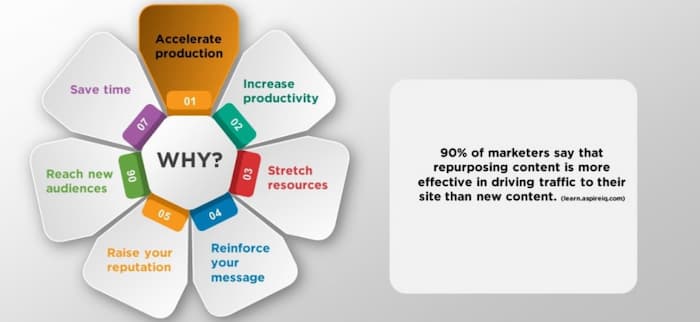
Reasons to repurpose content as an expert SEO tactic

Repurpose content

Choose one of your top-performing pages and repurpose the content into another form to take advantage of existing interest and the traffic already flowing to the page.

What does this mean exactly?

Let’s say you have a blog post on 7Advances SEO Strategies that get a high volume of search traffic. Use the content from that post and turn it into a video, podcast, infographic, slideshow or anything you believe will get a good response from your audience.

Why does repurposing content generate more traffic?

Using an alternative form of content gives you another way to deliver your content. Users all have different preferences on how they choose to consume content and so by providing multiple versions you open up new channels of interest.

Those that may have skipped through or skipped your blog post entirely may choose to watch a video or listen to an audio version.

The bonus of repurposing content that it’s not as hard to do as producing content from scratch. A good deal of the work is already done since you have a finished product. The content is already there it’s just a matter of putting it together in a way that users can consume.

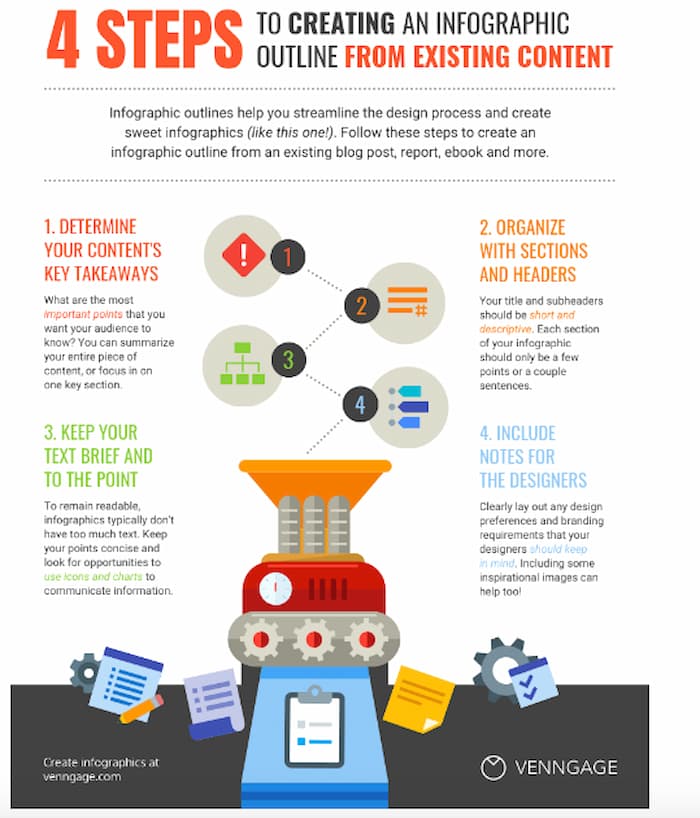
Repurpose your blog post into a new infographic

Turning a blog post into an infographic is a popular method of repurposing content. Visualized data has a much higher retention rate for people because it is a combination of images and facts. Images help visitors retain the most important points of a blog post.

Step one: The first step is to determine your key data points. 

What do you want readers to remember when they see your blog post? This will form the skeleton of your infographic.

Step two: Organize your infographic with sections and headers. 

The key to a good looking infographic is to make it look extremely organized. If everything is balanced and aesthetical it will make more sense to users when they read through the content.

Step three: Keep your text brief and to the point. 

The idea behind making the infographic is to give your audience the most important data points. Don’t try to transpose the entire blog post onto your image. Otherwise, they could just read the blog post.

Step four: Include notes for the designers. 

Be as descriptive as possible when making notes for the designers. You want your ideas to materialize as close to your vision as possible. Tell designers exactly what to do when it comes to branding, colours and images.

Here is an infographic from Venngage that walks you through these exact steps:

Infographic on how to repurpose content which is considered one of the advanced SEO strategies

Publish a video

Hey, have you heard about that new website called YouTube?! It should be obvious by now that if you’re going to publish a video, you’ll want to do it on YouTube. Not only is it the second-largest search engine in the world, but also, videos rank on Google all the time for high volume keywords. 

(Click here to learn about video trends in 2021)

Add YouTube traffic to your monthly search volume

Drive traffic from both Google and YouTube by publishing a video optimized for an important keyword that will drive traffic. YouTube is not as competitive as Google when it comes to ranking for keywords, which is something, you can capitalize on.

If you’re shy about being on camera, use the images from your infographic to make a video/infographic. You’ll need to be the narrator and be super engaging if you’re not going to show your face on the video.

Tips for optimizing your video

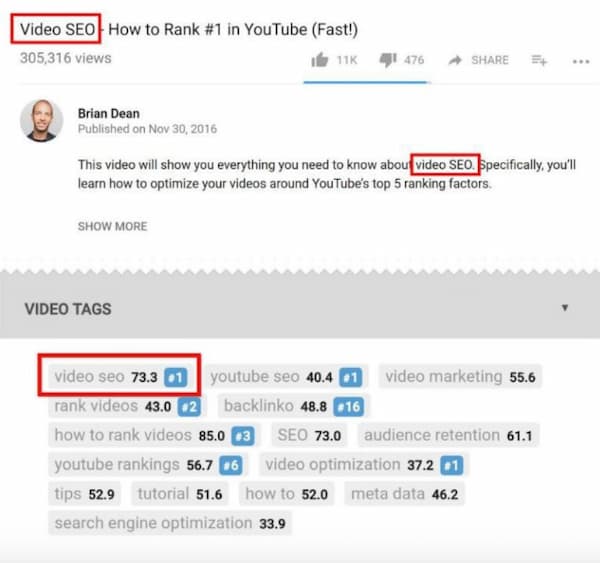
Make sure your main keyword is in the title, filename and tags. Take your video optimization to the next level by including a keyword-rich video transcript in the description. Add Chapters within your description to break up your video into segments. Take note of the top ranking videos and duplicate the tags they use since it also plays a big role in how YouTube sees your video.

This image highlights where keywords are located in YouTube video optimization. This is an advanced SEO tactics that will earn you a lot of traffic

Keep in mind that if people get bored and leave your video before it finishes, it will sink your YouTube ranking. Make sure there are no flat and boring segments. If you can’t help but be super boring then make your videos into short clips. Engagement is the key here.

Publish a slideshow

Slideshows are. away to repurpose content
Slideshare logo

If you’re going to go as far as publishing a video, you can easily import it to Slideshare to publish a slideshow. That’s not the only option for creating a slideshow. PowerPoint presentations convert perfectly and you can always make a slideshow from scratch.

Slideshows allow you to separate your content from the masses by providing a form of multimedia that isn’t as common as infographics and videos. They require user interaction which entices visitors to stay on your page longer and boosts engagement statistics.

Slideshare also has an average of about 80 million unique visitors a month with approximately 38 million registered users. This option can serve as an excellent source of traffic for B2B marketing.

Create bite-sized information for social media marketing

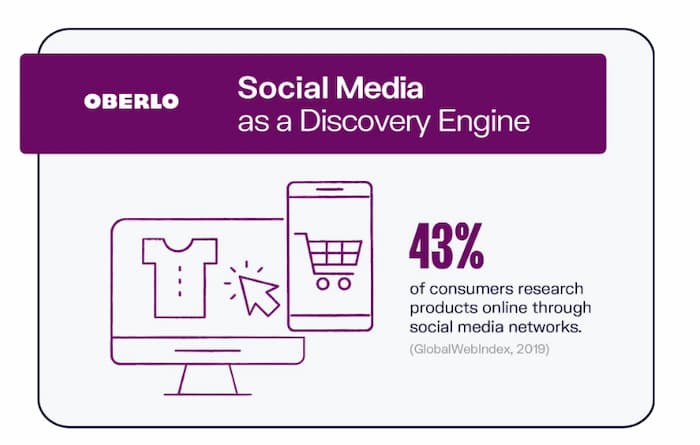
Divide your blog post into the most important points and post pieces of it on your social media one piece at a time. This can give your posts a longer lifespan for capturing interest and driving traffic to the blog post on your website. Oberlo does this really well with its infographics like this stat that was cut from their social media marketing infographic.

Example of making bite sized info for social media. Another advanced SEO tactis

Rather than one post of your entire blog article, you can use multiple posts that are more like teasers to get people to visit your page to read the whole thing. Not to sound like a broken record, but infographics are perfect for this type of social media marketing.

If you’ve turned your blog post into an infographic already you can use each segment as a social media post. Each post will be one of the main data points you’ve chosen for your infographic. With this already done you already have images and the most important messages ready to post.

Save time, resources and boost traffic with repurposed content

If you’re producing content regularly, repurposing content should be a regular part of your routine. It’s not easy to go through years of producing content regularly without experiencing overlap in topic and ideation.

Why not improve the quality of existing content and expand the reach it has by using multiple sources of traffic?

Re-evaluate your keyword strategy

There’s a common misconception that your keyword strategy is a “one and done” type of task. This couldn’t be further from the truth. Your keyword strategy should be re-evaluated periodically to expand on areas that are working to improve your bottom line.

Re-optimize for keyword variations

If there are keywords that are bringing in high converting visitors, you’ll need to pay closer attention to those phrases to build more content surrounding those issues and topics.

Why settle for one high-converting keyword when you can optimize for four or five similar phrases that work to produce the same results? There are many cases where you can get the same page to rank for more keyword variations by making small adjustments to optimize the page. To capitalize on those opportunities, you have to be aware of the keywords that are working to boost your business.

Publish relevant content

The content you publish is heavily influenced by the topics that are important to your audience as well as weighing in the business value the target keywords represent to your company. What you decided were the most popular keywords 5 years ago, heck, even one year ago may have changed in priority and almost most definitely in volume.

It’s important to stay updated on what is being searched the most to continue producing relevant content for your audience. Refreshing your keyword strategy is a way to ensure you’re up to date and delivering fresh and relevant content that drives traffic.

Steal ideas from your competition

An effective keyword strategy is not complete without doing a competitive analysis. Just as you may review popular terms being searched by your audience, you also want to check in on your competition to what terms they’re driving traffic from as well.

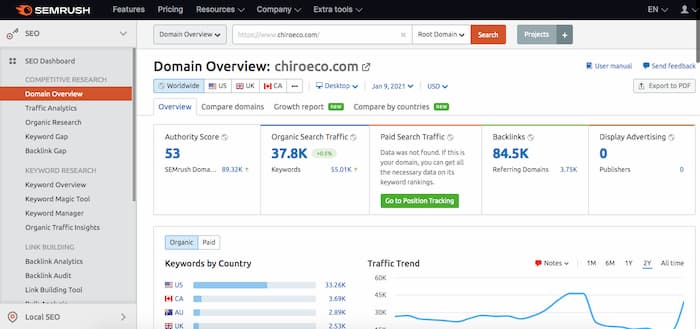
You can get ideas by running a competing URL through analytic software to see the both paid and organic traffic that is flowing through their site.

SEMRush software screenshot

If they’re executing an optimized PPC campaign, then paid traffic can speak volumes about what terms are making money for their company. Why else would they be paying for traffic if they weren’t making money from it?

The organic traffic that’s being driven is an indication of the content that’s being produced. If there are keywords they rank for that you don’t, take a closer look at the pages that rank to analyze the content and see if it’s a good fit for your audience.

If there’s business value in the search terms, you have new keywords and fresh content ideas to add to your keyword/content strategy.

A keyword strategy is a living entity

Think of your keyword strategy as something that is constantly evolving. Just as your rose bush needs priming and pruning, your keyword is also in need of fine-tuning to get the best results. Don’t stop adding keywords that work and taking some away those that don’t from your overall strategy. As your website develops over the years, re-evaluating your keyword strategy maintains relevant content and boosts traffic.

Build high-quality links

There’s no doubt that one of the advanced SEO strategies, high-quality backlinks increases the traffic to your website. Consider what makes a high-quality link and it’s a guaranteed fact that if you’re acquiring high-quality backlinks, you’re increasing search visibility.

If the link is on a highly relevant website that receives a lot of traffic, you’ll receive referral traffic with highly engaged visitors.

If the website has massive domain authority then that domain authority is transferred to your website, thereby raising your ranking ability. With improved rankings, the click-through rate from the SERP skyrockets.

IMage showing the CTR for SERP positions

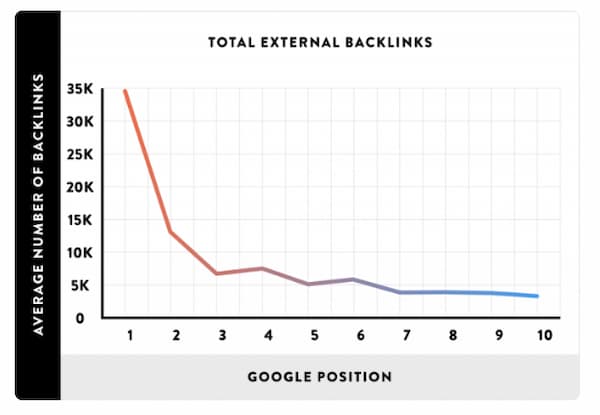
To be in the top 5 (top 3 positions are the bulk of the traffic) you need backlinks. The argument of what comes first, the chicken or the egg can be applied to this situation. Some debate that being in the top 3 ranked position leads to more backlinks, whereas others might say you need to acquire the backlinks to get to the top 3 positions.

Chart showing the relationship between backlinks and Google Ranking

Regardless of how you see it, it’s important to make high-quality link building a part of your routine for developing websites that rank at the top of the search results.

What’s the best way to build high-quality backlinks?

In an ideal world, the content on your website would naturally attract high-quality backlinks. Producing good content is a non-negotiable requirement to compete in the top 3 spots, but it’s not enough to acquire backlinks in a reasonable amount of time.

For a page to accumulate a high number of backlinks naturally, people have to know about it. It needs to be promoted through the proper channels and (ironically) have links built to it to get traffic flowing. Here are a few ways to build links to your pages to get your content in front of the right audience.

Outreach campaigns

This is one of the few methods reproducing natural link building at an accelerated rate. The concept of natural link building is people find your page, they like it so much that they link to it from their web properties.

In its simplest form, outreach campaigns are you reaching out to other website owners and telling them about your content and hope they like it enough to link to it. The major problem with this tactic is that it gets an abysmal conversion rate. Most simple outreach campaigns average an 8% conversion rate.

Here are a few themed outreach campaigns that boost your conversion rates to result in more links built to your page.

Broken link building

Broken link building is identifying broken links on your prospects page, contacting them to inform them of it and offering your link as a substitute for that link.

This tends to get a higher conversion rate because website owners care about the user experience of their pages. If there is a link that leads a user to a deleted page then it’s considered the link is contributing to a bad user experience.

By offering a page with content that is similar to what used to be there, you have more leverage by offering more value in linking to your website.

Read more on how to execute a broken link building campaign here.

Unlinked mentions

This form of outreach is themed to contacting website owners or authors who have mentioned your brand without linking to it. This receives a higher conversion rate on average because if your brand was worth mentioning, to begin with, most website owners won’t have a problem linking to your website.

Read more on how to execute an Unlinked Mentions link building campaign here.

Link reclamation

This type of campaign targets website owners that have linked to your website, but for some reason, your link was deleted. Links are deleted all the time, whether it by mistake, through updates or moved pages-it happens.

You can save a high percentage of lost links by simply reaching out to owners and asking them to replace your link.

Guest posting

This form of link building is probably among one of the top choices for business owners and SEO companies because it allows the opportunity for branding. Publishing an article on a popular website allows a company to demonstrate their expertise to an outside audience as well as a link back to their website.

Guest posting can land some high-quality backlinks when the websites you link from are highly relevant and have high domain authority.

Editorial links are also considered the crème de la crème of all the types of links you can get.

Read more on how to Guest Post here.

Update, merge, delete old blog posts

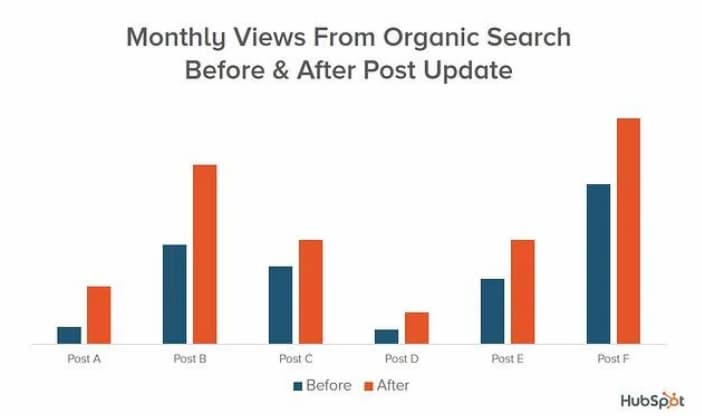
As a way to keep your blog content fresh, relevant and ranking highly, it’s important to update, merge and delete underperforming content. This is one of the advanced SEO strategies to add to a periodic routine for improved search visibility and high volumes of traffic.

Chart showing the impact of one of the advanced SEO strategies Hubspot used which was updating old blog posts

First off, Google prefers fresh content to stale content. There are some niches where fresh content is a ranking factor because of the continuous changes that can occur in the niche.

SEO is a prime example of a niche where things can change dramatically over a year. In many cases, there’s content that becomes irrelevant and out-dated making it completely obsolete.

Update old blog posts

Look for opportunities to update older blog posts that have slowly lost the traffic it once generated. The chances are that newer posts have been published that cover more information, cover new information, are more updated or just have more multimedia and value-added features.

Merge underwhelming blog posts

There are often situations where you’ve published blog posts that target similar keywords and answer similar search intent. If these blog posts are not ranking in the top 5 spots on the first page, you merge the two to create a monster blog post with more capability of ranking highly.

Combine the content of both pages to make your article a more comprehensive version. You will need to choose which page to keep and which one to delete based on the keywords within the URL and the backlinks that point to each page. It’s necessary to use a 301 redirect to tell search engines that content has moved from the deleted page to the merged page.

Google has made 301 redirects very clean in terms of transferring power from one URL to another, however, err on the cautious side and consider keeping the page that has more backlinks pointing to it. You can also use the volume of traffic and the keywords in the URL as part of choosing which page to delete.

Delete old posts with no traffic

It’s been proven that deleting pages that do not receive traffic can help increase your overall website rankings. Find pages that don’t rank well, or don’t drive traffic and delete the ones that aren’t contributing to your business.

The reasons to delete pages from your blog should match the following criteria:

  • The page has not received traffic within 90 days.
  • No backlinks are pointing to the page.
  • It’s a low-quality blog post.
  • There’s no business value associated with the post.

Use a 301 direct redirect to send users to new pages in case external links are pointing to those pages. You also want to save the link juice and send it to a similar page on your website.

Invest in video marketing

Video marketing boasts a slew of statistics that are pretty hard to ignore. One reason that stands out is that videos increase conversions by 80% when you add them to a landing page. This is backed by the fact that almost 90% of marketers are using video marketing in their digital marketing strategy.

Capitalize on social media traffic

Videos have been the preferred form of content for some time now by over 70% of people. The beauty of publishing a video is that once it’s on YouTube not only can you benefit from YouTube traffic but you can use it across multiple social media websites as well.

Facebook reports that video is the most shared form of content. Facebook stories, Insta stories are proving to be some of the most popular ways to get users’ attention.

Incorporate “Stories” for high engagement rates

The FOMO effect (Fear Of Missing Out) seems to be strong with most social media users. The idea of losing out on the opportunity to view a video (as such is the case with Stories) has proven effective for generating higher engagement rates.

Increase ranking on Google search

There’s evidence to support that incorporating video on your ranking pages can help push your ranking higher. Higher engagement statistics create a positive ranking signal and if you’re already ranking on the first page, it could be the added boost that pushes your website towards the first position.

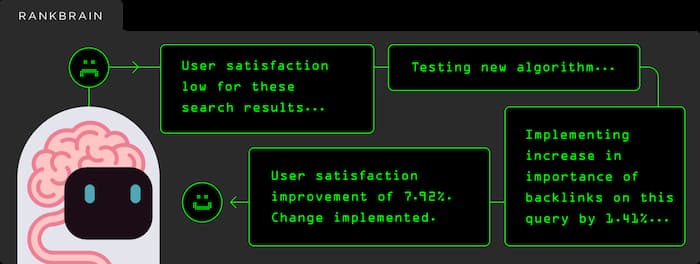
Rankbrain image of the AI assessing user engagement and assigning rank

Rankbrain factors in the user engagement statistics of a page to help determine what page satisfies search intent at the highest level. The most noticeable engagement statistic that increases is the average time spent on a page after adding a video. With more users spending more time on your page, the message is being sent that they are enjoying the content you’ve created, making your page more popular.

Increase traffic from Google SERP features

Your video can also appear in video carousels, the video tab on Google search, featured snippets, and the PAA box. As long as you have a link from your video to your web page, your video provides additional traffic to your website.

Optimize, optimize, optimize…

There’s always room to enhance optimization and get your page to generate more traffic. Optimization can occur in a few different areas both on-page content and building off-page.

Target featured snippets

Featured snippets are continuously appearing more frequently on Google, which is creating more opportunities for traffic and branding. Optimizing your content to appear in this feature is an absolute must when it receives the highest CTR. The fact that Google displays your website as the featured result contributes to the excellent branding of your company as industry leaders.

To learn more about optimizing for featured snippets click here.

Target PAA boxes

People Also Ask Boxes can also add a substantial number of visitors to your monthly volume of search traffic. If you rank for one of the questions in the PAA box, there’s a good chance you rank for several variations of that question.

You can optimize for the PAA box by answering popular questions that appear in the box. Tag your question using an h2 or h3 tag and use short, succinctly summarized answers directly after the question.

Optimize for search intent

Optimizing for search intent is a continual process. Make sure your content adequately covers the same topics as any of the competing pages in the top 10 results.

You can create a better page by expanding your topic coverage or improving your multimedia.

Optimize using anchor text links

The number of optimized anchor text links pointing to a page affects the page’s optimization. You can enhance the overall optimization of a page for a specific keyword by concentrating or diluting the anchor text ratio of the keyword you’re targeting.

(Read more on anchor text optimization here.)

Optimize for local traffic

Capitalize on high converting local traffic by optimizing your website with a local SEO strategy. Whether you have a brick and mortar business or not, it makes sense to pick up on searches being made within your area that can land you some extra business.

Creating a Google My Business profile is non-negotiable. It’s one of the easiest things to do-although optimizing your profile can be a little more involved.

Local SEO strategy includes Google My Business (image is the logo)

How to optimize your GMB profile

The first order of business is to fill out the basic information about your business. Make sure you enter data on every single field that’s available. The more information you provide to Google, the more searches your listing can appear for.

Small details count

Some businesses fail to enter their store hours. Let’s say that your store is open late yet if someone searches “X type of stores open late” you won’t appear because you didn’t enter store hours. Make the effort to include the small and simple details since they can land you more traffic.

Categories

Choose the categories that most applicable to your business. Search for important keywords you want your website to rank on the first page. Double-check what categories the companies listed in the local pack have declared. The difference between being a men’s tailor and a men’s clothing store can have an impact on how high your listing is ranked for specific keywords.

Add citations

To rank as a local business you need to have links from local websites and local directories. List your business in the top directories that are well known, such as Bing. You can transfer your GMB profile directly to a Bing account.

Use other websites like Yelp, Yellow Pages, Foursquare to get local traction in the search results. See more on the local link building here.

Increase traffic systematically using expert SEO tactics

The traffic generation ideas mentioned above are considered advanced SEO strategies and can be used to increase the volume of traffic your website receives regularly.

If you don’t have time to implement these SEO strategies yourself, feel free to send us a message for professional assistance. We’ll give you a full site analysis free of charge and let you know which of these tactics will help you generate the most traffic to your website.

Christian Carere
Christian Carere

Christian Carere is the owner and founder of Digital Ducats Inc. in Toronto and heads the SEO team at Austin Bryant Consulting in Plano, TX.  Christian has been published on publications such as Search Engine Watch, Venngage, Small Biz Daily, Grasshopper, Data Box, Socialnomics, and Mention.

old.digitalducats.com/

Written by Christian Carere · Categorized: Content strategy, keyword research, Link building, Local SEO, On-page optimization, SEO strategy, Technical SEO

  • Go to page 1
  • Go to page 2
  • Go to page 3
  • Go to Next Page »

Footer

Need professional SEO advice?

Give us a call to learn more about how we can help your business

Call for a consultation Request a proposal

Request a free website analysis and proposal for your company by filling out the ” Request a Proposal” form.

  • Privacy Policy
  • Terms Of Service
  • Cities we’ve served

© 2026 · Digital Ducats Inc.