• Skip to main content
  • Skip to footer

Digital Ducats Inc.

SEO Consulting & Services

  • Home
  • About
    • SEO Consulting
  • Services
    • SEO
    • Local SEO
  • Contact
    • Pricing
    • Write For Us
  • Blog
You are here: Home / Blog

Dec 01 2020

How To Perform An SEO Competition Analysis

One of the biggest components of search engine optimization is being able to perform an SEO competition analysis. It is a necessary evil of SEO that must exist in order to identify what it takes to rank in the top positions.

Analyzing your competitor’s can reveal an incredible amount of information about what is being used to rank highly. Search intent is a major point to tackle when it comes to providing content that ranks highly. If you can identify what it is and how it is being answered you have a major ranking factor taken care of.

Part of that process is also identifying the keywords and backlinks that your competition is using to fuel a top ranking in the SERPs.

This article details the various tools, strategies and steps in an SEO competition analysis that are used to uncover information about the websites that are ranking for your target search terms. 

Perform a SERP Analysis

When you want to rank for a specific keyword one of the first things you want to do is get an idea of the competitive landscape. Your competition in the real world may not be an exact reflection of who you’re competing with online.

SEO can be an area that some companies pursue more aggressively than others. It’s possible there are major competitors in your industry that could have a location on the same block as you and yet they’re not ranking for the same keywords.

The flipside of the coin is that there may be companies you haven’t heard of that are on the first page of Google for important keywords to your business.

The point is that you need to look at the search engine results page for important search phrases to get an idea of who you’re competing against.

Assess the authority of your competition

The authority of a website refers to the level of trust, credibility and overall ranking ability it has in your industry. When a website has a lot of backlinks pointing to its domain, it will have high domain authority. You’ll need to compare the authority of the domains that rank in the top 10 positions to your own domain authority for every SEO competition analysis you perform.

What is domain authority?

Domain authority refers to a website’s ability to rank based on the number of links it has acquired from credible websites. It’s important to understand that Google uses what’s called PageRank to assign a value to a page based on its ability to rank.

Although no one knows for sure how PageRank is determined, we know that a good deal of it is based on the quantity and quality of the backlinks pointing to the page.

Google’s patent states that the popularity of a website can be determined by how much it is being shared on the web by other websites. The number of backlinks from related websites speaks to the credibility of the content.
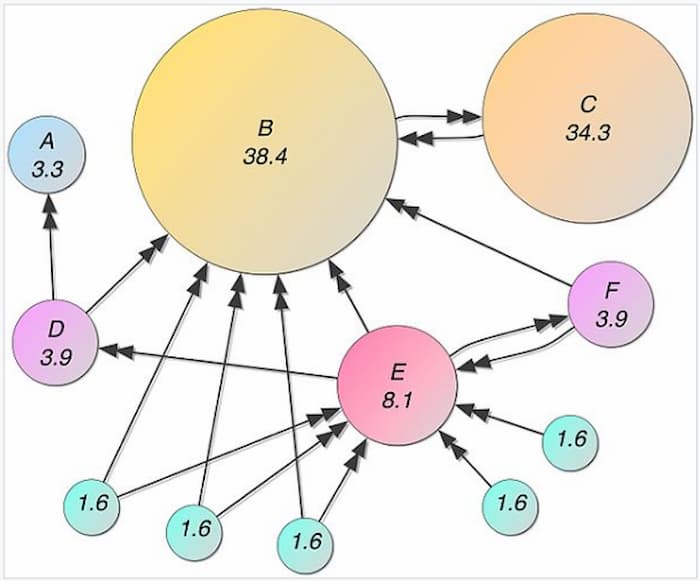
To perform an SEO competitive analysis PageRank is estimated using analytical tools

Therefore, links from websites that have accumulated a large number of backlinks from other websites with high volumes of backlinks (authority websites) will have the most impact on a website’s authority rating (or PageRank) and ranking ability.

How do you measure domain authority?

Google stopped publicly displaying PageRank in 2016 in an effort to reduce page sculpting tactics and rank manipulation. In the absence of PageRank, companies like Moz, Ahrefs and Majestic developed their own system for assigning authority.

Moz: Domain Authority and Page Authority (DA and PA)

Ahrefs: Domain Rating and URL rating (DR and UR)

Majestic: Trust Flow and Citation Flow (TF and CF)

Although none of these units of measurement is the exact formula Google uses to determine PageRank, they provide a gauge for determining the authority of a site. Each authority rating is based on the quality and quantity of the linking websites. Whichever form of measurement you use it’s wise to keep it consistance in an SEO competition analysis.

What’s the difference between domain authority and page authority?

Domain authority refers to the strength of the domain as a whole. It’s a measure of the total backlinks that are pointing to all of its pages.

Page authority refers to the strength of a page only. Page authority is derived from the backlinks that are pointing to it as well as the inherent authority passed on from the domain.

The advantage of high domain authority is its ability to rank. As a result, its pages will inherit a minimum amount of authority when they are published which means because of the authority the domain carries, the pages will not need as many backlinks (if any at all) to rank for a keyword it’s targeting.

Related reading: How to Make Your Site Appear First On Google

For example, brand new websites start with a DA of 1 (using Moz system of measuring domain authority). When it first publishes a page, it will need to acquire backlinks to compete with a website that has a DA of 50 since it’s newly published pages mostly likely start with a page authority with a DA between 20 or 30.

Websites with high domain authority rank for more keywords mainly because they have more backlinks.
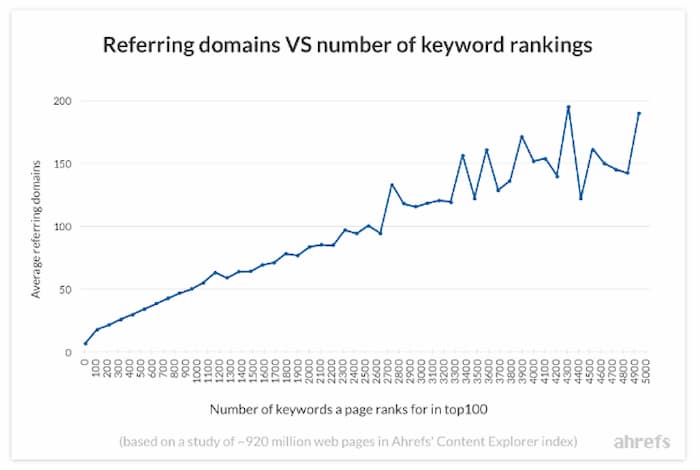
This chart shows the number of ranking keywords increases with the number of referring domains

Tools to compare domain authority

One of the most convenient ways to compare domain authority directly from the results page is to use a plugin that gives you a quick summary of the pages on the SERP. Each of the major analytic tool companies offers their own version but Mozbar seems to be among the most popular because they offer a free version that gives you the DA, PA and number of backlinks, which is exactly what you need to start your comparisons for your SEO competition analysis.

Use plugins for a high-level SERP assessment

Here is an example of how the SERP looks when using the Mozbar.
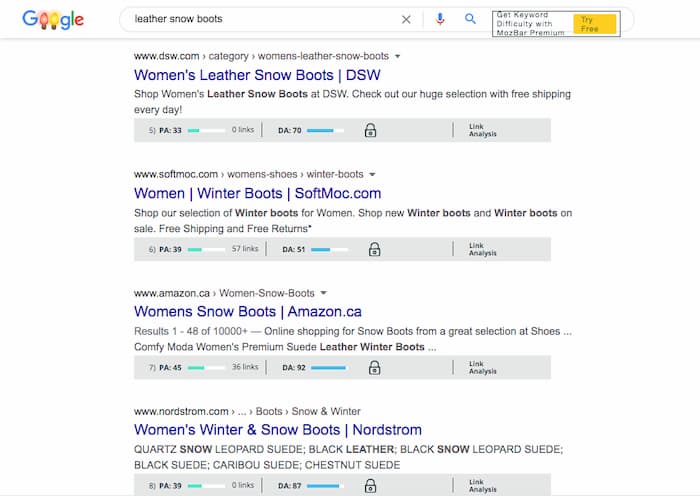
Example of Mozbar used in an analysis of the SERP

You can immediately get an idea of the domain authority, page authority and the number of backlinks for each website in the top 10 results. Of course, this is at a high level to give you an idea of whether you should look deeper into detail.

Ahrefs also provides a toolbar with more capabilities; however, you need to subscribe to their service to get the features.

If the websites on the SERP are comparable to your own, you can look at the top five domains individually to come to a greater understanding of what types of links are being used to rank the page. 

Backlink Analysis

Whenever you’re assessing a competitor’s backlink profile, you should take note of the referring domains, the types of links and the domain authority of the linking sites. You’re looking for possible opportunities to get these links yourself, while also trying to establish a strategy for your own link building campaign.

Referring domains

The number of referring domains is an important metric in your SEO competition analysis because it paints a clearer picture of the strength of the domain. In the situation where two domains have the same number of backlinks, the one that has more referring domains is going to have more authority (depending on the quality of the links of course). The website with less referring domains means they received multiple backlinks from one site in particular, which wouldn’t be as strong an indication of the popularity of the website.
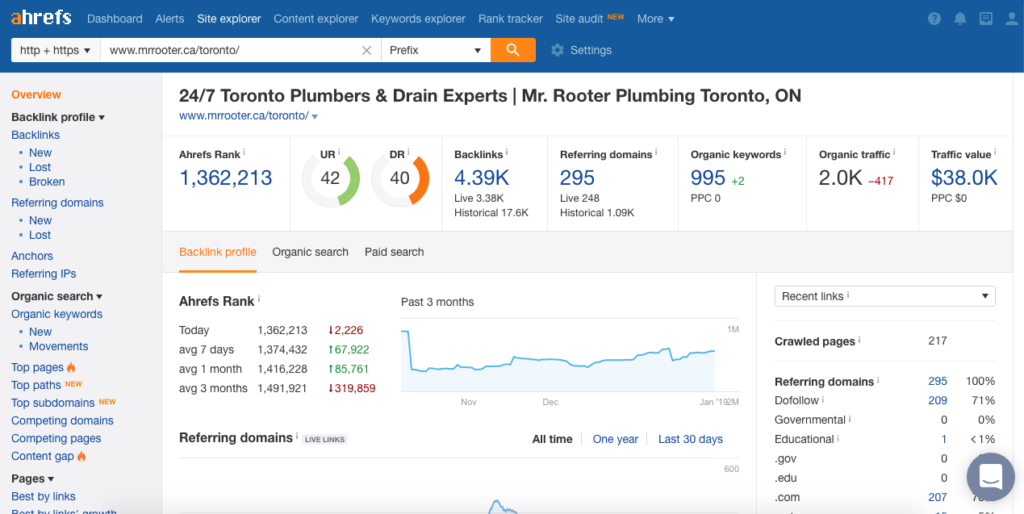
Image of Ahrefs dashboard to illustrate the number of referring domains.

Gauge the number of backlinks needed in your link building campaign

This aspect is important to note when assessing your competitors link profile. If there are a high number of referring domains, you’re going to need to build a prospect list that yields comparable numbers. Surpassing the number of referring domains can put your website out in front of the ranking.

Find likely linkers

Another aspect of comparing referring domains to the total number of backlinks is determining who are the websites most likely to link to your content. When there is a high number of backlinks compared to referring domains, it means there are websites linking more than once to your competition.

You may be able to reach out to websites that are linking multiple times to your competitor’s pages since you share the same topics. If they are enjoying your competitors’ content you can look up the pages that they’ve linked to and use the skyscraper method to publish something similar but better.

You would then reach out to the likely linkers and them about your improved version of content and ask them to give you a link.

Identify low-quality links

Although you never aim to use low-quality websites in your link building campaign it’s important to identify them during an SEO competition analysis to uncover opportunities. If you find that a page is ranking from a lot of low-quality links, you may be able to outrank it with just a few quality links.

Reverse engineering how your competition is maintaining their top ranking provides insight into how you strategize your SEO campaign.

Content gap analysis by keywords

One of the best ways to identify relevant content to rank a page is to find the keywords that a competing page ranks for that you don’t. In order for a page to rank for a keyword, it has to have content that satisfies the intent of the search.

 When you find unique keywords a competing page ranks for and you don’t it’s an opportunity to optimize for that term to improve your page’s ability to satisfy search intent. The additional content will not only add another keyword to rank for but create more relevance for your initial target keyword.

Traffic analysis

The traffic a website receives determines the success of generating leads and revenue. You can learn a lot about how a company generates revenue by analyzing both their organic and paid traffic.

Organic traffic

Organic traffic mainly comes from content that ranks, as well as direct searches for a business. Run a report on the non-branded terms that a website ranks for to see whether there are new opportunities for your website to rank.

You can run a keyword gap analysis on the top 5 domains you compete with in order to streamline this process. Most major analytic tools offer this option. Here’s a screenshot from SEMRush on their version.
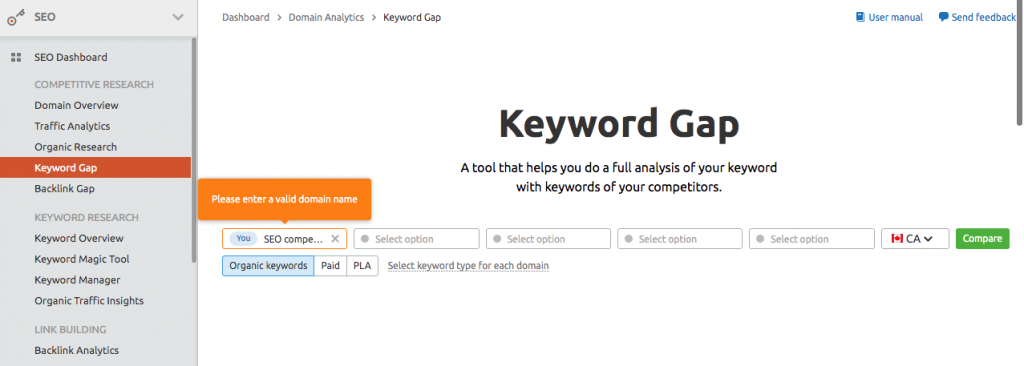
Learn how to perform a keyword gap analysis as part of your SEO competition analysis

Paid traffic

Here you will find some of the highest converting terms that you may not find from a regular keyword report. Look to see what keywords are in your competition’s paid traffic report because they are obviously making money on those keywords if they’re paying for every click to their website.

You may want to create a landing page optimized to target these terms as they’re usually transactional terms that users are typing into search engines. 

Sales script

One of the things to look out for is the way your competition is writing ads. If an ad is successful in attracting a high number of clicks, it most likely has wording that’s working to attract users’ attention. Promote a higher click-through rate by using similar phrases to generate a higher CTR.

Identify and duplicate content type

It’s advisable to follow the most predominant type of content that ranks on the first page of the search results. Remember that search engines place a high priority on a website’s ability to answer search intent. If there is a popular content type that populates the first page, it’s because search engines are favouring that format.

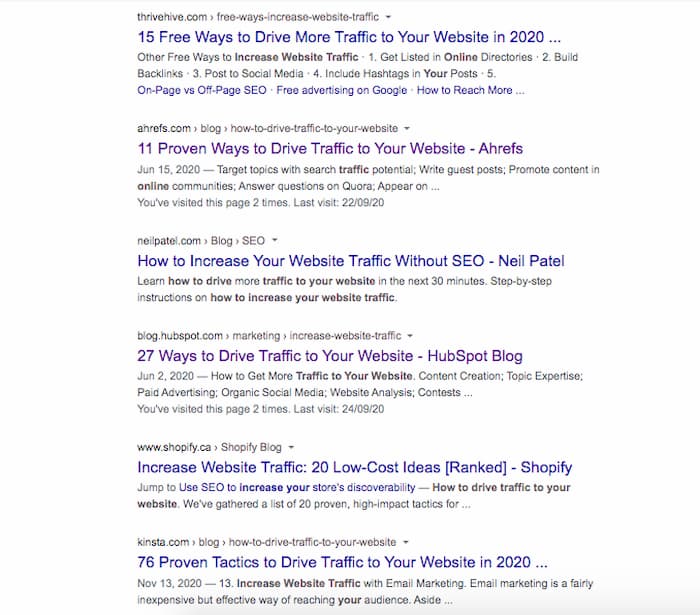
For example, if 5 of the top 10 results are list-styled forms of content, you would improve your page’s chance of ranking if you followed suit. If you search the term “How to drive traffic to your website” you would see that 8/10 pages are numbered lists. 
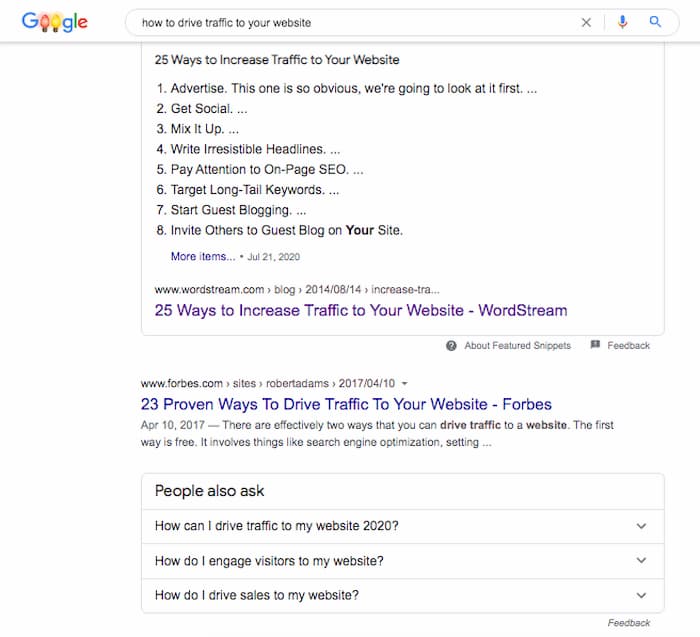
Example of list-styled content type identified during an SEO competitive analysis
More evidence of list-styled content found in an SEO competitor analysis

If you wanted to rank for this keyword, you would have the best chance at ranking by writing a list-style piece of content, like 33 Ways To Drive Traffic To Your Website.

Similarly, if you’re seeing guides or in-depth pieces of content being published, it’s a clue to the level of detail you need to commit to your content.

It’s next to impossible to rank a 300-word article when every page on the top 10 is over 3000. There’s obviously content being covered in a long-form article that would be impossible to cover in a few paragraphs.

Exceed the standard of quality set by an SEO competitive analysis

If you’re not familiar with 10X content, it basically is content that is 10 times better than anything else on the SERP. Aim to produce 10X content in every aspect of your website’s development to destroy your competition.

A strong analysis of your competition provides insight into how to overtake their positions. Follow the step outlined and you’re well on your way to enjoying the success top rankings bring to your business.

If you don’t have time and want to know how we would do it, give us a call or email us for a proposal. We provide a thorough competitive analysis as part of our SEO services for each of our clients.
Written by Christian Carere · Categorized: Web development

Nov 29 2020

How To Find & Fix 404 Error Codes

The technical performance of your website is one of the many moving parts that play a role in search engine optimization. An error-free website that functions on a high level is a strong characteristic shared among top-ranking websites. At some point in time, every website will show a page not found 404-error code. This article will show you how to find and fix 404 error codes. 

What is a 404 error code?

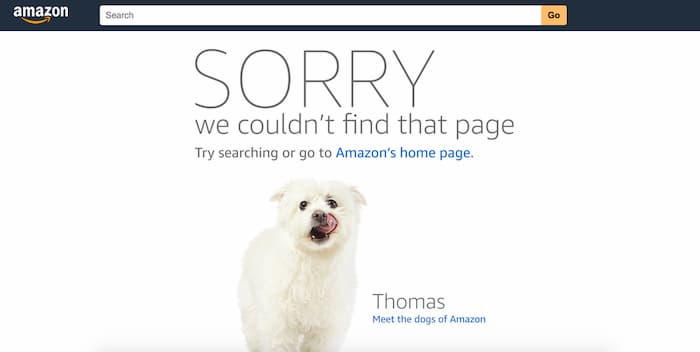
Whenever a link points to a URL whose page does not exist, a 404 error code is generated. The result is usually a page that tells the user that the content no longer exists or cannot be found.

Amazon 404 not found page example

404s are generated from one of three reasons:

  1. The page was deleted
  2. The page was updated or moved to a new URL
  3. The page does not exist

What is the significance of a broken link/missing page on your website?

Like most things in search engine optimization, the main underlying issues are related to user experience and authority.

Reduced user experience

Developing a website that is user friendly and provides an enjoyable user experience should be a priority for publishers and site owners to ensure your site demonstrates higher user engagement.

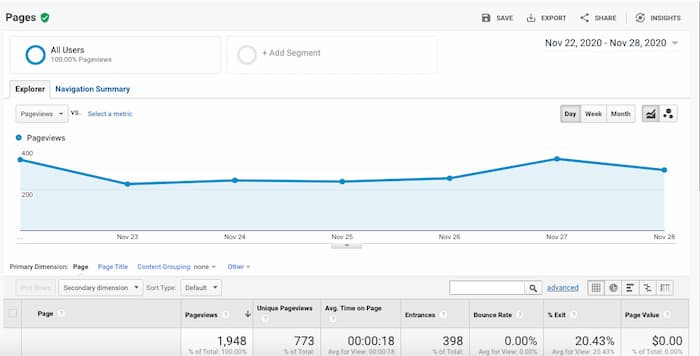
User engagement statistics include the bounce rate, length of time spent on your website and the click-through rate (if you’re reading an Analytics report it would be average pages per session). 

Reduced user experience why 404 errors affect ranking

Missing pages are considered to contribute to a poor user experience because of the impact it has on these statistics.

When a visitor lands on a page that informs them the content is missing it contributes to higher bounce rates. Users will leave a website when they can’t find the information they’re looking for. This eliminates any possibility of clicking further within the website and reduces the average time spent on the website.

These statistics are measured by search engines and contribute to the position a website holds on the search engine results page.

Reduced domain authority

One of the three most important ranking factors in SEO is the authority a website builds from the backlinks it acquires. If an external website is linking to a missing page on your website, you’re losing the opportunity to improve your ranking ability.

Every backlink acts as a vote of credibility to your content. If an external link points to a page that does not exist, there is no authority and improved ranking ability transferred to your website.

Tools to Identify broken links and missing pages

Finding broken links is a relatively straightforward process that can be accomplished with a variety of tools. You can use one or all of the following to identify what pages are missing, as well as where the requests for those pages are coming from (broken links).

Search console

Google’s search console is an absolute necessity when it comes to managing the health of your website. If you haven’t submitted your domain to gain access to this data you should do so immediately to identify any type of errors being generated on your website.

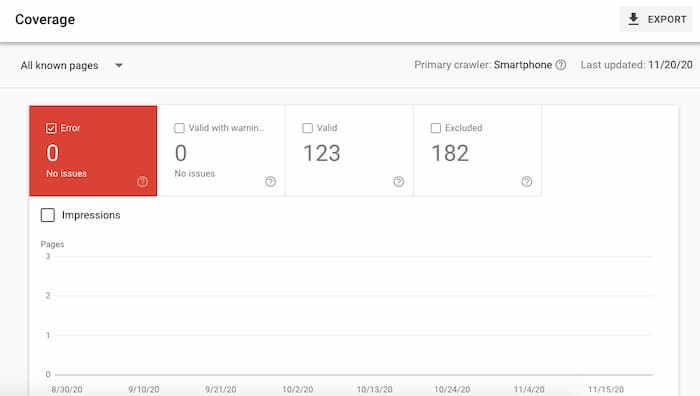
Search console is a way to find 404 error codes on your website

Go to search console. Click on converge to see the pages that are generating errors. If your website is generating 404s you will see the pages being listed in the report.

SEMRush

Using a third-party tool can streamline your efforts because they are designed to specifically help you find and replace 404 error codes.

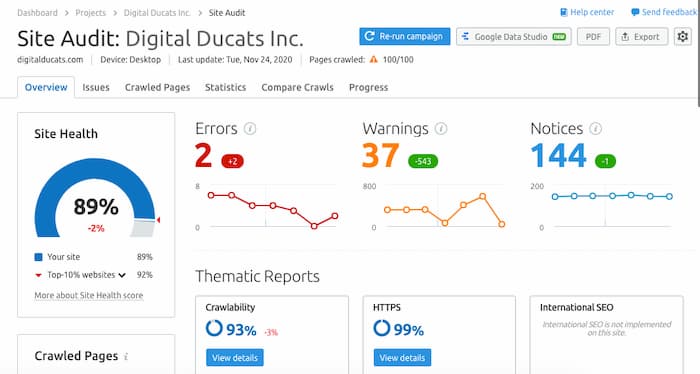
Run a site audit. The report that’s generated will look like this:

Site audit from SEMRush

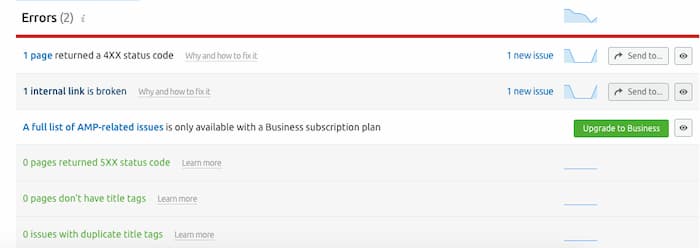
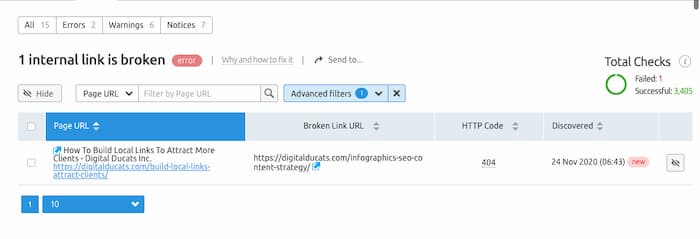
Click on the errors link to get a summary of errors on your site. The broken links will appear at the top of the list if your website does in fact have broken links.

how to find and fix a 404 error code

The beauty of this report is that it shows you the internal pages linking to missing content as well as the target URL that’s actually missing.

The details SEMRush provides on how to fix 404 error codes

Solutions for repairing 404 errors

There are three possible solutions to eliminate 404 error codes from your website:

  1. Delete the link pointing to the page
  2. Create new content in the URL that’s missing
  3. Redirect the old URL to a new URL

Delete the broken link

An error code is only generated when a request for a page is being made. It’s important to understand that if you delete a page it doesn’t constitute a 404 if there are no further requests to load the page. Therefore if you delete any internal (or external) links that are pointing to the page, there won’t be any further requests.

Create new content

The possibility exists that the page may have been deleted by accident. In the event that the URL does in fact present value to your website, you can publish a page with the same URL.

This is a solution that many SEOs use as a link building strategy when they find broken links on a website that represents value as a link prospect.

Redirect the old URL to a new URL

This solution is ideal when the old URL has external links pointing to it, but you’ve updated content to a new URL. A 301 or 302 redirect is a code written into your .htaccess files that tells your website to skip loading the old URL and load the target URL instead.

Redirecting a page to a new page allows link authority to transfer to the new target. This makes using a 301 ideal when external sites are linking to a missing page. If you can’t get the external websites to change the links, this is a solution to preserve the authority the old URL is generating.

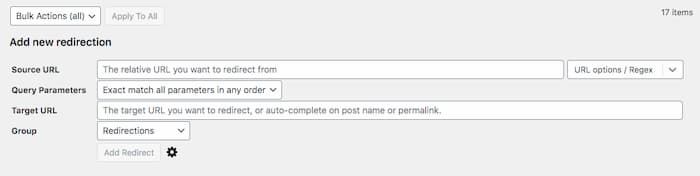
If you’re using WordPress, a simple solution is to install a plugin. Redirection allows you the convenience of entering the old and new URLs on one interface.

use a redirection plugin to redirect broken links

Create user-friendly 404 pages to improve the user experience

It’s only natural for people to land on missing content. If a user mistypes a URL, it will generate a 404 error code. This type of situation is unavoidable, however, you can improve your user engagement by creating creative and helpful 404 pages.

Create a page that’s in line with your brand. For example, some websites make light of landing on missing pages and can add some humour to the situation. If you’re familiar with Lionel Richie’s music, you might find this 404 page entertaining:

Example of funny 404 not found page

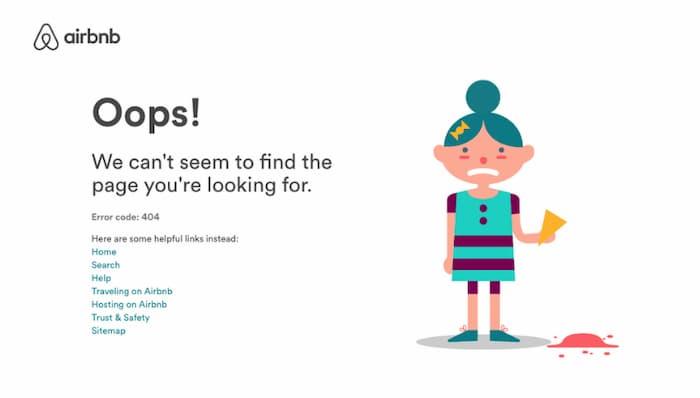
Create a page that at the very least has a search bar so users can type in exactly what they were looking for. If you want to guide them even further, offer additional links that they are most likely to click on, such as the homepage, your blog page, product or service pages.

Example of a good 404 page

Improve user experience by fixing 404 error codes

Generating 404s is not something you need to be overly worried about if there aren’t many instances of them.

If your website is accumulating a high number of 404s you need to investigate to make sure there aren’t serious issues that are causing them such as indexing problems or pages being deleted.

Find and repair 404 error codes to create a more enjoyable user experience. Fixing errors that exist contribute to higher user engagement statistics and better performance in the SERPs.

Written by Christian Carere · Categorized: Technical SEO

Nov 27 2020

SEO KPIs To Benchmark Campaign Performance

Ultimately, the goal of every SEO campaign is to increase the revenue that a company receives from its website. Unfortunately, hitting that goal can take upwards of a year to see real results. Establishing SEO KPIs help you understand whether your SEO campaign is moving in the right direction.

There are several different aspects to tracking your website’s progress, but the most important metrics will be those that are in line with your website’s overarching goals. The following is a list of SEO KPIs that you can use to monitor your site’s performance and benchmark the progress of your SEO campaigns.

Organic traffic by source

The source of your traffic is an important SEO KPI because it’s necessary to know exactly where your traffic is coming from and what’s working to increase the volume of monthly visitors to your site. This can be traffic from social media, organic search, direct (when people enter your URL directly) or referral traffic (when users follow a link to your site).

The idea is to build the volume of your organic traffic up to tap into the largest source, Google search. You want the flow to come from users who are looking for businesses like yours. 

Measuring the increase in organic search volume gives you insight into improved SERP position on existing pages and/or an increased number of keywords ranking.

Best performing pages

You can identify the best-performing pages of your site by comparing the traffic that each page receives. This can be important information for guiding your decisions on what topics to build around as well as where you need to improve.

The best pages are typically the ones with the most traffic, although if you have high converting pages, it’s also another way of looking at which pages perform.

Go to behaviour, site content and all pages in Google Analytics. Here you can select the number of pages you want to be displayed and sort the results from largest to smallest volume of visitor’s traffic.

Conversions by source

This KPI is important to note because you want to see what pages are converting the most visitors to clients. To measure conversion, you need to set it up in your analytics.

Select how you want to classify a conversion by choosing the pages or buttons that need to be pushed to consider a conversion completed. For example, if you want to track sales, then you would need to assign the PAY button on your checkout page as a completed conversion.

You can also use contact forms, contact pages and click to call buttons as completed conversions.

Knowing which pages convert at the highest rate will also give you an idea of how to guide the traffic on your site. 

Build more internal links to the pages that convert the highest from the pages that receive the most volume to increase conversion rates.

Bounce rate

The bounce rate refers to the number of visitors that land on your site and leave without interacting further with your website. This is a measurement that’s usually associated with poor user experience, poor page speed, poor content and demonstrates low user engagement.

Lowering your bounce rate can be done by guiding users to more relevant pages within your website. Adding more internal links will immediately give visitors more options to choose from when they land on your page, rather than backing out of it.

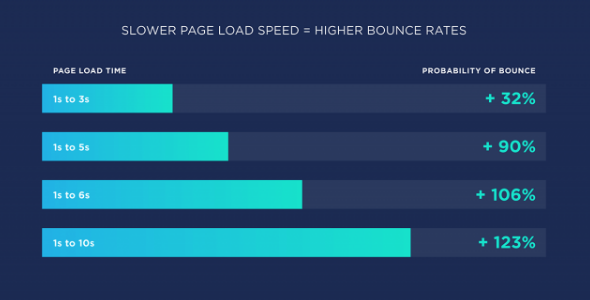
Improving page speed is proven to reduce the bounce rate.

Faster page is a SEO KPI for improving conversions and click-through rate

Page speed

If you’re in the retail business this is an important KPI because it directly affects sales. Improving page speed for Amazon resulted in saving millions of dollars in abandoned checkouts.

The page speed of your page is an indication of the overall performance it has for providing a good user experience. The faster your page loads, the more you’re going to make from visitors staying on your site.

Average time per session

The length of time a user spends on your page is also a KPI for user engagement. If the dwell time on your pages is much longer than your competitors, it shows that you’re able to hold your audience’s attention and therefore have content that satisfies search intent.

In the same respect, if the dwell time on your page is shorter than the competing pages, you’ll need to consider updating pages to compete at a higher level.

If you’ve implemented a new content strategy and are updating pages on your site, then the length of time that visitors are spending can be an indication of the effectiveness of your campaign.

Click-through rate

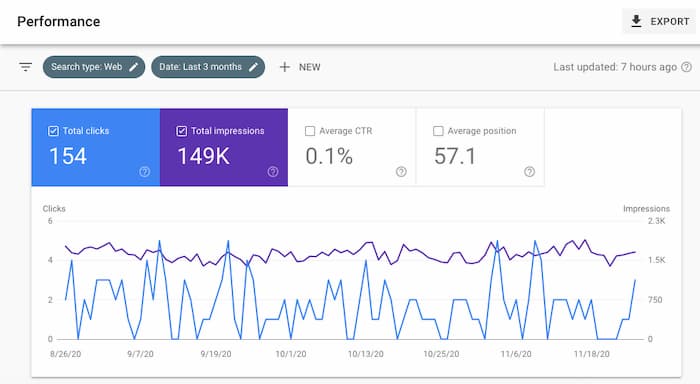
Here is an important KPI to watch for since this is a measurement of the number of clicks your site receives based on the number of impressions your site generates in the search results. In other words, if you’re ranking for a keyword, whenever a search is made on Google using that keyword, it would count as an impression.

To improve the click-through rate, you need to improve your page’s position in the search results. For example, if you’re on the third or fourth page of Google, you may get thousands of impressions. However, your click through rate would be extremely low because barely anyone ever makes it past the first page of results.

When your goal is to improve the traffic your website receives, the click-through rate can be an indication of the progress you’re making in the SERPS.

You can find your click-through rate in Google Search Console.

Click-through rate is one of the SEO KPIs that indicate improvement in SERP position

Referring domains

A measure of site popularity can be made from the number of websites that link to your content. This has been an established ranking factor that promotes more search visibility and improves SERP position (when the links are from quality, relevant websites).

If the goal is to improve authority and ranking ability, you can use the number of referring domains your website is accumulating as an SEO performance indicator. The more quality website you have linking to yours, the more ranking ability you develop.

Domain authority

The domain authority is an important SEO KPI because it indicates the strength of your backlink profile. If you’re engaged in a link building strategy, you want to see the domain authority gradually rise.

Of course, domain authority can be measured as DA by Moz, DR (domain rating) by Ahrefs, Trust and Citation Flow (TF and CF) by Majestic and SEMRush also has its rating system for measuring the strength of a URL.

Whichever system you use, stay consistent with it when comparing progress. Each company has its methods and formula, but at the end of the day, they are primarily based on the quality of backlinks your site had pointing to it.

“Compare to” function

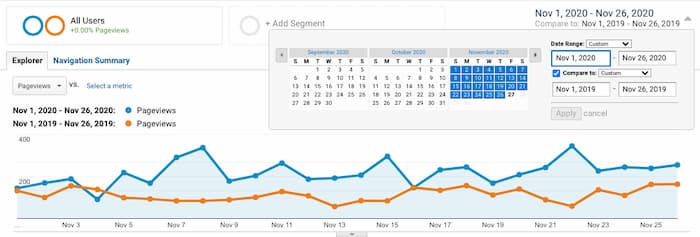
Using the compare to option on Analytics can help put things into perspective on how your site is performing based on specific periods.

Comparing the previous year’s data to the current year is good for avoiding seasonal or cyclical differences that may occur naturally in your industry.

For example, if you sell outdoor furniture in a country that has four seasons, your sales in each season will vary greatly. You can’t accurately compare traffic reports from spring to winter months because the winter months will naturally have a much lower search volume.

Comparing the current year vs. the previous year gives you an idea of how much your website has improved its performance. You can compare the data from previous years’ traffic, conversions, bouncer rates or any SEO KPIs relevant to your current SEO campaign.

Benchmark your progress with key performance indicators

It can be frustrating when you’re paying for results without seeing any. Establish the SEO KPIs that are most relevant to your SEO campaign to make things clearer on the different stages of the development of your website.

Knowing what to expect and when to expect it can make things much easier to manage and create more confidence in the plans you’ve set into motion. Without signs of progress, playing the long game can be extremely frustrating.

Give us a call to help develop an SEO strategy that will drive more traffic and increase the revenue your site generates regularly. We promise to have a set of SEO KPIs you can monitor throughout your website’s development.

Written by Christian Carere · Categorized: Web development

  • « Go to Previous Page
  • Go to page 1
  • Interim pages omitted …
  • Go to page 13
  • Go to page 14
  • Go to page 15
  • Go to page 16
  • Go to page 17
  • Interim pages omitted …
  • Go to page 32
  • Go to Next Page »

Footer

Need professional SEO advice?

Give us a call to learn more about how we can help your business

Call for a consultation Request a proposal

Request a free website analysis and proposal for your company by filling out the ” Request a Proposal” form.

  • Privacy Policy
  • Terms Of Service
  • Cities we’ve served

© 2026 · Digital Ducats Inc.